BRAVO – Wireless Alarm Control Panel
14
3.10. Preparing of BRAVO RC
BRAVO RC is a key fob remote control for:
- Arming and Disarming of BRAVO system;
- Information for the system status;
- Information for current alarm events via LED and
sound signalization.
Technical Characteristics:
1 х 3 V/ 600 mAh,
CR2450 type
Battery life
(max. without LED)
Radio distance
(open space)
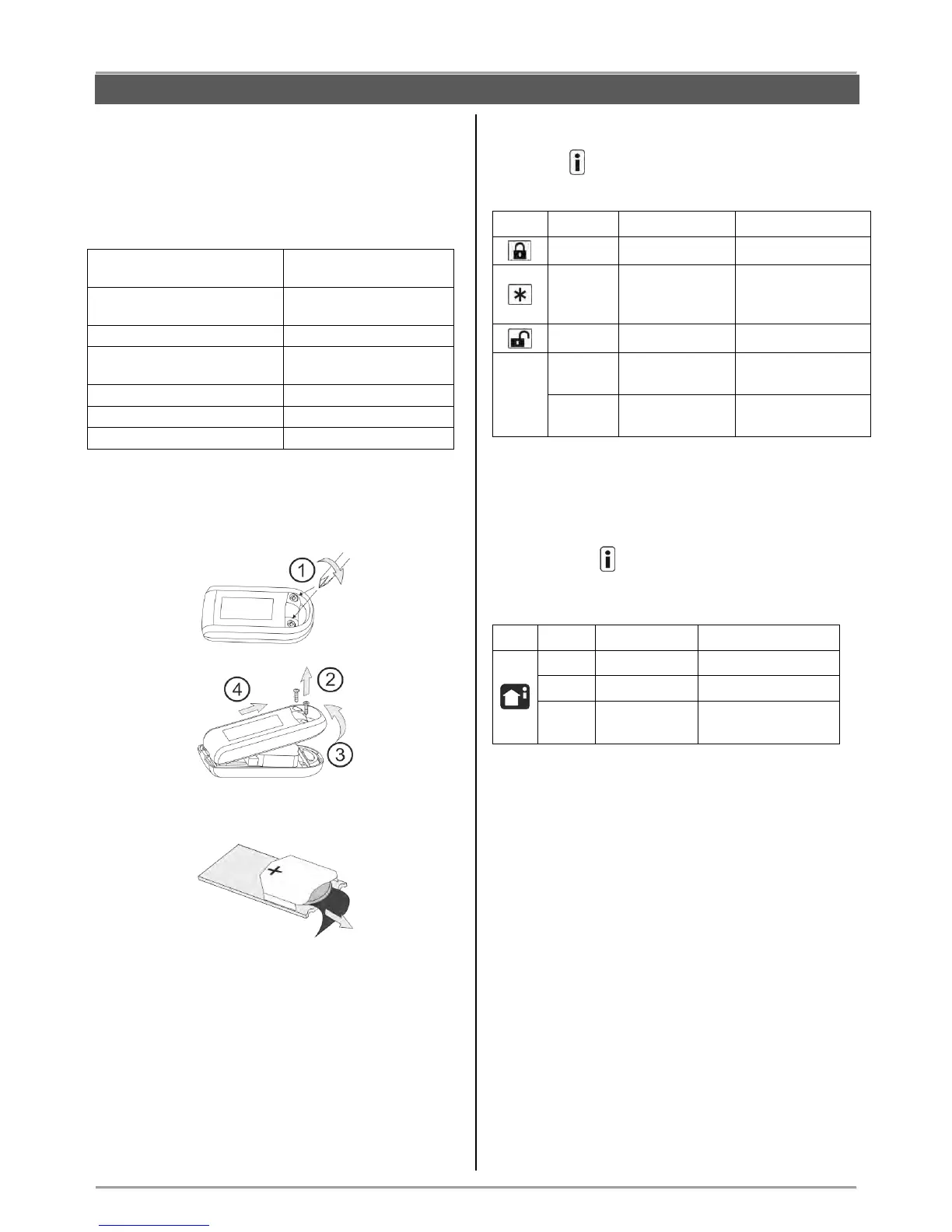
Switching on the battery
1. Remove the back cover of the key fob as undo the
two screws:
2. Remove the protecting folio:
3.Close the cover of the remote control.
4. Enroll the key fob to the panel configuration as follow
the steps described at item 6.3 in “System
Configuration” section.
Note: You can find detailed information for operation
with the key fobs by User in items 8 and 9 of this
manual.
The sequence for replacing the battery of a key fob is
described in item 10.3.
Specialized LED indication of a key fob
The button has different LED and sound signalization
when a control button is pressed:
According the
programmed for
the button*
Battery low of the
remote control**
No communication
with the panel
* The functionality of the button is programmed with ProsTE software
as the action can be different for every one remote key-fob.
** The indication is visualized after the indication of the main action of
the pressed button and refers to the used key-fob.
By pressing the button of the key fob the user is
informed for the current system status and alarm
events:
Alarm memory
(in disarming)



 To Next Page