BRAVO – Wireless Alarm Control Panel
22
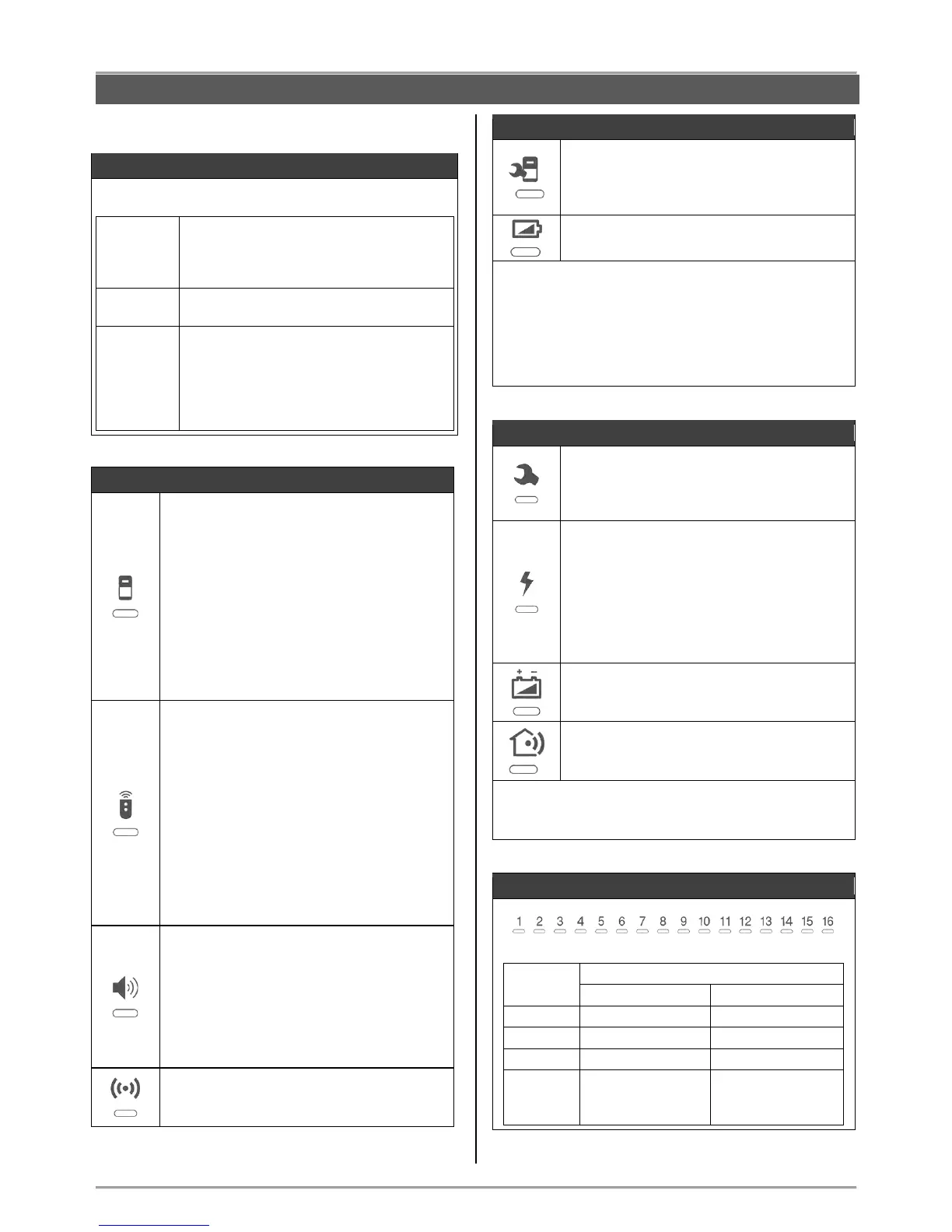
5.2. LED Indication
Information LED for the current status of the
system:
- Normal operation mode.
- The system is ready for arming.
- Blinking during searching of a free
channel.
- The system is armed.
- Blinking during an alarm cycle.
- The system is not ready for arming –
there are open instant type zones.
- No main or back-up power supply.
- The jumper RESET is not removed.
- Technical problem with the panel or with
a device.
Indicators for Device Groups
Detectors
To the group can be enrolled up to 16
devices from BRAVO PIR, MC, FD or FL
type – only 1 detector to each zone.
LED Indication
Lights on in red in case of activated detector
together with the corresponding zone
number.
In “Device enrolment” mode lights on
permanently as indication for a selected
group.
Key fob remote controls
To the group can be enrolled up to 8 devices
BRAVO RC type.
Attention: The enrolled to positions 1 and
2 key fobs become MANAGER and are
obligatory for entry in “Device
enrolment” mode – see item 6.3.
LED Indication
In “Device enrolment” mode lights on
permanently as indication for a selected
group.
Sounders
To the group can be enrolled 1 outdoor
wireless siren.
LED Indication
In “Device enrolment” mode lights on
permanently as indication for a selected
group.
Repeater panel
To the group can be enrolled 1 device
BRAVO RPT type.
Indicators for Device Troubles
Technical trouble
Indication for:
- Activated tamper switch;
- Lost device.
Battery low charge
Indication for low battery charge of a device.
LED Indication
In “Reviewing Troubles” mode the respective LED
indicator lights on in yellow and the number of the first
device with trouble is blinking and the indicator for its
type is lighting on. If there are more devices with
troubles, their numbers are lighting in yellow.
Reviewing of their type is done by the arrows.
Indicators for Panel Troubles
Tamper
Indication for activated tamper – the panel’s
box is open or the tamper plate on the
bottom is broken.
Mains power supply 230V lost
The sound signalization for mains power
supply lost can be immediate or delayed for
programmed time interval.
By default the signalization is immediate.
The time delay for the signalization can be
programmed via specialized ProsTE
software – see item 7.9.
Battery low charge
Indication for low charge, missing or
switched off battery of the panel.
Trouble with the communication channel
Indication for trouble in the connection with
any of the used communication modules.
LED Indication
In “Reviewing Troubles” mode the respective LED
indicator lights on in yellow.
Indicators for Zones/ Devices
The position is not
used for the current
type of the device
No device enrolled
to the position



 To Next Page