BRAVO – Wireless Alarm Control Panel
27
7.9. Programming of parameters with
ProsTE Software
The installer can program some additional parameters
and settings via specialized ProsTE software.
ProsTE specialized software is available for download
for registered users only from the official web page of
the manufacturer:
http://www.teletek-electronics.com
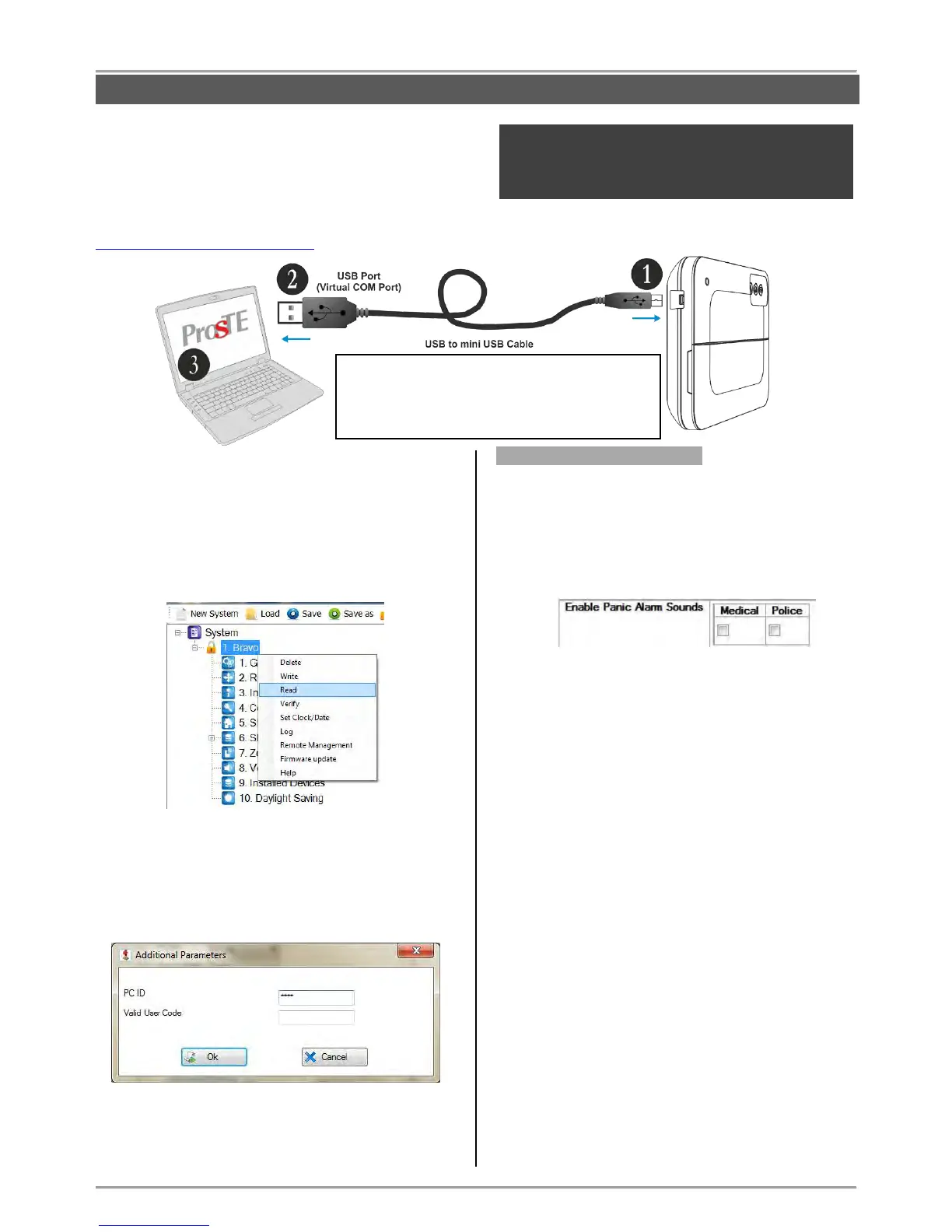
Run the program and select the BRAVO panel from the
list.
Reading the system configuration.
Select the BRAVO panel and use the right mouse
button to open a list with control options:
Select “Read”. In the “Read” window select the
“RS232” tab. Enter the COM port number to which
you are physically connected. Press the “OK” button.
Enter a valid PC ID code in the “Additional
Parameters” screen. By default the PC ID code is
1234, and the second field can be left empty:
Press the “OK” button and wait for the message for
successful reading of the system configuration.
Menu “1. General Settings”
Select the “1. General Settings” menu – at the right side
of the screen are available the following settings:
Enable Panic Alarm Sounds (enabling of the sound
signalization at panic alarm event).
The sound signalization is enabled when the box
under to the respective panic type is checked.
Enable Trouble Sounds (enabling the sound
signalization for technical troubles).
The sound signalization is enabled when the box
next to the respective trouble is checked. By default
the sound signalization for all technical troubles is
enabled.
Description of the troubles:
- Device Tamper/ Lost – Active tamper of device/
Lost communication with device
- Device Battery Low – Low charge of battery of a
device
- Panel Tamper – Active tamper of the panel’s box
- Panel AC Lost – The mains power supply is
missing
- Panel Battery Low - Low charge of the panel’s
battery
- Panel Comm Fail – The communication with central
monitoring station is lost
Enable Panel Sounds (enabling of sound
signalization from the panel).
The sound signalization is enabled when the box
next to the respective sound is checked.



 To Next Page