BRAVO – Wireless Alarm Control Panel
21
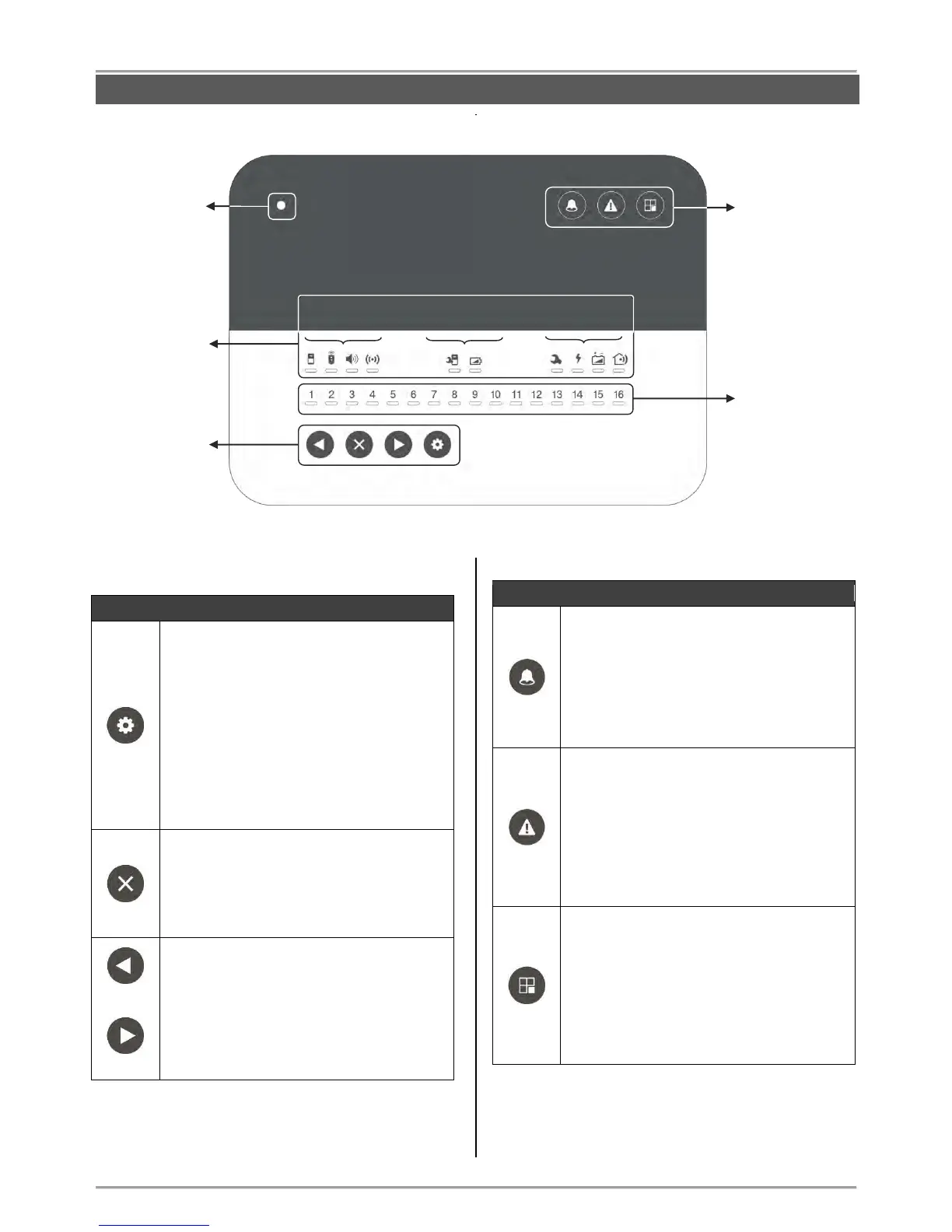
5. Description of the Front Panel
5.1. Buttons
Button Programming
- Entry/ Exit for “Device enrolment” mode –
see item 6.1;
- Scrolling over the device groups in “Device
enrolment” mode;
- Entering in a special mode for disarming
the system from User via the panel’s buttons
– see item 8.3.2.
LED Indication
After entering in the “Device enrolment”
mode lights on in red.
Button Cancel
- Deleting a device in “Device enrolment”
mode - see item 7.5.
- Setting digits in a special mode for
disarming the system from User via the
panel’s buttons – see item 8.3.2.
Arrow Buttons
- Scrolling over zone and position numbers
in “Device enrolment” mode, for reviewing
the bypassed devices in the system, or
reviewing the alarms in zones;
- Selecting digits in a special mode for
disarming the system from User via the
panel’s buttons – see item 8.3.2.
Button Alarm Review
- Entry/ Exit for “Reviewing Alarm Events”
mode – see item 9.2.
LED Indication
In case of alarm event in the system lights
on in red. After entering the “Reviewing
Alarm Events” mode, the button is blinking.
Button Attention
- Entry/ Exit for “Reviewing Troubles” mode
– see item 9.1.
LED Indication
In case of a technical trouble in the system
lights on in yellow. After entering the
“Reviewing Troubles” mode, the button is
blinking.
Button Bypass
- Entry/ Exit for “Bypassing zones/ devices”
mode – see item 7.5.
LED Indication
Lights on in yellow if there are bypassed
zones/ devices in the system. After entering
the “Reviewing bypassed Zones/ Devices”
mode, the button is blinking.
BRAVO Panel – Front view, open cover.
Information Buttons
for System Status
LED Indication
for the System
LED Indication for
Zones/ Devices



 To Next Page