37
5.1.11 GPS Fuel Counter
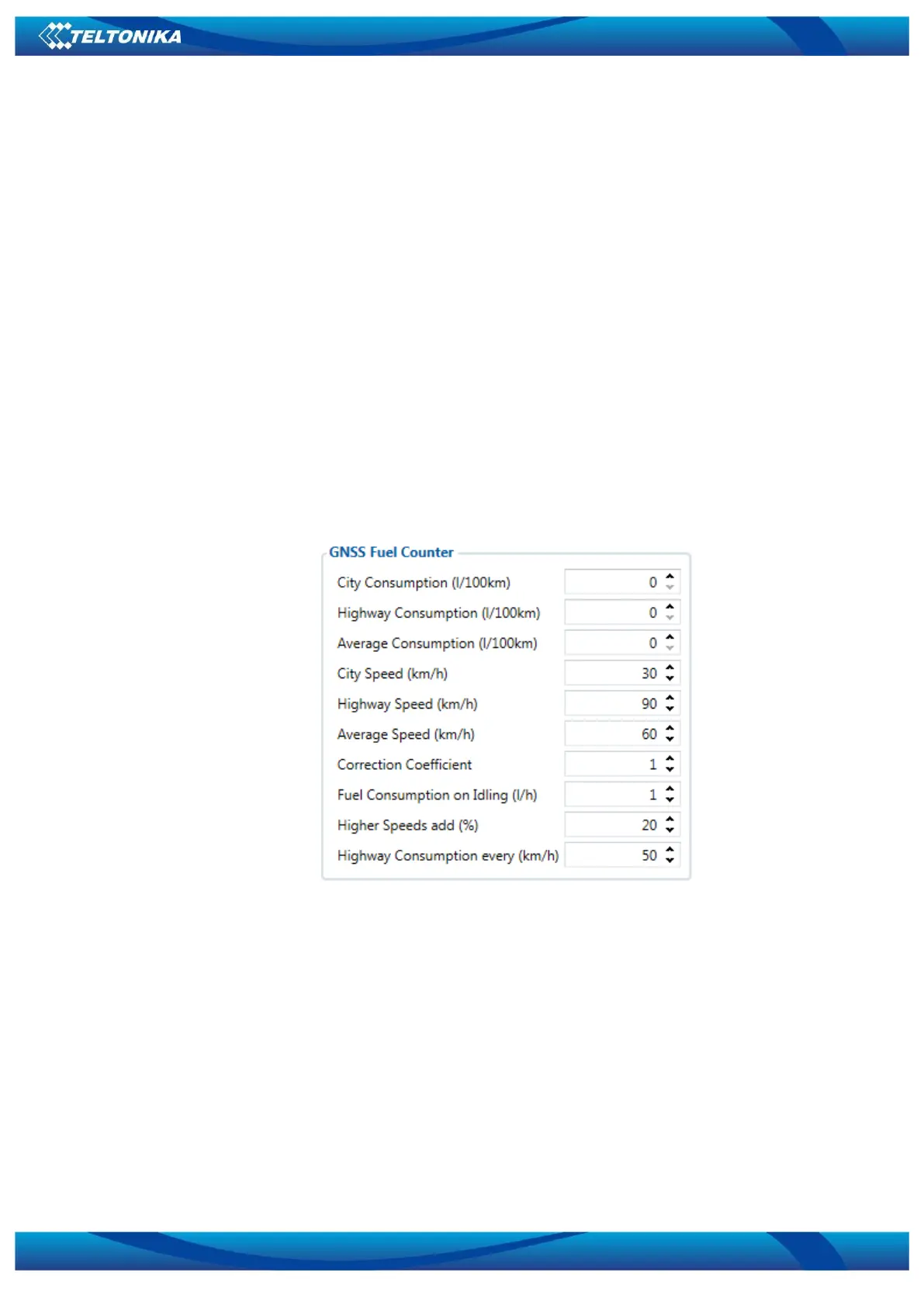
Configuration of Fuel Consumption (Figure 7)
1. To configure these parameters use fuel consumption data, which is stated in your car
technical documentation. By default speeds for this fuel consumption norms are: City – 30 km/h,
Average – 60 km/h, Highway - 90 km/h. If you want, you can change it.
2. When speed is higher than highway speed, FMB010 adds highway fuel consumption x %
of highway fuel consumption every y km/h, by default FMB010 adds 20% every 50 km/h. It
means that fuel consumption is (1.2 * Highway Fuel Consumption) on 140 km/h speed, (1.4 *
Highway Fuel Consumption) on 190 km/h speed.
3. Correction coefficient is used for correction of every fuel consumption value which is
sent to server (Used Fuel * Correction coefficient). By default it is 1, min 0.01 and max 2. For
example when correction coefficient is 1 and FMB010 calculates that used fuel for 35 m distance
is 20 ml, sent value will be 20 ml; if correction coefficient is 1.2, sent value will be 20 * 1.2 = 24
ml.
4. Fuel consumption on idling is used to calculate fuel consumption when ignition is on, but
vehicle speed is 0 km/h. By default it is 1 l/h, min 0 and max 5 l/h. Almost in all diesel cars this
parameter is less than 1.0 l/h. In gasoline cars this parameter is about 1.5 – 2.0 l/h.
Figure 7 GPS fuel counter settings
When ignition is on, device starts calculating fuel consumption. When GPS speed is 0, used
fuel is calculated l/h. When device is moving FMB010 gets speed value every second from
satellites and according to this speed calculation of fuel consumption is done. Device takes
travelled distance of this period to calculate used fuel in ml, and sends this value to server,
parameter Used fuel (ml) calculated by GPS. Also parameter AVG fuel consumption (l/100km) is
sent, which is calculated by GPS (this parameter is sent multiplied by 100).
Both parameters are calculated from the moment when device powers on for the first
time. If you want to reset “Used fuel (ml) calculated by GPS” and “AVG fuel consumption
(l/100km) calculated by GPS” parameters, you need to send SMS command “fc_reset”. If GNSS fix
was lost FMB010 uses average fuel consumption setting to calculate used fuel for range without
GNSS fix.



 To Next Page