GREER COMPANY 1918 EAST GLENWOOD PLACE, SANTA ANA, CA 92705 PN W450250 Rev A 06/01/00
TEREX RCI 510 RATED CAPACITY INDICATOR OPERATOR'S MANUAL TEL:(714) 259-9702 FAX:(714) 259-7626
11 of 35
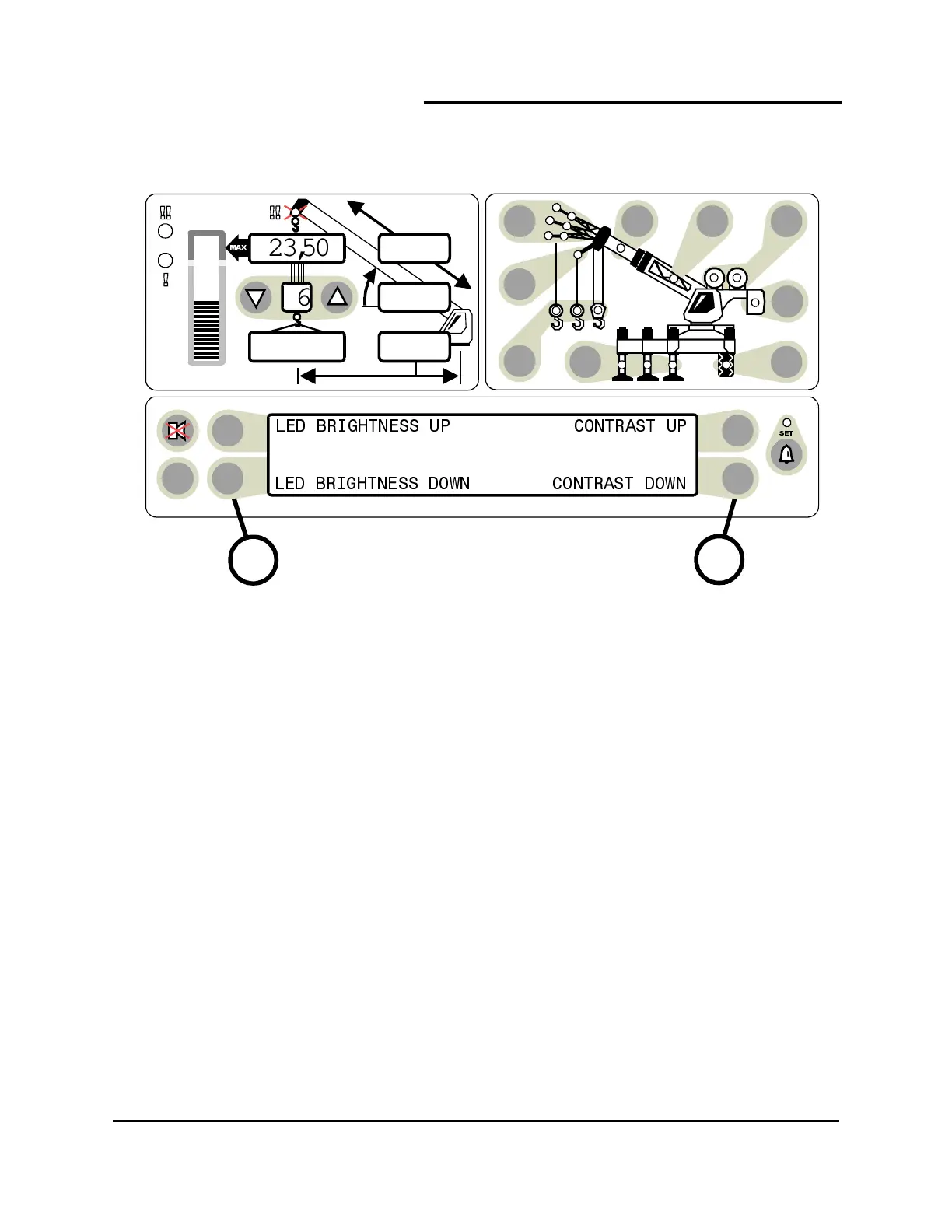
Immediately following self-test and the start up screen, the information display will display a 2 second
reminder of the brightness and contrast control functions.
Push buttons to the left of the information display (item 25) allow the brightness of all LED’s on the display
panel to be adjusted up or down at any time during operation of the system unless operator alarms are
being set.
Push buttons to the right of the information display (item 27) allow the contrast of the information display
to be adjusted up or down at any time during operation of the system unless operator alarms
are being set.
During adjustment of the contrast or brightness, the information window will automatically display the
reminder window shown.
TEST
6
23,500
i2,300
44.8
62.7
26.4
25
27



 To Next Page