GREER COMPANY
1918 EAST GLENWOOD PLACE, SANTA ANA, CA 92705 PN W450250 Rev A 06/01/00
TEREX RCI 510 RATED CAPACITY INDICATOR OPERATOR'S MANUAL TEL:(714) 259-9702 FAX:(714) 259-7626
25 of 35
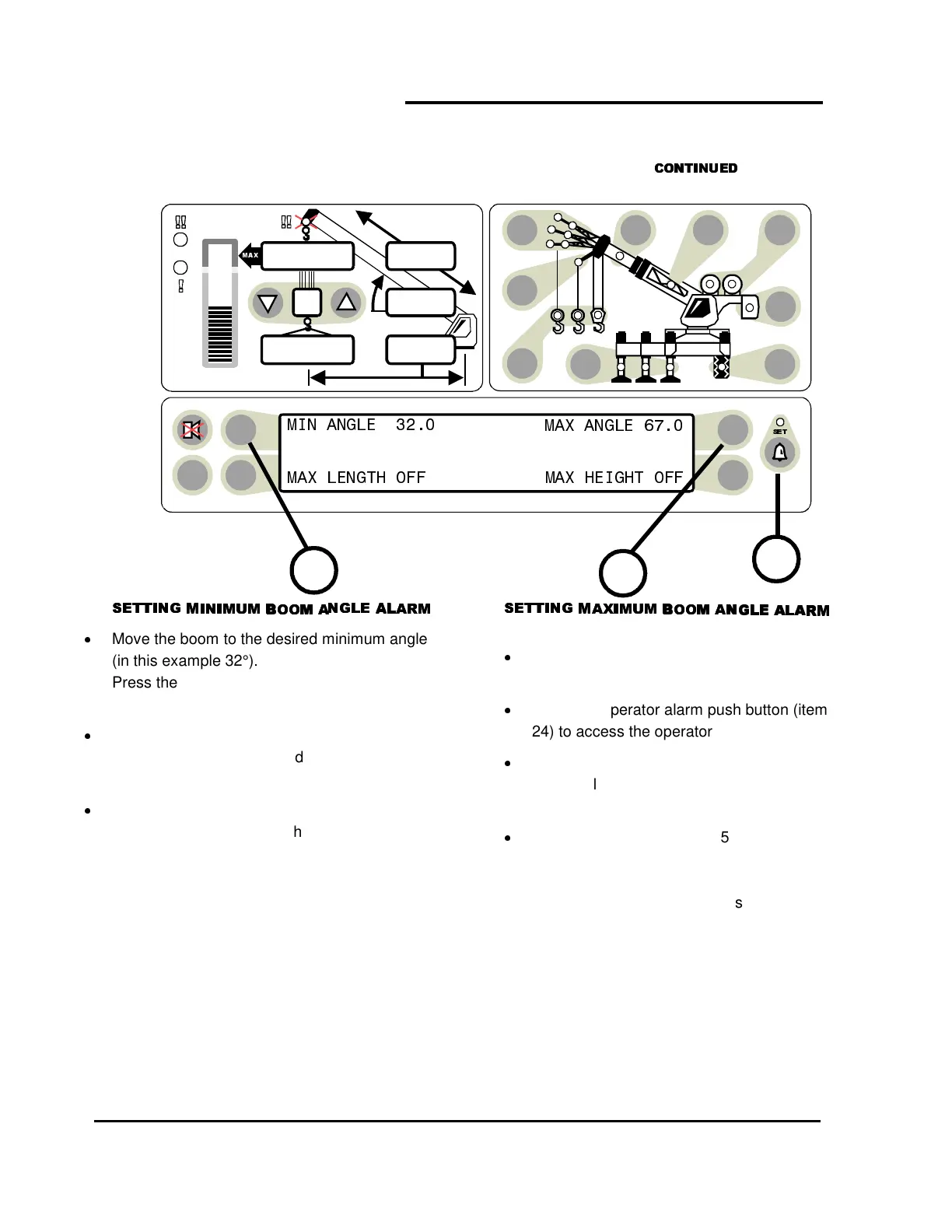
Move the boom to the desired minimum angle
(in this example 32°).
Press the operator alarm push button (item 24)
to access the operator alarm screen.
Press the push button (item 28) pointing to Min
Angle. In this example the display will read
MIN ANGLE 32°
.
The red warning light (item 5) will flash and the
audible alarm will sound whenever the boom
angle is below 32°.
Pressing the MIN ANGLE push button again will
cancel the alarm and the display will read
MIN ANGLE OFF
Move the boom to the desired maximum
angle (in this example 67°).
Press the operator alarm push button (item
24) to access the operator alarm screen.
Press the push button (item 29) pointing to
Max Angle. In this example the display will
read
MAX ANGLE 67°
.
The red warning light (item 5) will flash and
the audible alarm will sound whenever the
boom angle is above 67°.
Pressing the MAX ANGLE push button
again will cancel the alarm and the display
will read MAX ANGLE OFF.
+
, ,
TEST
, -
6
23,500
i2,300
44.8
62.7
26.4
24
28
29



 To Next Page