Servicing
Safety Precautions
7-4 Model 42i Low Source Instruction Manual Thermo Electron Corporation
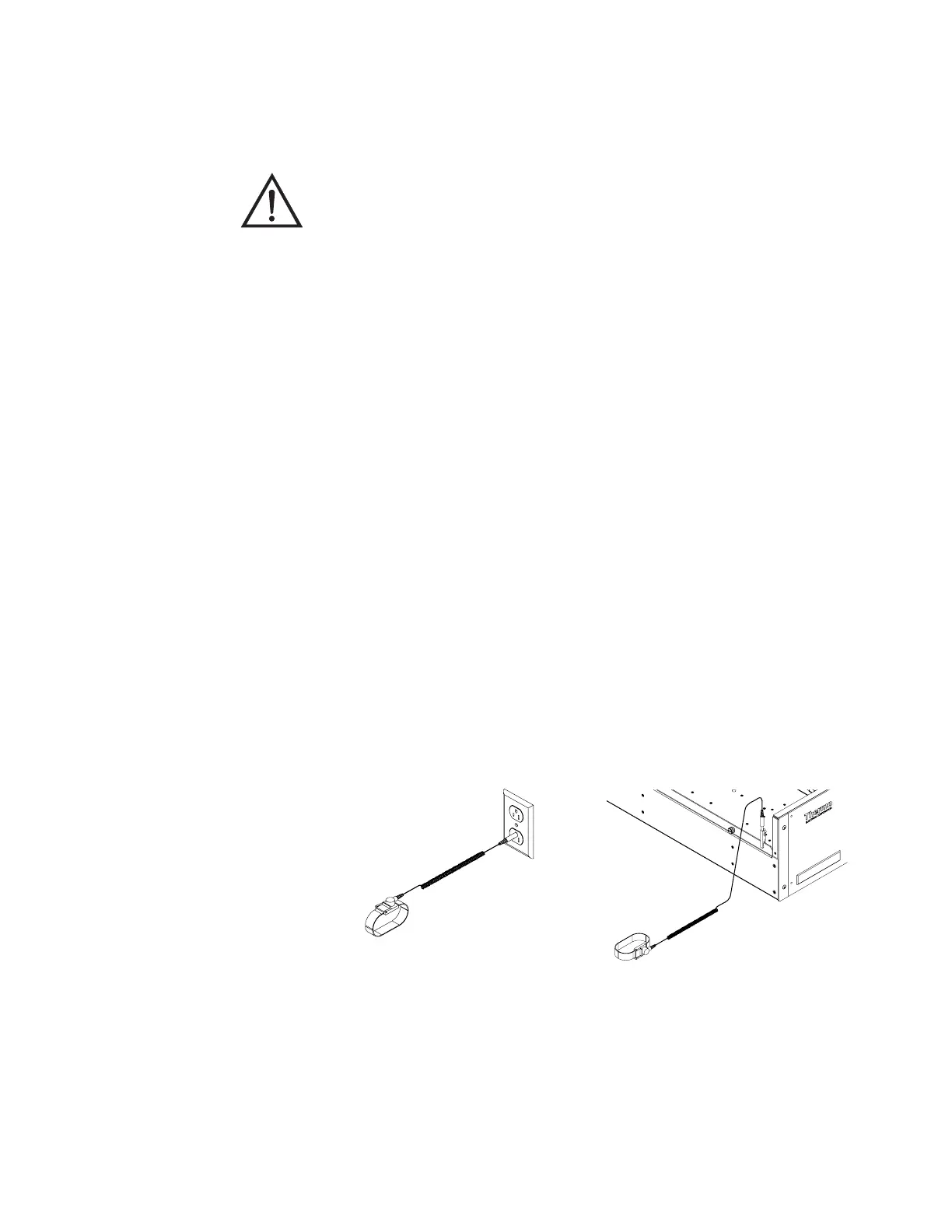
Figure 7-1. Properly Grounded Antistatic Wrist Strap
Equipment Damage Some internal components can be damaged by small
amounts of static electricity. A properly grounded antistatic wrist strap must
be worn while handling any internal component (Figure 7-1). If an
antistatic wrist strap is not available, be sure to touch a grounded metal
object before touching any internal components. When the instrument is
unplugged, the chassis is not at earth ground.
Handle all printed circuit boards by the edges.
Do not point the photomultiplier tube at a light source. This can
permanently damage the tube.
Do not remove the LCD panel or frame from the LCD module.
The polarizing plate is very fragile, handle it carefully.
Do not wipe the polarizing plate with a dry cloth, it may easily scratch the
plate.
Do not use alcohol, acetone, MEK or other Ketone based or aromatic
solvents to clean the LCD module, use a soft cloth moistened with a
naphtha cleaning solvent.
Do not place the LCD module near organic solvents or corrosive gases.
Do not shake or jolt the LCD module.







 To Next Page