www.thunderlaser.com DONGGUAN THUNDER LASER EQUIPMENT CO.,LTD
tech@thunderlaser.com Shatian Town, Shatian Dadao, Mintian
Tel : (86)769 826653 Dongguan City, Guangdong Province, China
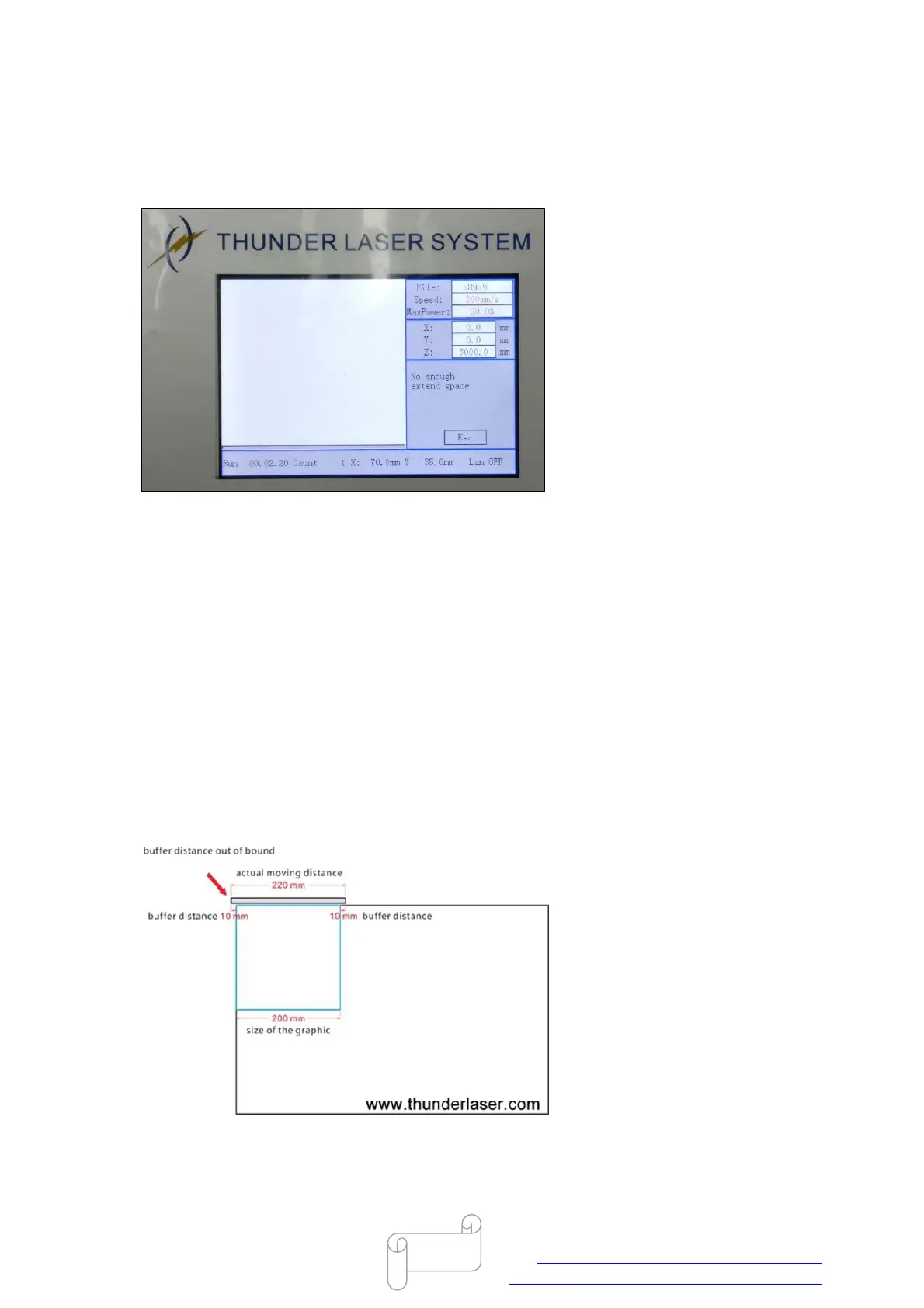
2.2 Alarm of LCD panel—No enough extend space
LCD panel shows the following information:
This problem only appears on engraving mode, it’s caused by the buffer distance is out of bound.
For example, if you want to engrave a picture of 200×200mm, you move the laser head to the
top left corner of the working table and press the “Origin” to set the starting point.
When you press the “Start” button to start engraving, the failure warning would appear.
How to fix this problem?
Press ESC at first, and then move laser head to right distance to leave enough buffer distance.
Now set a new starting point by pressing the “origin”, you will find the problem was fixed when
you run the job again.
Why this happen?
When the machine is engraving in high speed, the actual moving distance of the motor is usually
large than the graphic.
Therefore, we need to keep enough buffer distance on the two sides of the graphic.
The buffer distance will be longer as long as you set faster speed, so we need to keep more buffer
distance when the speed is higher.
(Buffer distance out of working table)



 To Next Page