www.thunderlaser.com DONGGUAN THUNDER LASER EQUIPMENT CO.,LTD
tech@thunderlaser.com Shatian Town, Shatian Dadao, Mintian
Tel : (86)769 826653 Dongguan City, Guangdong Province, China
3.7 How to run several laser machines with one PC via USB
cable
If there are several USB interfaces with your PC, it’s able for one PC (laser software) to connect
with several machines
But pc will does only communicate with one machine and sending the file into the laser in the
same time
For USB connection as below
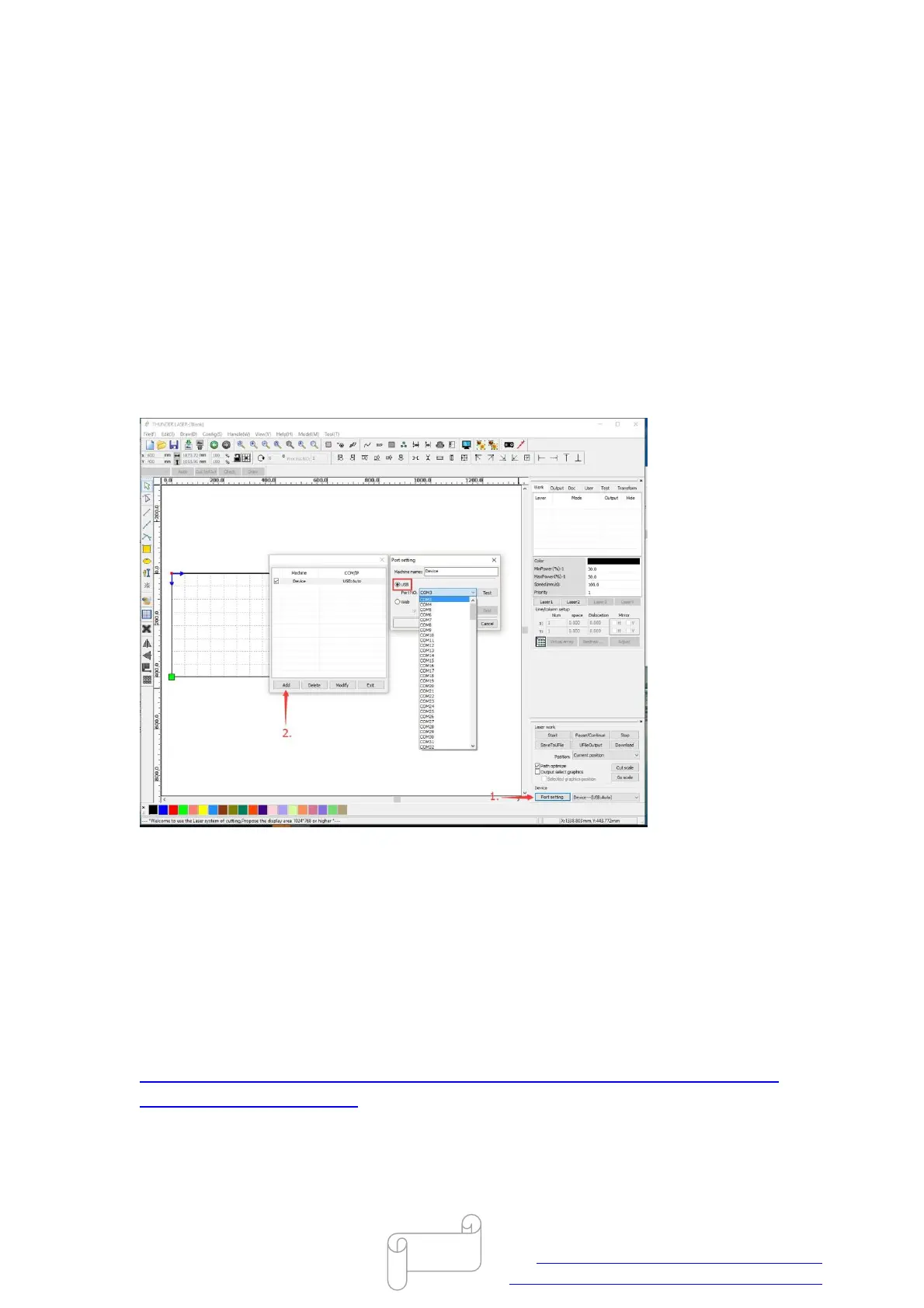
1. When connecting with the first machine, it’s connected automatically as default.
2. When connecting with the second machine, please click the “Add” below, then click “USB”
and choose COM3 (or other ports).
3. When connecting with more machines, it’s the same as 2. (Just choose different COM ports)
If you use Ethernet interfaces,please refer to the following video teaching you how to set
network. And the way of adding more Ethernet port is the same as above.
https://www.thunderlaser.com/how-to-use-your-laser-software/19-how-to-connect-the-las
er-using-a-ethernet-cable.html
End



 To Next Page