TKS Operator's manual
30
3.3.4.4 Command "Go to"
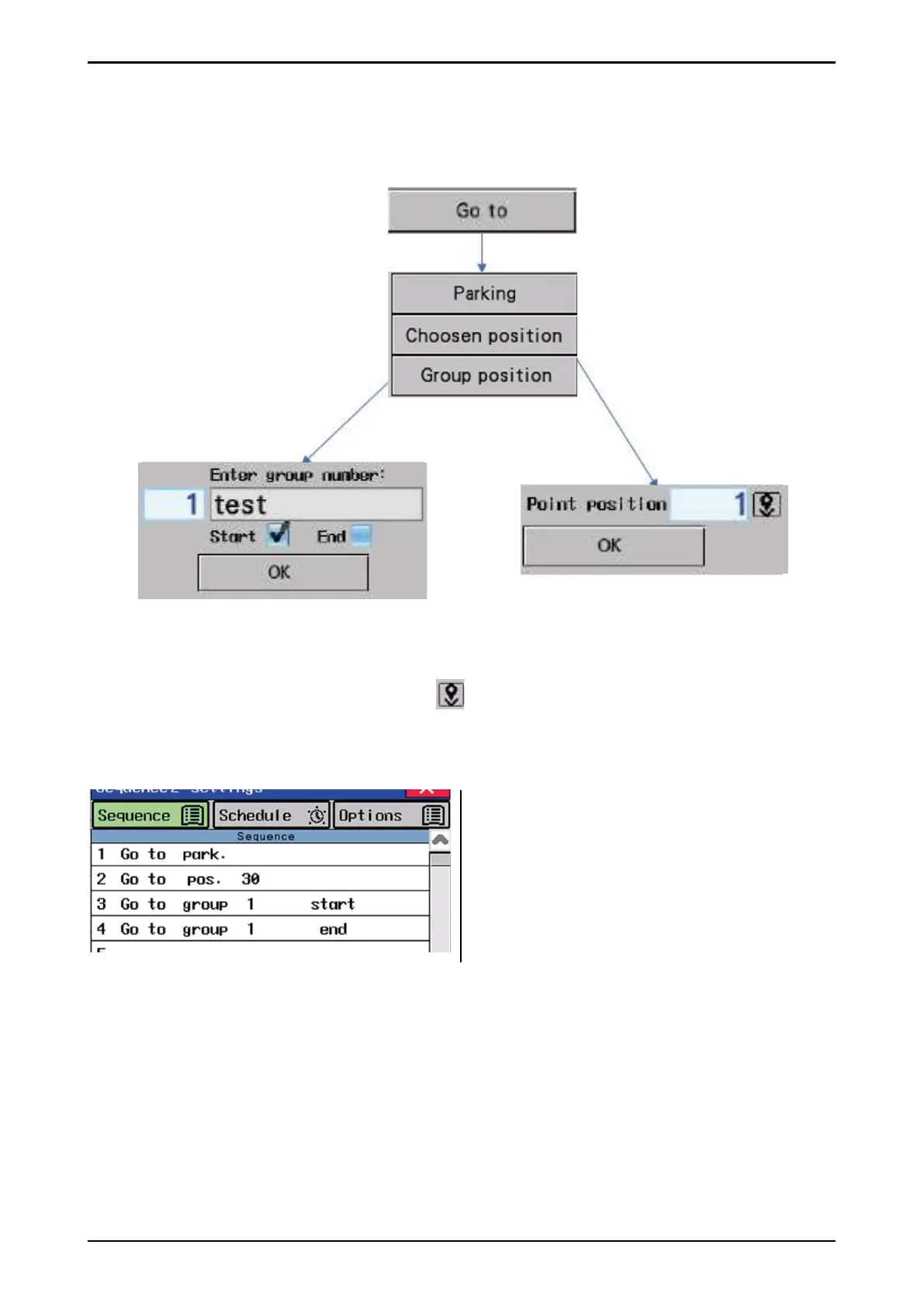
Go to command is used to send the machine to the selected position when running in sequence.
Go to: Select the desired destination: Parking position, selected position or groups position.
Go to -> Parking: The maschine has to be driven to the parking position.
Go to -> Selected position: Enter position or ( ) for the current machine position.
Go to -> Group: Enter group number. The name of the group number entered is also displayed.
Choose whether you want the machine to go to the start or stop (end) position of group.
1. Drive machine to parking position
2. Drive machine to position 30
3. Drive machine to group 1 start position
4. Drive machine to group 1 stop (end)
position.
TIP for using the command «Go to»
• If the machine is equipped with brushes, then you can use the "Go to" as the brush function.
For example, send the machine backwards and forwards through the barn every 2 hours.
• The machine is not in the parking position after feeding. Use only "Go to" function.
• Send the machine to the desired position at the time.
• Startgroup feeding from selected position (start or end). Normal feeding is started from the
nearest position to the machine. You can send the machine to the desired group position (start
or end) to always start there.
• Other possibilities
Fig. 48b



 To Next Page