TKS Operator's manual
34
3.3.5 Schedule
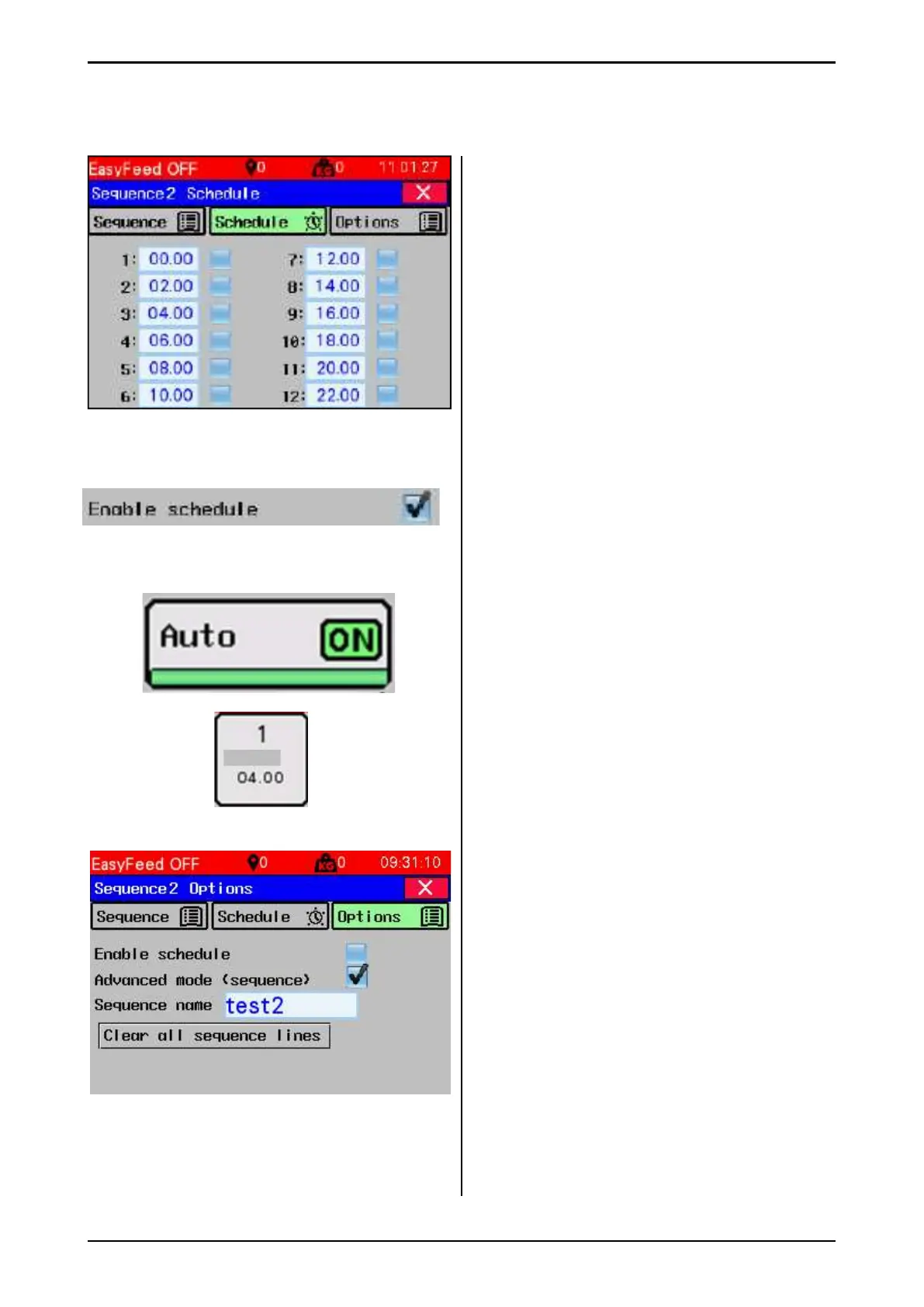
Each sequence has 12 start times for automatic
(scheduled) start.
• The time can be changed to anything from
00:00 to 23:59 (entered from 0.0 to 23.59).
• Time can be enabled or disabled
• Two (or more) equal times in the same
sequence can only start sequence or group
feeding once.
• Equal times in several sequences can start
feeding in several groups or sequences at
the same time. Group/sequence with lowest
number is prioritised
• Automatic start only applies to sequences
that have enabled schedule in sequence
selection menu and EasyFeed must be in
"Auto" mode.
The next feed/sequence start time appears in
the Home screen.
3.3.6 Options
Enable schedule – ables schedule feeding or
sequence running
Advanced mode (sequence) –
• If this is enabled, it is converted to sequence.
• If it is not enabled, the feeding works in a
single group If it is not enabled, the feeding
works in a single group
• To enable/disable, press and hold for
1 second.
• Sequence name – Name the sequence
Sequence name is displayed on the
home screen.
• Clear all sequence lines –
• Removes all commands in the selected
sequence.
• Button must be held down for 1 second.
Fig. 52
Fig. 53
Left



 To Next Page