Regular Payload Series-Hardware Installation Manual TM5 Series Hardware Version:3.1 Document Version:1.01 45
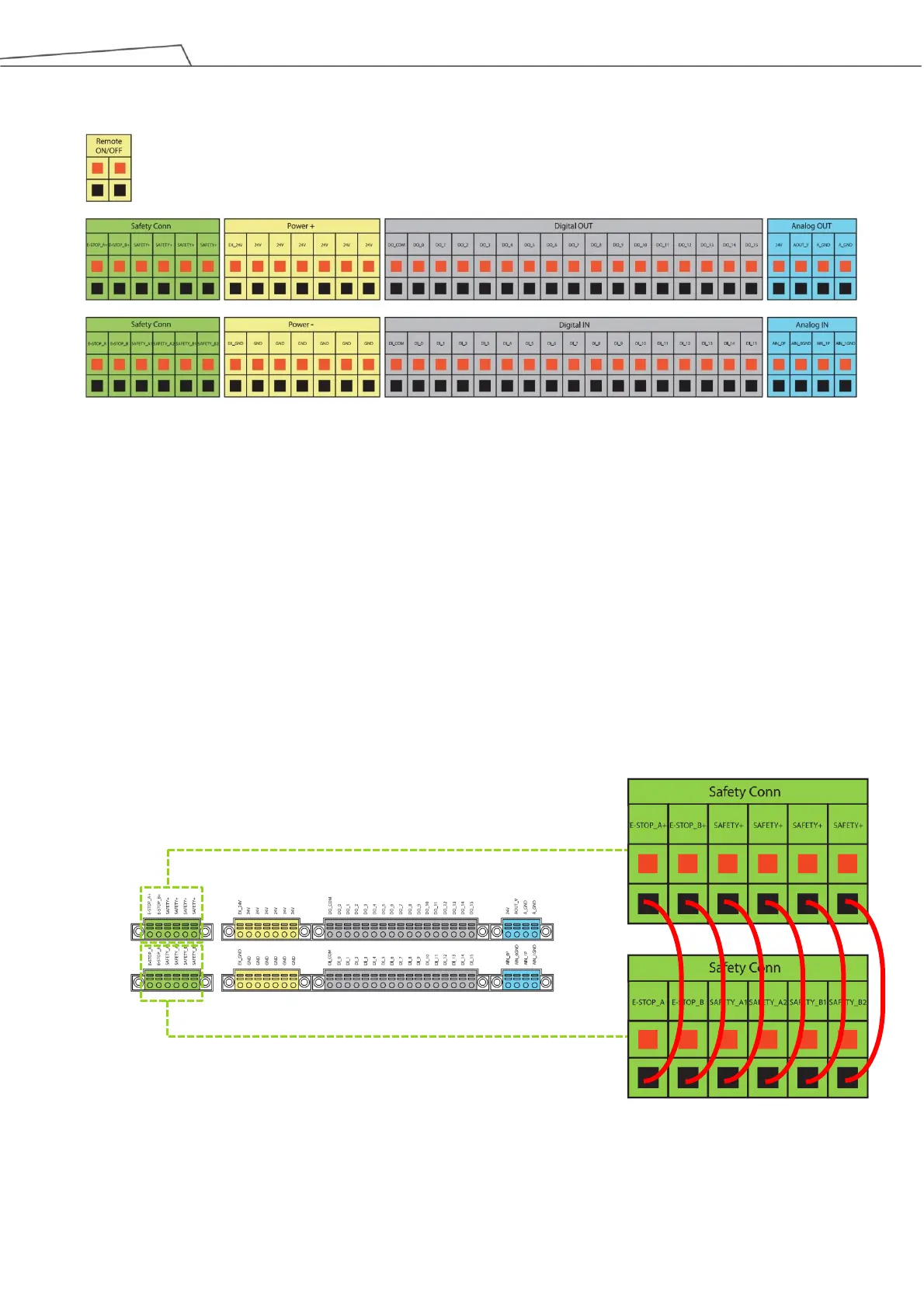
Figure 33: Control Box I/O Configuration (2/2)
5.3.1 Safety Connector
Provides extension ports for Emergency Stop (ESTOP) & Safeguard Port.
1. ESTOP is a N.C. contact (Normally closed). When any connected ESTOP switch is OPEN, the robot
enters the Emergency STOP state.
2. Safeguard A Port is a N.C. contact (Normally closed). When Safety A switch is OPEN, the robot enters
the Safeguard Pause state.
3. Safeguard B Port is a N.C. contact (Normally closed). When Safety B switch is OPEN, the robot enters
the Safeguard Collaborative Mode state.
Figure 34: Safety Connector



 To Next Page