14
9. TRY TO USE FIRST
Various audio data are stored on the supplied memory card, which are called "Prerecorded audio les."
For the contents of prerecorded audio les, read "Prerecorded audio le list" on p. 104.
Program numbers are assigned to these 8 prerecorded audio les by default. They can be played readily in
default condition.
The table below shows the prerecorded audio les to which program numbers are assigned.
Program No. Phrase No. Content of audio source
P001 00001 2-tone chime
P002 00002 Descending 4-tone chime
P003 00003 Gong
P004 00004 Yelp
P005 00005
Attention please. The re alarm is indicating a re. We're now
investigating the cause. Please wait for a further information.
P006 00006 There is a re. Please evacuate as quickly as possible.
P007 00007
Attention please. A few minutes ago, we announced there may be a
re. However, this was a false alarm. Once again, there is no re.
P008 00008 Ascending 4-tone chime
Explained here is the procedure to play "2-tone chime" of the prerecorded audio les through the front key
operation.
Note
To play other prerecorded audio les than the 8 les listed above, programs need be created on the EV-700
Setting software.
(See the separate EV-700 Setting software instruction manual.)
Tip
Phrases 00009 through 00016 are assigned to Program Nos. P009 through P016, respectively, by default.
When you record audio sources in Phrases 00009 through 00016, you can play them without the need for
programming on the EV-700 Setting software.
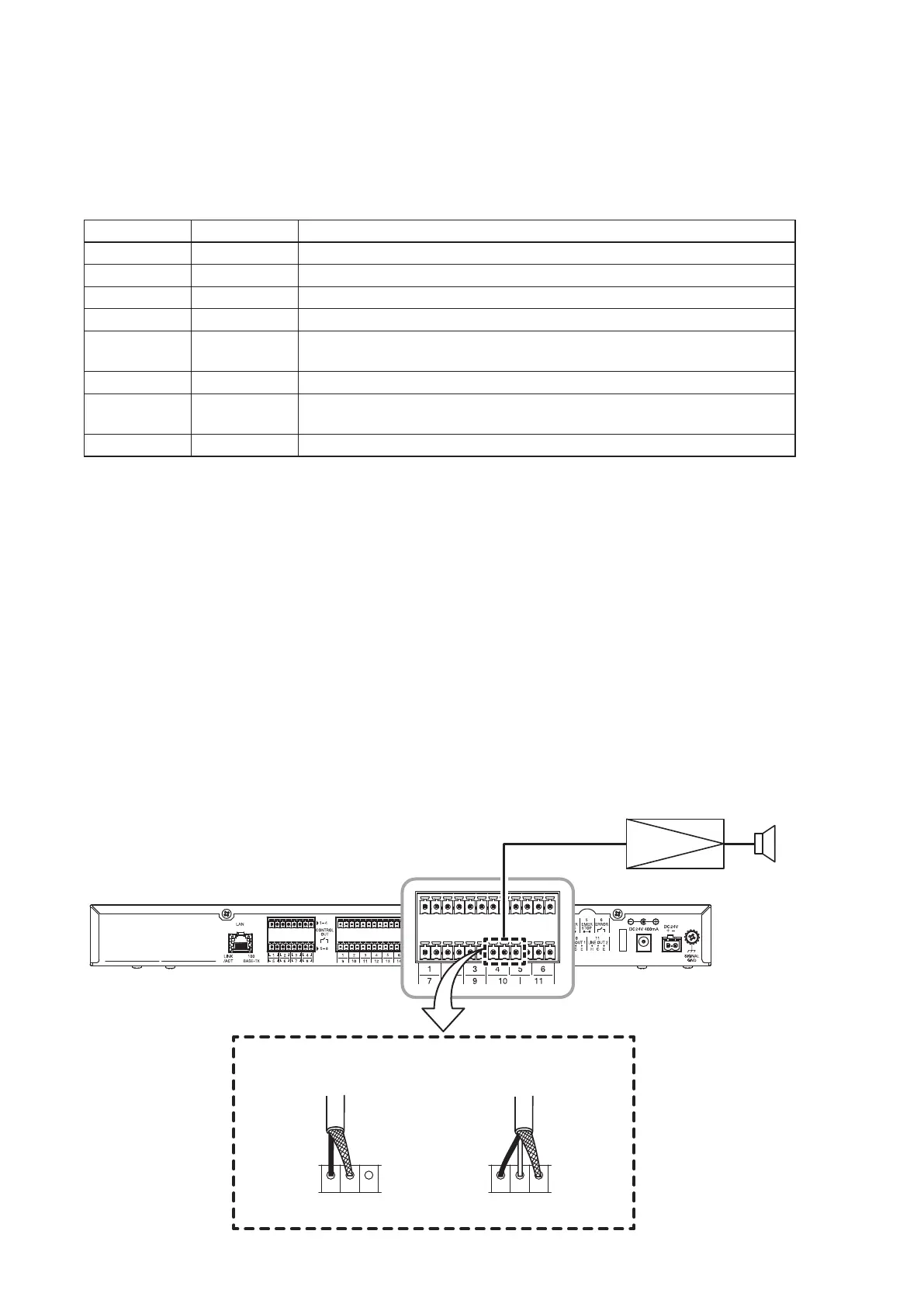
9.1. Connections
Connect each device as shown below. After inserting the supplied memory card into the Memory card slot A,
connect the power source to the unit, then turn on the amplier's power.
Use a single core or 2-core shielded cable for connection between the unit and the amplier.
LINE OUT 1
C EH
LINE OUT 1
C EH
[When using a single core
shielded cable]
[When using a 2-core
shielded cable]
To power amplifier To power amplifier
EV-700
Line input terminal
Amplifier Speaker
Line output 1 terminal
For the detailed
connection, see
p. 93.
For the connection between
the amplier and speakers,
see each individual instruction
manual.



 To Next Page