59
1 2 3 4 5 6 7 8
Flashing
(READY)
ON
Displayed for 3 seconds.
(DEL)
(EMER)
14.5. Deleting the Recorded Audio Sources
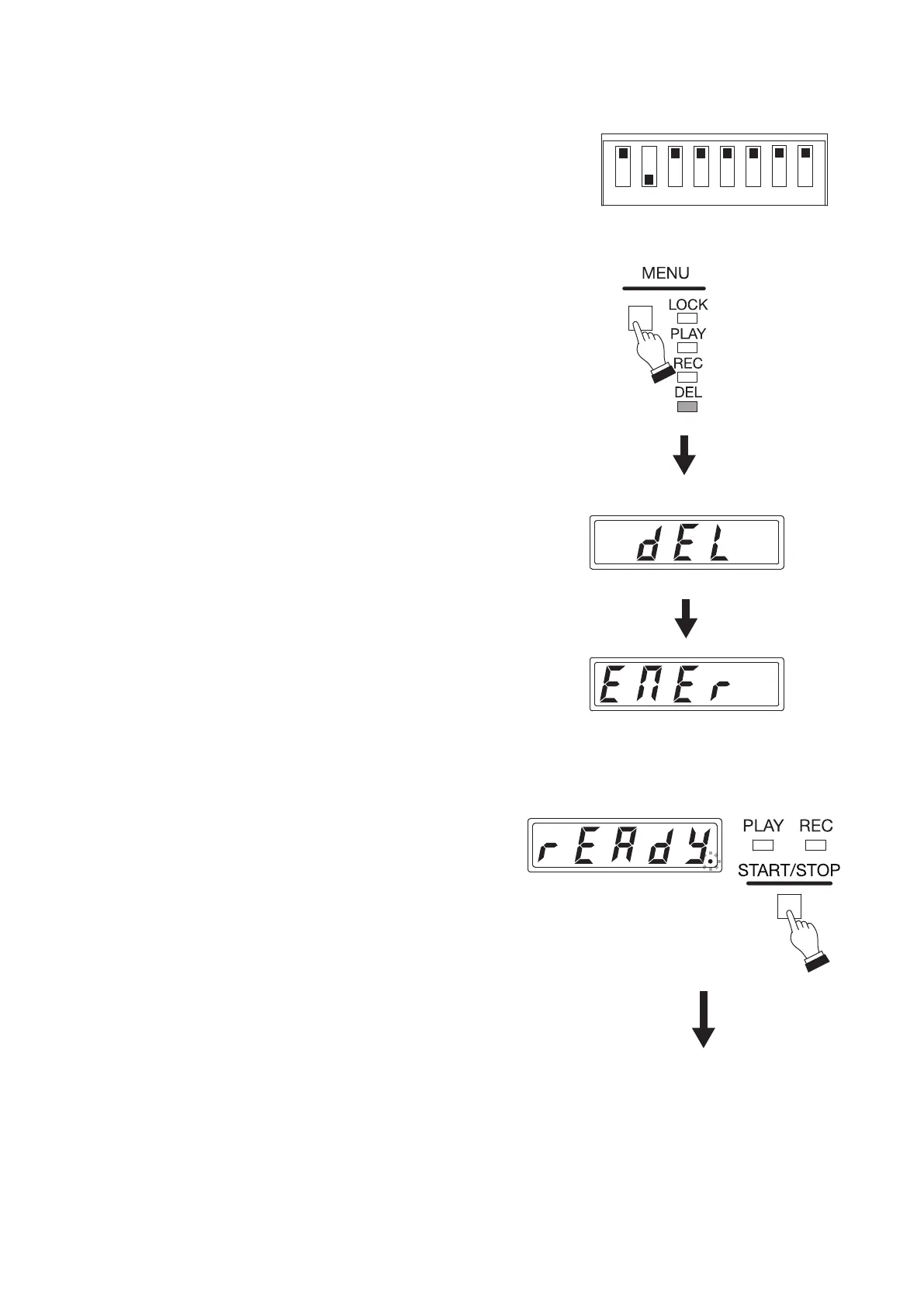
Step 1. Set only Switch 2 to the ON position.
Conrm that the "EMEr" (EMER) indication appears on
the Status display.
Step 2. Press the Menu key to select Delete mode.
Press the Menu key some times until the Delete mode
indicator lights.
The "dEL" (DEL) indication appears for about 3 seconds on
the Status display, followed by the "EMEr" indication.
Tip
You can monitor the recorded contents to be deleted only
with headphones before you delete them. (See p. 58,
"Conrming Audio Source Contents.")
Step 3. Press the Start/Stop key.
The "rEAdy" (READY) indication appears on the
Status display, then the unit will be placed in Delete
standby mode.
The dot at the lower right corner of the Status
display ashes during Delete standby.



 To Next Page