80
20. ACQUIRING OPERATION HISTORY
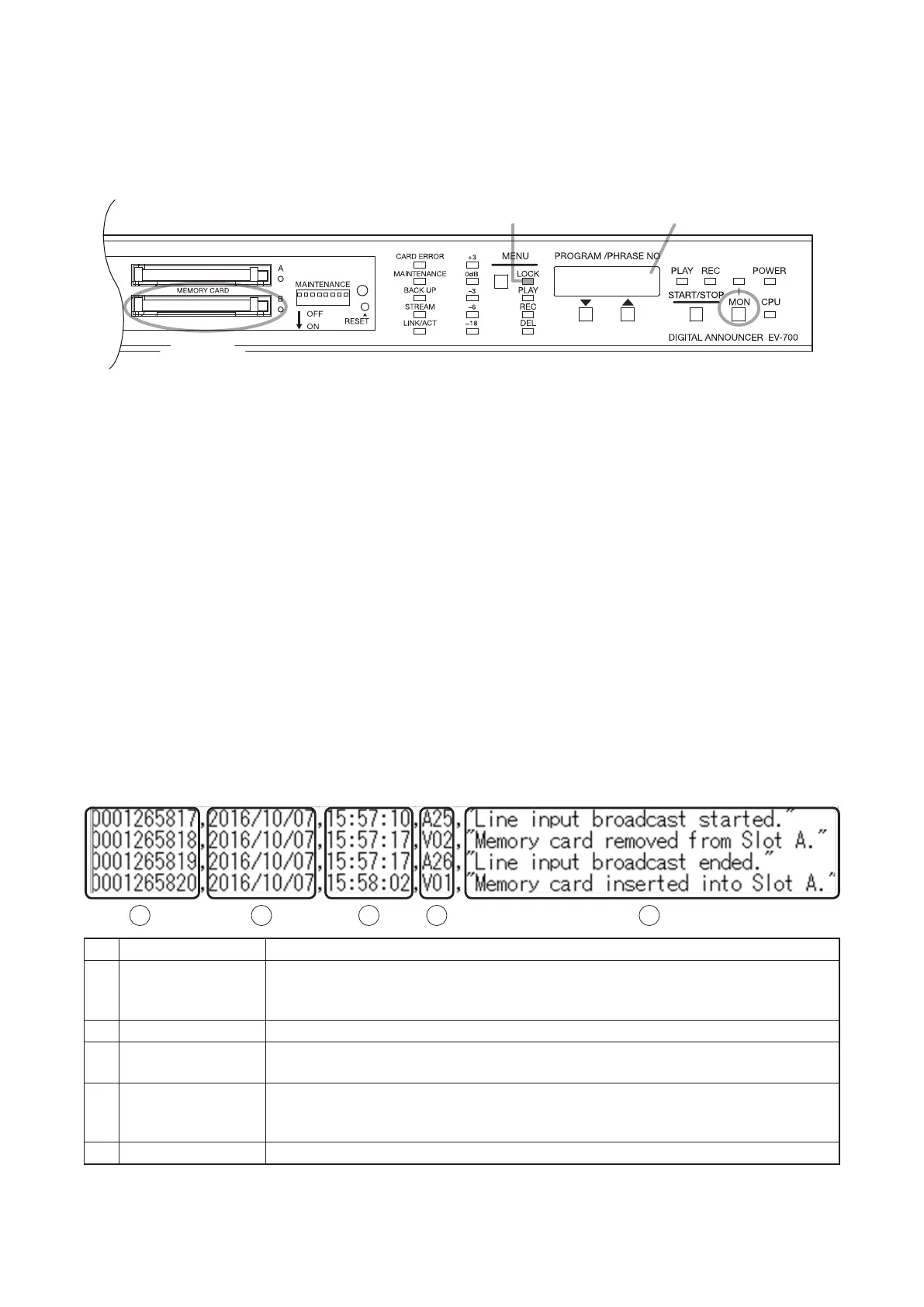
You can download the operation history recorded in the unit to the Memory card B.
Note
You cannot download the history le to the Memory card B when the backup function is enabled.
Step 1. Conrm that the Lock mode indicator is lighting when the unit is standby for operation.
Step 2. Insert a memory card (option) into the Memory card slot B.
Step 3. Hold down the Monitor key for 3 seconds or more.
The "Log" indication ashes on the Status display, and the operation history will be downloaded to the
memory card B.
When the download is completed, the indication "done" appears on the Status display for about 3
seconds.
Step 4. Remove the Memory card B from the EV-700.
Step 5. Insert the Memory card B into a PC, then check the history using the EV-700 Setting software.
Tip
Operation history is downloaded in 2 formats having the same data, xml and csv.
The history le contents in either format can be conrmed using the EV-700 Setting software.
As for the csv format le, its contents can be conrmed without using the EV-700 Setting software.
[How to see history file in csv format]
Status displayLock mode indicator
3
1
2,4
1
2 3 4 5
No. Item Description
1 History number A History control number. The larger the number, the latter history in time. The
history number would return to "0000000000" when it reaches an upper limit of
"9999999999."
2 Date of history Date information set to the EV-700 at the timing when history was recorded.
3 Hours, minutes, and
seconds of history
Time information set to the EV-700 at the timing when history was recorded.
4 History code Indicates category of history. History is grouped into 3 categories by a prex
alphabet.
A: Action, V: Event, E: Error
5 History content Description of history.



 To Next Page