15
9.2. Broadcasting (Playing)
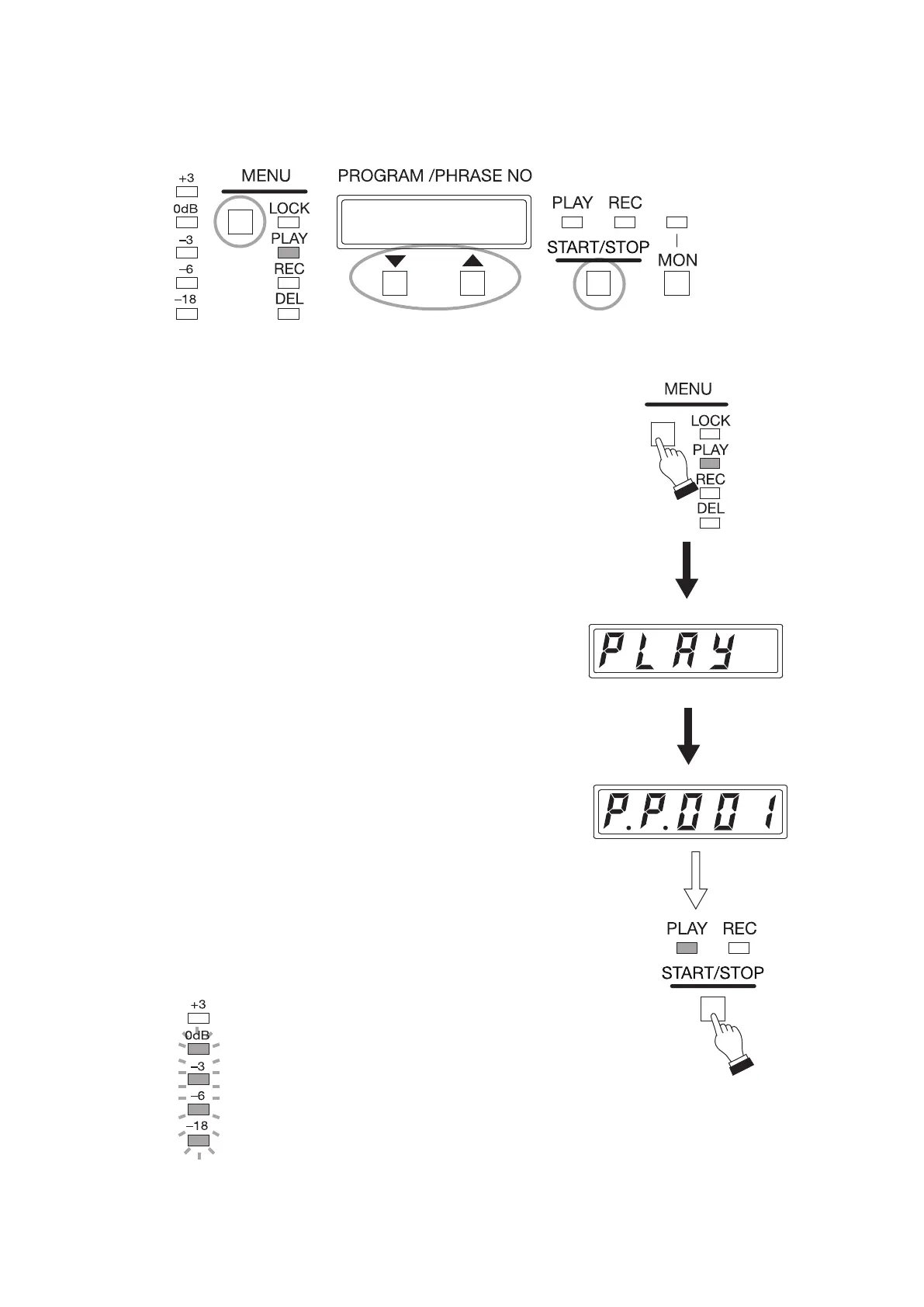
Play the program through the front panel operation.
The following procedures show an example to play "2-tone chime" registered in Program No. 001 (P001).
1
1
2
ON
Displayed for 3 seconds.
(PLAY)
Program number display
ON
Step 1. Press the MENU key to select the play mode.
The PLAY mode indicator lights.
The "PLAY" indication appears for about 3 seconds
on the Status display, followed by the program number
indication.
Tip
Program number is displayed as "P.P.001" (which means
Program No. P001) by the factory default.
If the "P.P.001" indication does not appear, press the Up
or Down key to display "P.P.001."
Step 2. Press the Start/Stop key.
Playback starts.
Tip
As the delay time is factory-preset to 2 seconds, playback
starts 2 seconds after the Start/Stop key is pressed.
The Play indicator lights during playback, and the signal
level is displayed in the level meter.
Playback stops automatically when complete.
Flashing



 To Next Page