76
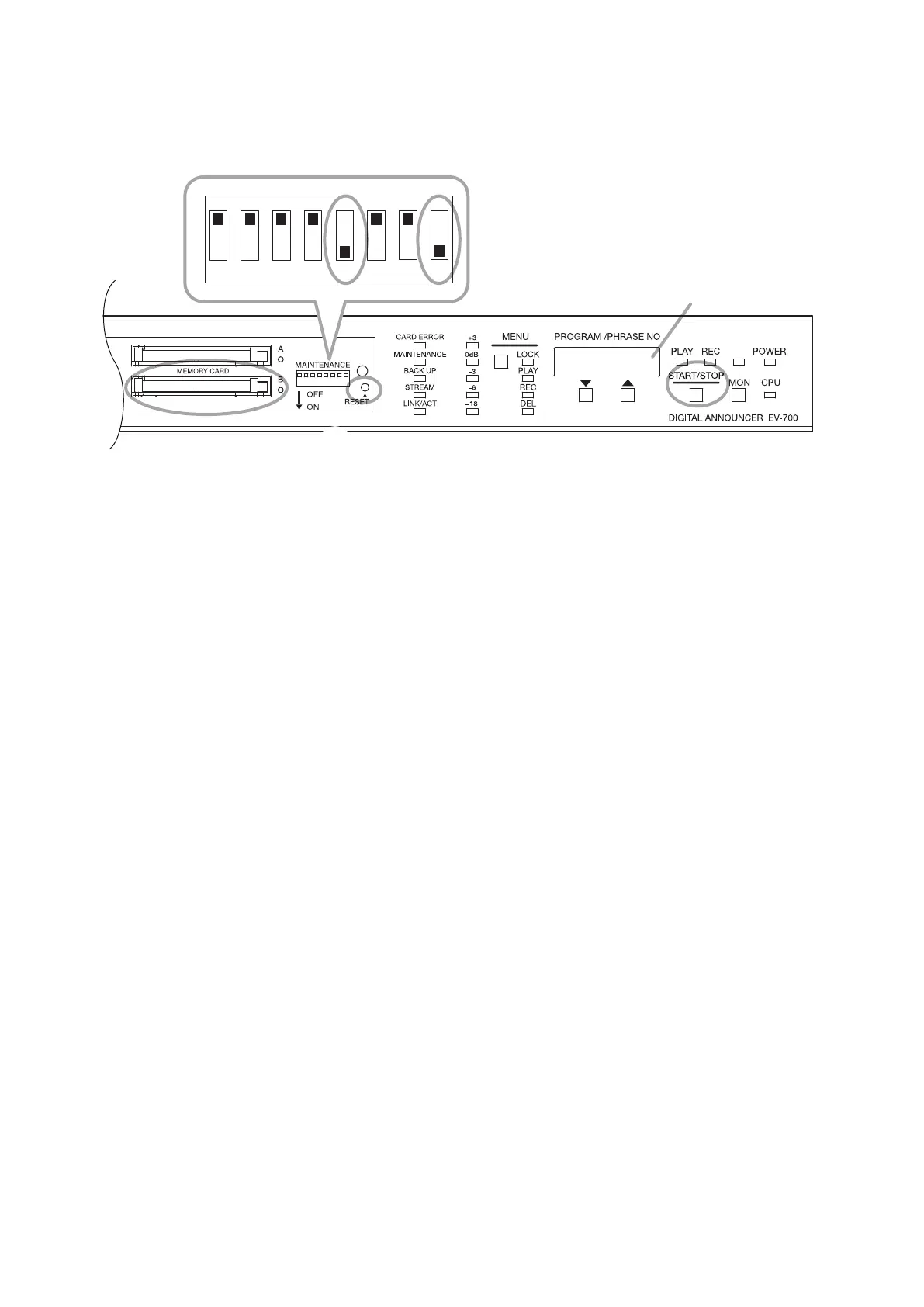
18.7. Updating the Firmware (Use Switches 5 and 8.)
You can update the rmware using the memory card on which the latest rmware is recorded.
Status display
1 2 3 4 5 6 7 8
2, 5
1
6
3, 4
Step 1. Insert the memory card on which the latest rmware is recorded into the Memory card slot B.
Step 2. Set Switches 5 and 8 to the ON position.
The current rmware version appears on the Status display.
Step 3. Press the Start/Stop key.
The "rEAdy." indication appears on the Status display.
Step 4. Press the Start/Stop key.
Firmware update begins.
Copy progress is shown in percentage on the Status display during updating. ("**PCt")
The "uP.End" appears on the Status display when rmware update is complete.
Step 5. Return Switches 5 and 8 to the OFF position.
Step 6. Hold down the Reset switch for 2 seconds or more, or unplug the power supply cord on the rear panel,
then plug it again.
The unit restarts and the updated rmware is reected to the unit.



 To Next Page