12
COMPONENTS
OPERATION METHOD OF CONTROL PANEL
Tap To select any relevant item. Continue to press Used for continuous moving.
(Moving of chinrest and
measuring head)
Touch the screen softly with a finger. Continue to touch the screen softly with a finger.
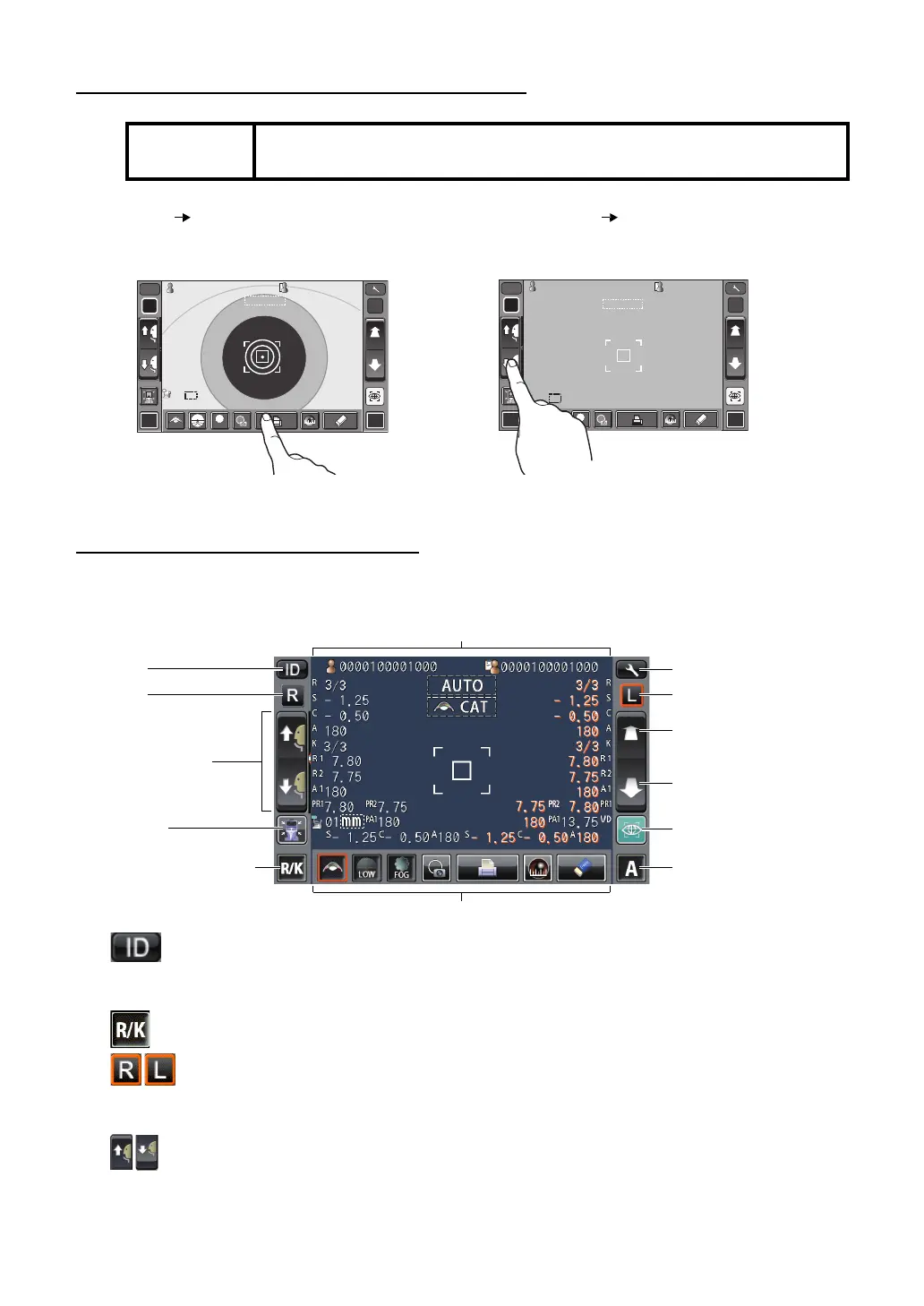
CONTROL PANEL COMPONENTS
The control panel is designed as a touch panel for performing various operations and settings.
It displays images and shows information, including set conditions and measurement results.
ID button ................................ Input the patient ID (up to 13 characters) and operator
ID (up to 21 characters). However, if no patient ID is
input, the patient No. is allocated automatically.
Measurement mode button ...... Selects a measurement mode from REF, KRT and R/K.
R button/L button................. Selects the right/left eye. By tapping the button, the
main body moves to the selected direction.
The selected button is framed in orange.
Up/down button for chinrest ... Moves the chinrest up/down.
NOTE:
The control panel is a touch panel. Do not use any sharp tools; e.g. ball
point pen.
R L
R/K
ID
A
13.7513.75
-1.- 1. 2525
-0.- 0. 5050
7.807 .8 0
7.807 .8 0
7.757 .7 5
1801 80
1801 80
010 1
VDVD
PR2PR2
00001000010000000100001000 00001000010000000100001000
mmmm
R
S
C
A
K
R1
R1
R2R2
A1A1
PR1PR1
3/33/3
3/33/3
AUTOAUTO 0/30/3
0/30/3
R
S
C
A
K
R1
R1
R2R2
A1A1
PR1PR1
PR2PR2
PA1PA1
PA1PA1
LOWLOW
FOGFOG
R L
R/K
0000100001000010000100001000010000100001 00001000010000100001
13.7513.75
diodio
AUTOAUTO
010 1
VDV D
S
ID
A
mmmm
R
S
C
A
K
R1R1
R2R2
A1A1
PR1PR1
PR2PR2
PA1PA1
PR2PR2
PA1PA1
R
S
C
A
K
R1R1
R2R2
A1A1
PR1PR1
HIGHHIGH
FOGFOG
0/30/3
0/30/3
0/30/3
0/30/3
Settings button
Display
L button
Measuring head forward
button
Measuring head back-
ward button
Start button
Auto/Manual button
Function button
ID button
R button
Up/down button for
chinrest
Reset button
Measurement mode button














 To Next Page