40
OPTIONAL OPERATIONS
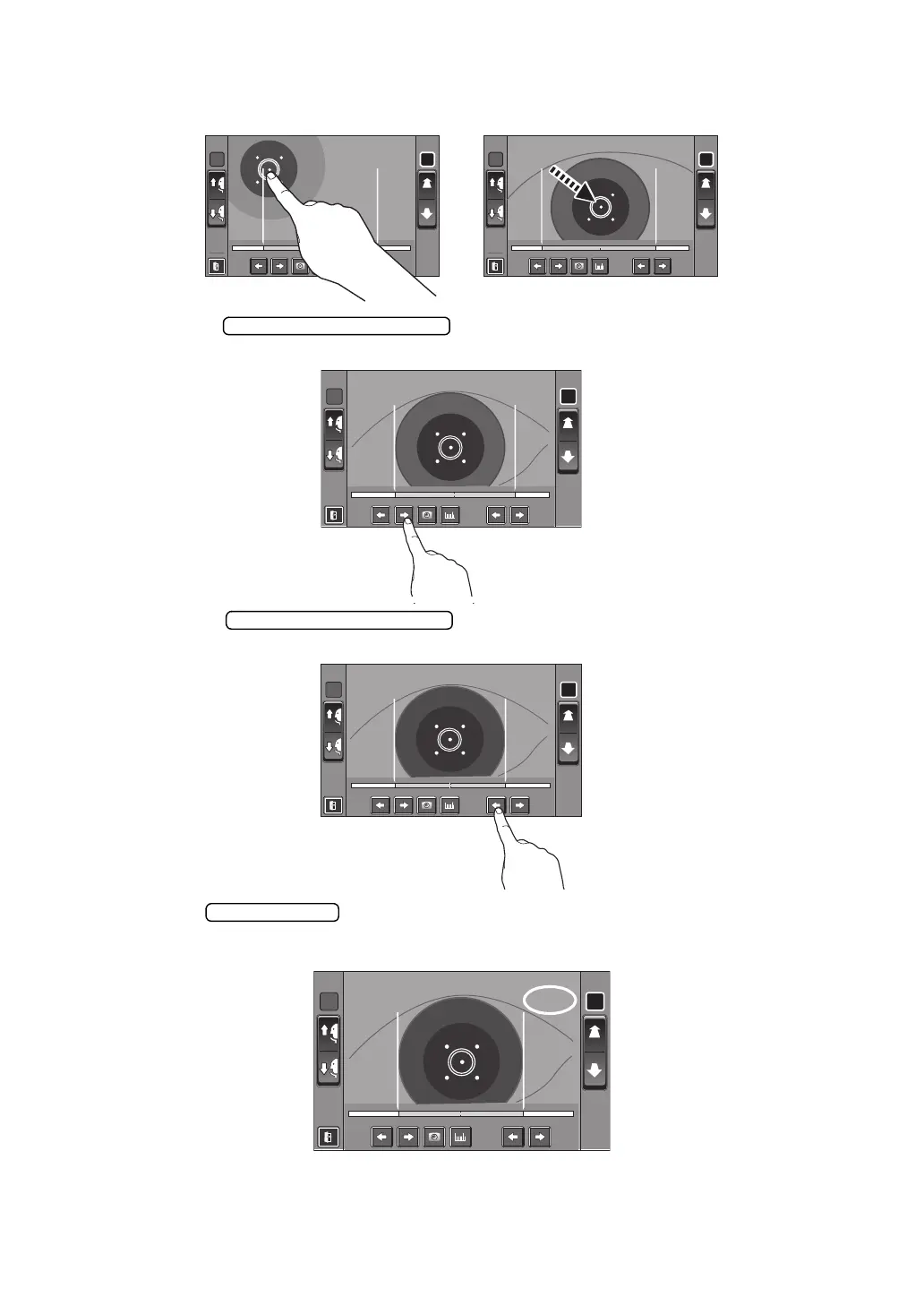
4 When the pupil is displayed, tap around the pupil. The measuring head moves to display
the pupil image and alignment dot at the center of the screen.
5 Using the button (L), move the left positioning bar to the left
end of the iris from the operator side.
6 Using the button (R), move the right positioning bar to the
right end of the iris from the operator's side.
7 Tap the button.
8 The cornea diameter is displayed.
R L R L
R:0.00R : 0 . 0 0 L:0.00L: 0 . 0 0 R:0.00R : 0 . 0 0 L:0.00L: 0 . 0 0
R L
R:0.00R:0. 0 0 L:0.00L: 0 . 0 0
R L
R:0.00R:0.00 L:0.00L : 0 . 0 0
R L
R:0.00R : 0 .00 L:9.50L:9. 5 0














 To Next Page