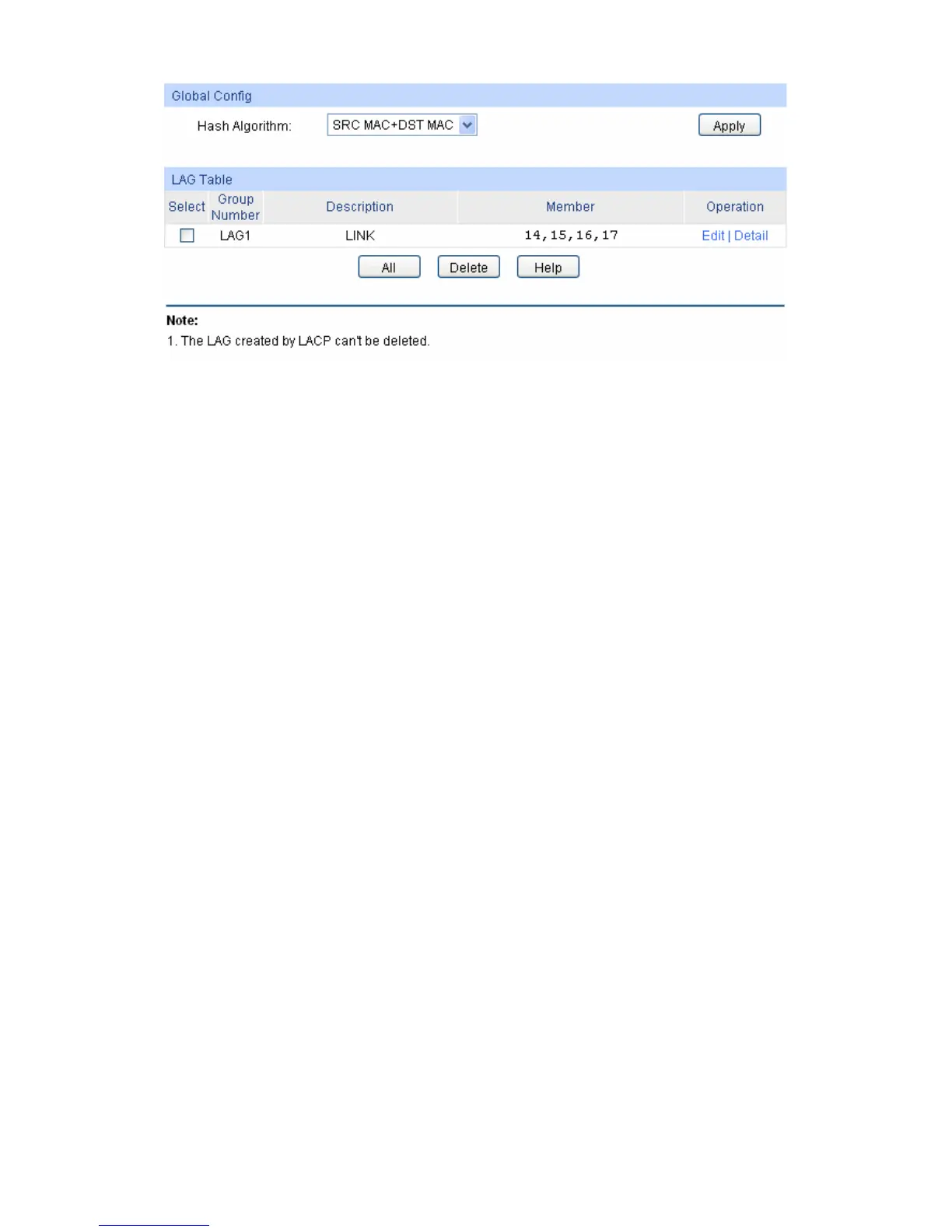
Figure 5-6 LAG Table
The following entries are displayed on this screen:
Global Config
Aggregate
Arithmetic:
Select the applied scope of Aggregate Arithmetic, which results
in choosing a port to transfer the packets.
SRC MAC + DST MAC: When this option is selected, the
Aggregate Arithmetic will apply to the source and
destination MAC addresses of the packets.
SRC IP + DST IP: When this option is selected, the
Aggregate Arithmetic will apply to the source and
destination IP addresses of the packets.
LAG Table
Select: Select the desired LAG. It is multi-optional.
Group Number: Displays the LAG number here.
Description: Displays the description of LAG.
Member: Displays the LAG member.
Operation: Allows you to view or modify the information for each LAG.
Edit: Click to modify the settings of the LAG.
Detail: Click to get the information of the LAG.
Click the Detail button for the detailed information of your selected LAG.
37











 To Next Page