Chapter 3 The Setting of Operation Panel & Remote Controller
3-1 The Operation of the Operation Panel and Monitor Mode
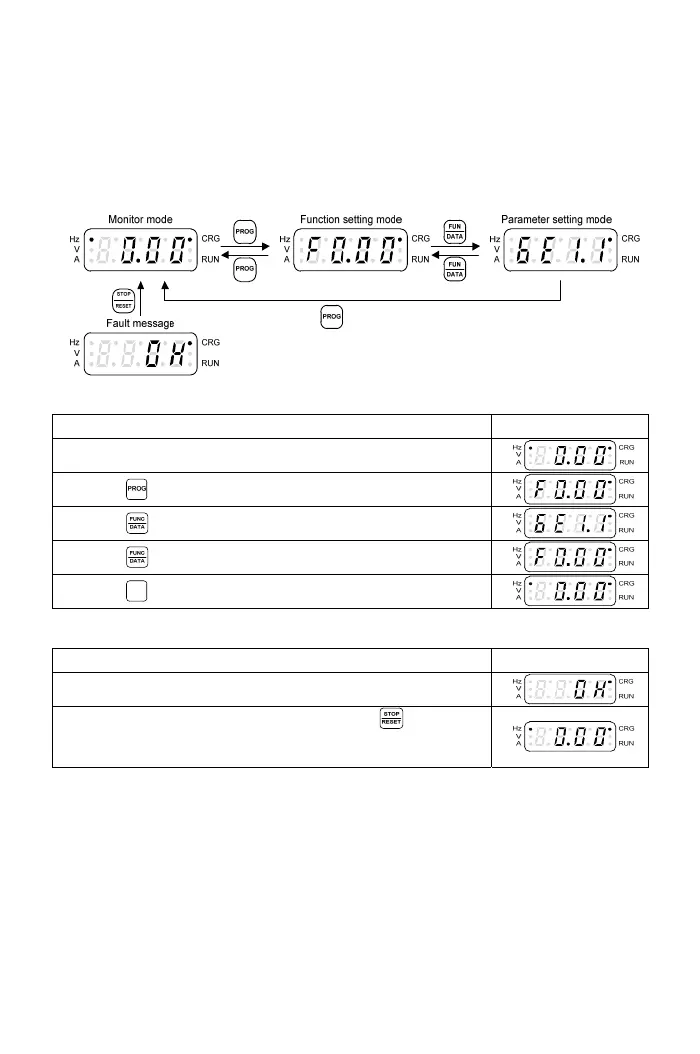
3-1-1 The Operation of Operation Panel
The ope
ration of the operation panel includes fault messages and three
modes. The switching methods are shown as below figure:
The operation steps are shown in the below table (by default setting)
Operation Steps Display
1.Start the drive and enter the main display.
2.Press key and enter the function setting mode.
3.Press key and enter the parameter setting mode.
4.Press key and return to the function setting mode.
5.Press
PROG
key and return to the monitor mode.
Fault message display:
Operation Steps Display
The fault message displayed during the drive operation
1.After the error is troubleshooted, pressing key to
clear the fault message and then return to the monitor
mode.
13



 To Next Page