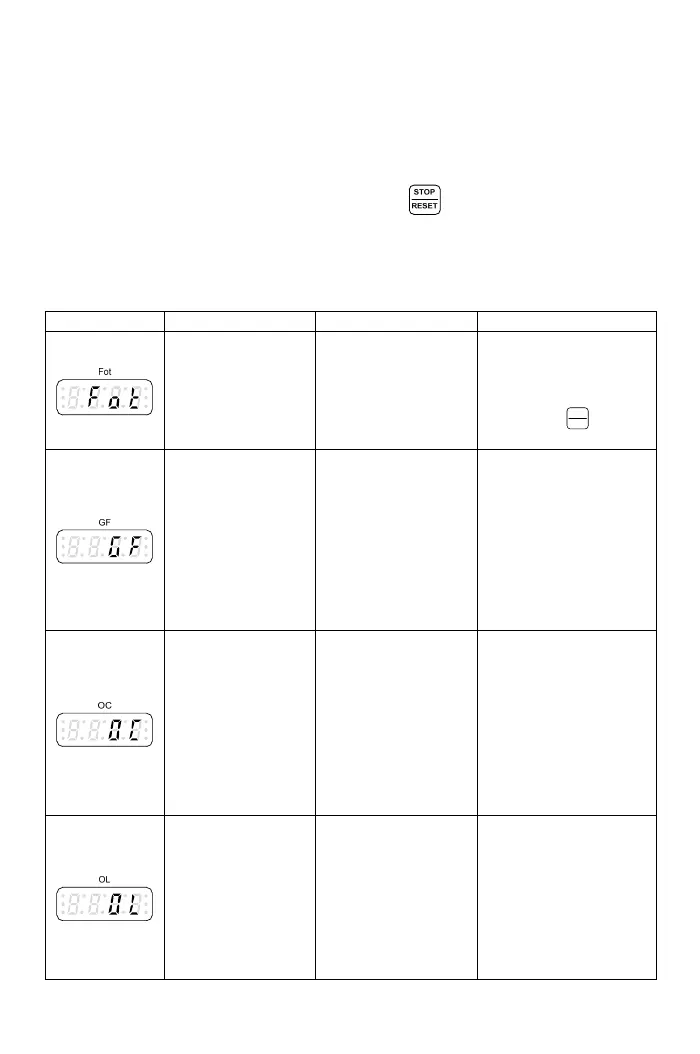
-2 Fault Protection Display and Troubleshooting
ults
urs, the drive trips by the protection functions and
i
trou
7
A: Description:
T e drive has well protection functions to protect drive and motor when fah
occur. When the fault occ
d splay the fault message on operation panel. After the fault is
bleshooted, reset the drive by pressing “
” of the drive operation panel
or b l to the drive multi-function input
term
B: Protection and Troubleshooting List:
Drive erro
Displa Troubleshooting
y the external operation reset signa
inals.
r trip message
y Description Cause
●Drive outputs fault
current.
●High temperature on
IGBT module.
the drive to
hen reset
command from
multi-function input
terminal or
IGBT module error
●Error on the drive
Return
repair w
power system.
“
STOP
RESET
”
are
useless.
Grounding fault
●The three-phase
output current is
unbalance and
exceeding the
detection level of
grounding fault.
●Grounding fault
detection level:
F4.01.
The output terminal of
the drive is short or
grounding.
●Check the insulation
value of motor.
●Check the shield of
motor’s wire.
Drive over current
●The drive current
during the
operation exceeds
220% of drive’s
rated current.
●The output terminals
of drive are short.
●The load is too
heavy.
●The acceleration
time is too short.
●Drive is immediately
restarted during
coast to stop.
●Use special motor.
●Check wires of
U/T1,V/T2,W/T3
terminals to verify if
there is short between
terminals.
●Check the motor and
drive compatibility.
●Check the motor
operated in over-rated
running.
Motor overload
●Operation current
exceeds 150% of
motor’s rated
current and
reaches the motor
overload protection
time.
●Active time: F4.10.
●Motor is overloaded.
●The voltage setting
of V/F pattern is too
high or too low.
●The current setting
of motor’s rated
current is invalid.
●Check the load of
motor.
●
Check if the acceleration
or deceleration time is too
short.
●Check if V/F setting is
proper.
●Check if the rated
current setting is valid.
98



 To Next Page