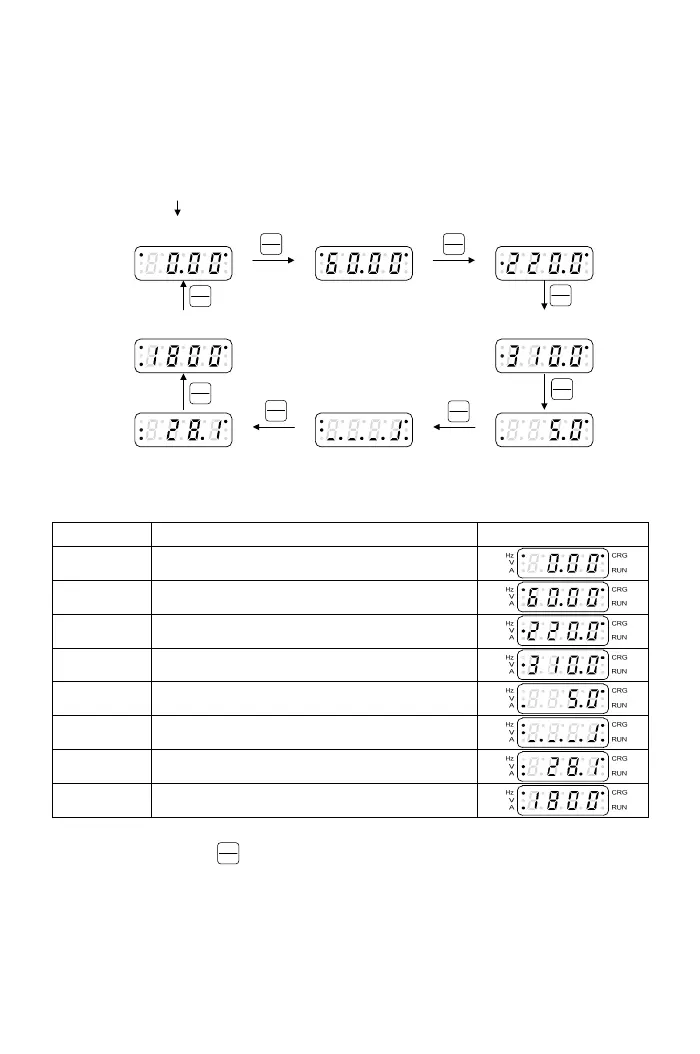
3-1-2 Monitor Mode
There a
re eight monitor modes can be selected in the monitor mode. User
can determine one of eight monitor modes as the main display on the
operation panel. And the monitor mode can be switched as shown in below
figure:
Hz
V
A
CRG
RUN
Hz
V
A
CRG
RUN
Hz
V
A
CRG
RUN
Hz
V
A
CRG
RUN
Display 1
(Output Frequency)
Display 2
(Frequency Command)
Display 3
(Output Voltage)
Display 8
(Default:Motor Speed(RPM))
Hz
V
A
CRG
RUN
Display 4
(DC bus Voltage)
Hz
V
A
CRG
RUN
Hz
V
A
CRG
RUN
Hz
V
A
CRG
RUN
Display 7
(Default:Temperature of Heat Sink)
Display 6
(Default:Terminal Status)
Display 5
(Output Current)
Enter monitor mode
FUN C
DATA
FUNC
DATA
FUN C
DATA
FUN C
DATA
FUN C
DATA
FUN C
DATA
FUN C
DATA
FUNC
DATA
The descriptions of monitor modes are shown in the below table(example by default
setting)
Display Descriptions Display
Display 1 Output frequency (Hz, CRG: ON)
Display 2 Frequency command (Hz, CRG: ON)
Display 3 Output voltage (V, CRG: ON)
Display 4 DC bus voltage (V, CRG: ON)
Display 5 Output current (A, CRG: ON)
Display 6 Terminal status (Hz, V, CRG, RUN: ON)
Display 7 Heat sink temperature (V, A, CRG: ON)
Display 8 Motor speed(RPM) (Hz, A, CRG: ON)
a. User can select the main display from eight monitor displays and switch to another
monitor displays by
FUNC
DATA
key under monitor mode. The selection of monitor
displays can be set from F1.08.
b. User can determine one of the displays to be the main display according to the
demand. If the user does not change the display back the main display after the
setting is completed, the drive will automatically switch back to the main display
after the operation panel is idle over 3 min.
c. The display 6~8 are defined by F1.09~F1.11
14



 To Next Page