18
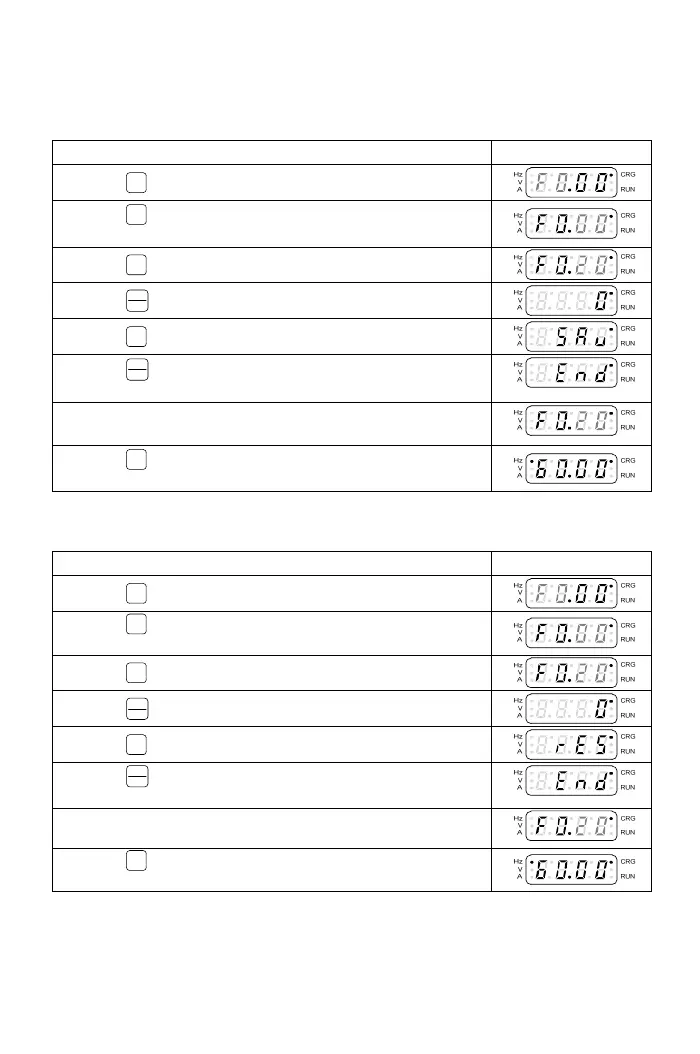
3-1-9 Save and Restore the Setting Value.
a.The ope
ration steps of saving drive function setting are shown in the below table:
Operation Steps Display
1.Press
PROG
key and enter the function setting mode.
2.Press
<<
key and switch to the function number setting
mode.
3.Press
▼
key to select F0.20.
4.Press
FUNC
DATA
key and enter the parameter setting mode.
5.Press
▲
key and select the “SAv”.
6.Press
FUNC
DATA
key to save settings. The display of operation
panel will display “End” after 2sec.
7.After the panel displays ”End” for 1 sec, the display
automatically returns to the function setting mode.
8.Press
PROG
key and return to the monitor mode
(frequency command).
b.The operation steps of resuming drive function setting are shown in the below table:
Operation Display
1.Press
PROG
key and enter the function setting mode.
2.Press
<<
key and switch to the function number setting
mode.
3.Press
▼
key to select F0.20.
4.Press
FUNC
DATA
key to enter the parameter setting mode.
5.Press
▲
key and select the “rES”.
6.Press
FUNC
DATA
key to save the setting. The panel will display
“End” after 2sec.
7.After the panel displays ”End” for 1 sec, the display
automatically returns to the function setting mode.
8.Press
PROG
key and return to the monitor mode
(frequency command).



 To Next Page