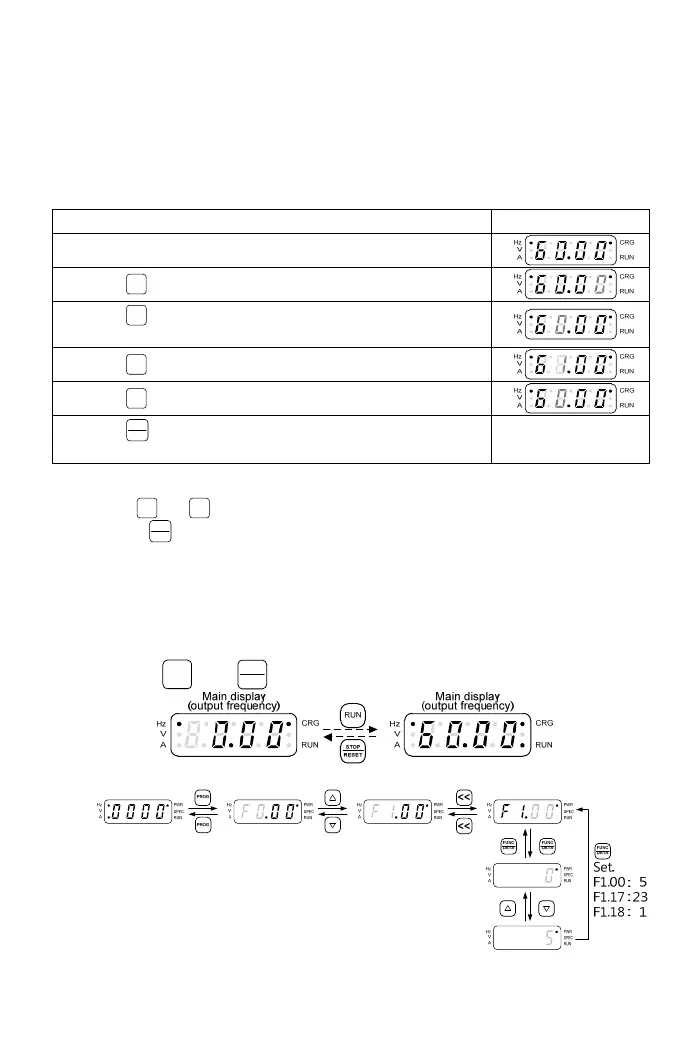
3-1-6 The Operation in the Monitor Mode
Frequency command, motor speed(RPM), machine speed(MPM) are
changeable under monitor mode. For example of frequency command
change, the setting steps are shown in the following table.
The operation steps are shown in the below table:
Operation Steps Display
1.In the monitor mode, the display is shown as right.
2.Press
<<
key to shift the digit of frequency command.
3.Press
<<
key to shift the digit of frequency command.
Example: Change the digit of decimal value.
4.Press
▲
key to increase 1 to the frequency command.
5.Press
▼
key to decrease 1 to the frequency command.
6.Press
FUNC
DATA
key to save the setting value within 5sec,
when completing setting of the rotation speed.
Note: grey-color digits in above table means digit flashing.
a.Use
▲
or
▼
key to control the rotation speed in the monitor mode.
b.Press
FUNC
DATA
key to save the setting value within 5sec(the setting value is
flashing), when the required rotation speed is set. If the setting value is not
saved, the display will return to the monitor mode after 5sec and save the
value automatically after 3 min. If the saving of the setting value is not
completed and drive immediately powers off within 3 min, the setting value will
recover to the original value before setting.(see F1.07 for the setting).
3-1-7 Start/Stop of the Drive
Pr
ess
RUN
and
STOP
RESET
key to control the output of drive. Shown as below:
3-1-8 SPEC Programmable Special function key(SPEC) for forward/reverse
(grey-color digits in above table means digit flashing)
17



 To Next Page