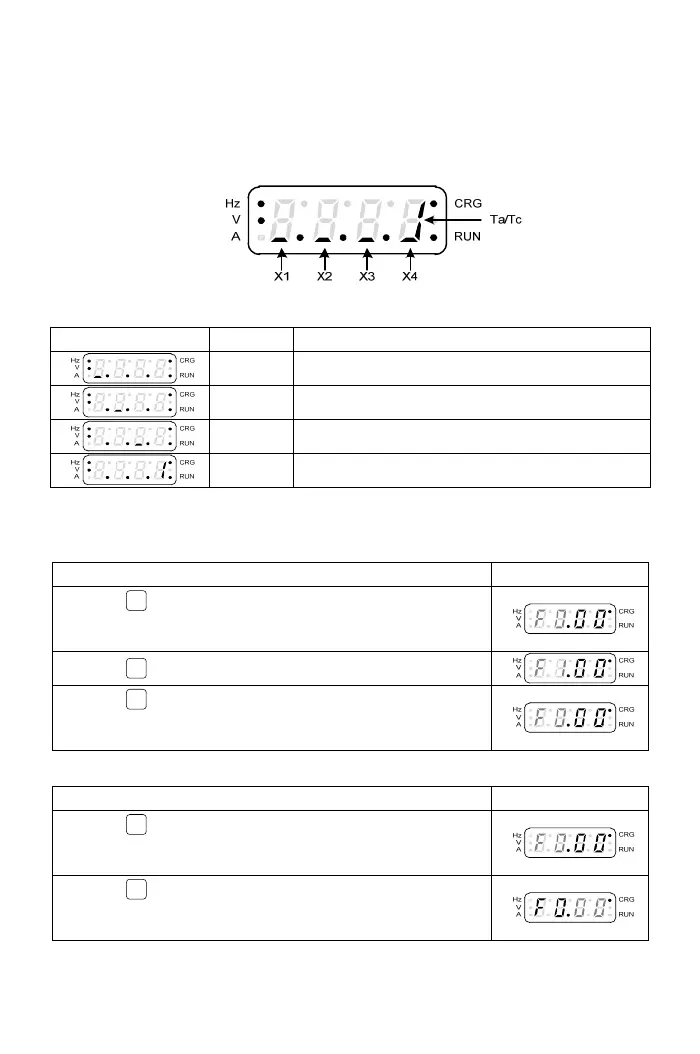
3-1-3 The Status of Multi-function Terminals
The default settin
g of “Display 6” is the status of multi-function input
terminals and the definition of each segment on the seven-segment display
for 4 digits is shown as below figure:
The definition of display shown in the below table:
Display Terminal Status description
X1 Multi-function input terminal “X1” is active.
X2 Multi-function input terminal “X2” is active.
X3 Multi-function input terminal “X3” is active.
Y1 Multi-function input terminal “Y1” is active.
3-1-4 The Function Setting Mode
a.The selection of function group:
Operation Steps Display
1.Press
PROG
key to enter function group setting mode
under monitor mode and the function group in the display
will be flashing.
2.Press
▲
key to increase the function group number.
3.Press
▼
key to decrease the function group number.
See “Chapter 4 Parameter List” for the setting range of
function groups.
b.The switch of function group and function number:
Operation Steps Display
1.Press
<<
key to switch the function number setting
mode to function group setting mode when function group
is flashing.
2.Press
<<
key to switch the function group setting mode
to function number setting mode when function number is
flashing.
15



 To Next Page