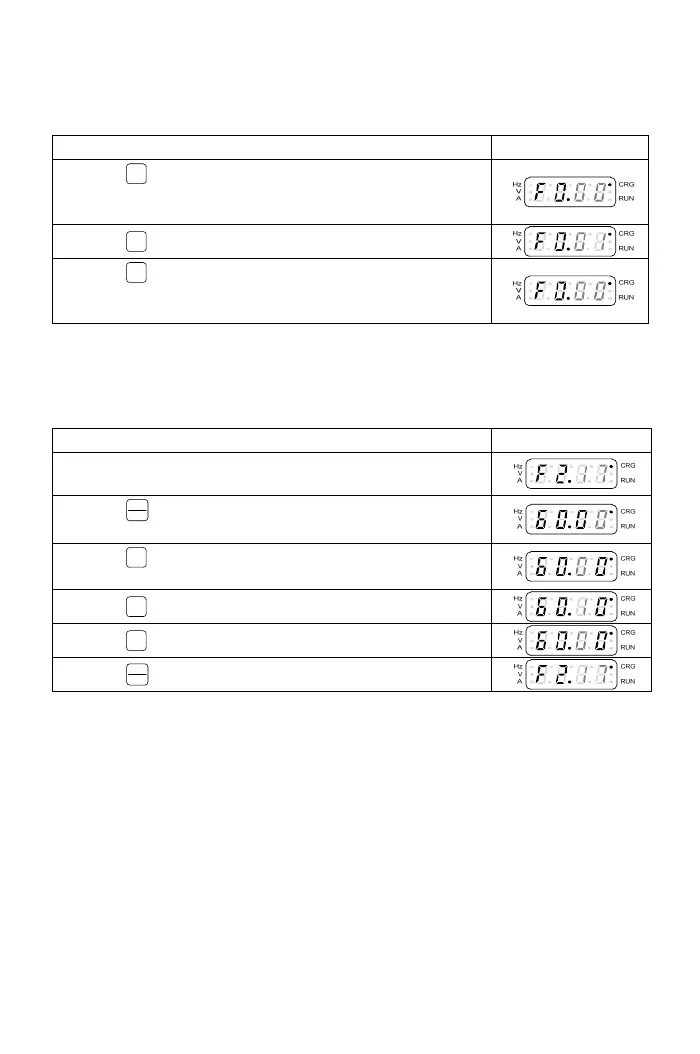
c.The selection of function number:
Operation Steps Display
1.Press
<<
key to switch to the function number setting
mode after the function group is selected. And the
function number is flashing.
2.Press
▲
key to increase the function number.
3.Press
▼
key to decrease the function number. See
“Chapter 4 Parameter List” for the setting range of
function numbers
.
Note: The grey-color digits in above tables represent the flashing of the digits.
3-1-5 Parameter Setting Mode
The setting ran
ge of parameter is according to the function. The operation
steps are shown in the below table:
Operation Steps Display
1.The function setting mode: example F2.17(output
frequency).
2.Press
FUNC
DATA
key in the function setting mode and enter
parameter setting mode.
3.Press
<<
key to shift the digit; Example: Shift the
number to the last digit after the decimal point.
4.Press
▲
key to increase 0.1 to the output frequency.
5.Press
▼
key to decrease 0.1 to the output frequency.
6.Press
FUNC
DATA
key and return to function setting mode.
a.The digit of parameter value is flashing after the parameter value is changed.
(grey-color digits in above table means digit flashing)
b.The setting range of F2.17 is 0.00~400.00Hz
16



 To Next Page