【F1.14】 Digits of Decimal Value (Machine Speed)
Set the digits of decimal values (the range from 0~3 digits behind the decimal point)
to display the higher resolution of machine speed for observation of machine speed.
【F1.17】 SPEC Key Setting
The setting of SPEC key is similar as multi-function input setting; see the function
F5.19 ~ F5.22 for SPEC key setting reference.
【F1.18】 SPEC Key Self-Holding Function
SPEC key self-holding function
0: Disable
1: Enable
Example: SPEC key is set as reverse command.
●Start command(F1.00) is set as 5 (Start the drive by operation panel)
●Set function F1.17 as 23 (reverse command)
●Set function F1.18 as 1 for holding operation and press “SPEC” key
during the drive operation, and motor will run in reverse direction.
【F1.19】 Stop Mode
a. The settings are listed as below:
0: Ramp to stop + DC braking (see functions F3.21 ~ F3.35)
1: Coast to stop (inertia stop)
2: Coast to stop + DC braking
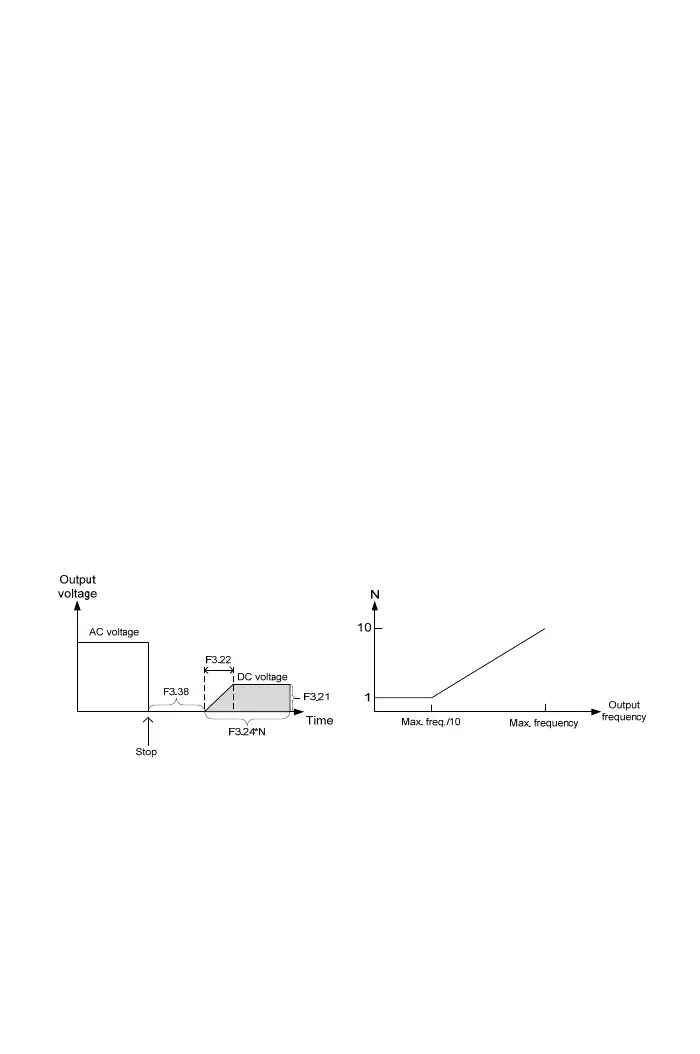
b. When F1.19=2, the stop operation is shown in the below diagram:
c. When the output current is abnormal at DC braking, adjust the suitable time by
function F3.38 to release the remained magnet of rotor and then to perform DC
braking.
【F1.20】 Reverse Prohibition
The settings are listed as below:
0: Reverse rotation allowed
1: Reversal rotation NOT allowed
45



 To Next Page