c. Setting range: 0: Disable 1: Enable
【F3.19】 Response Time of AVR
Set the response time of AVR. The setting range is 0~255.
【F3.21】 DC Braking Level
a. Set the current level of DC braking.
b. The setting range is 0~150% of drive rated current.
【F3.22】 DC Braking Response Time
According to the DC braking conditions to adjust the response time. The setting
range is 0~255.
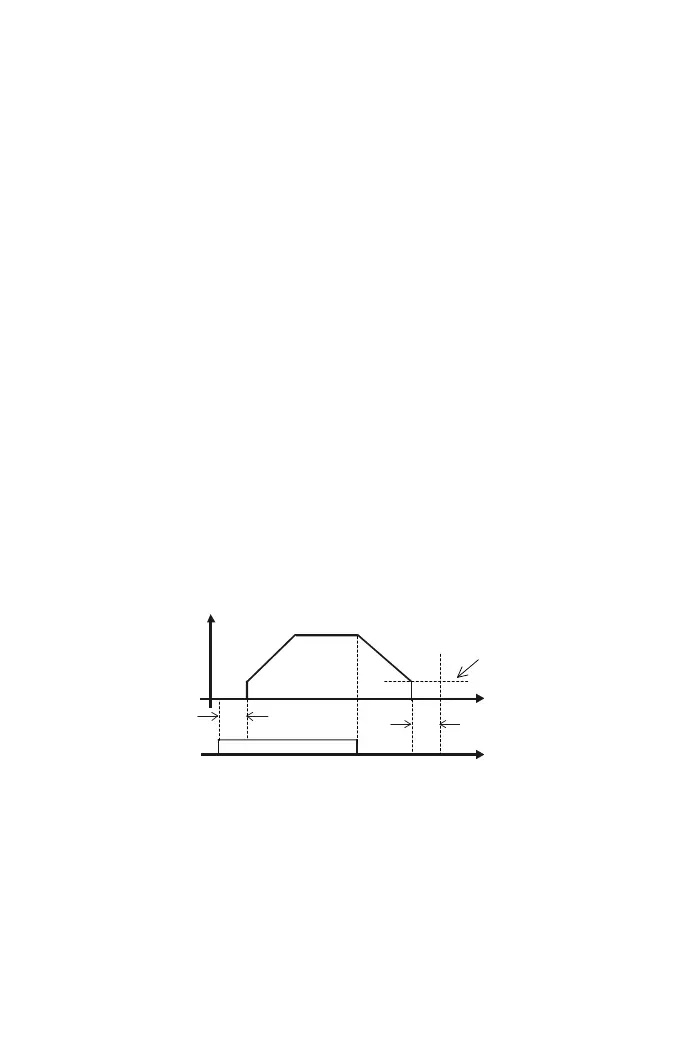
【F3.23】 Time Interval of DC Braking at Start
Set the DC braking for motor random running at start. The setting range is 0.0~60.0.
【F3.24】 Time Interval of DC Braking at Stop
a. The setting of time interval of DC braking is to avoid inertial run of motor at stop.
b. Set the DC braking of ramp to stop. The setting range is 0.0~60.0 sec.
【F3.25】 DC Braking Frequency at Stop
a. Set the DC braking frequency at stop. The setting range is 0.1~60.0.
b. If changing the setting value of frequency below the starting frequency(F2.33),
the drive will stop by DC braking, and the DC Braking Frequency at Stop(F3.25)
will be not active.
Start
command
Time interval of
DC braking at
start F3.23
Time interval of DC
braking at start F3.24
Output
frequency
DC braking
frequency at stop
F3.25
Time
Time
【F3.30】 Operation Selection at Instantaneous Power Failure
a. The settings are listed as below:
0: Drive cannot be restarted at instantaneous power failure.
1: Drive can be restarted at instantaneous power failure.
(see the function description of the restart after instantaneous power failure
detection of multi-function output setting (F5.26) )
2: Ramp to stop
57



 To Next Page