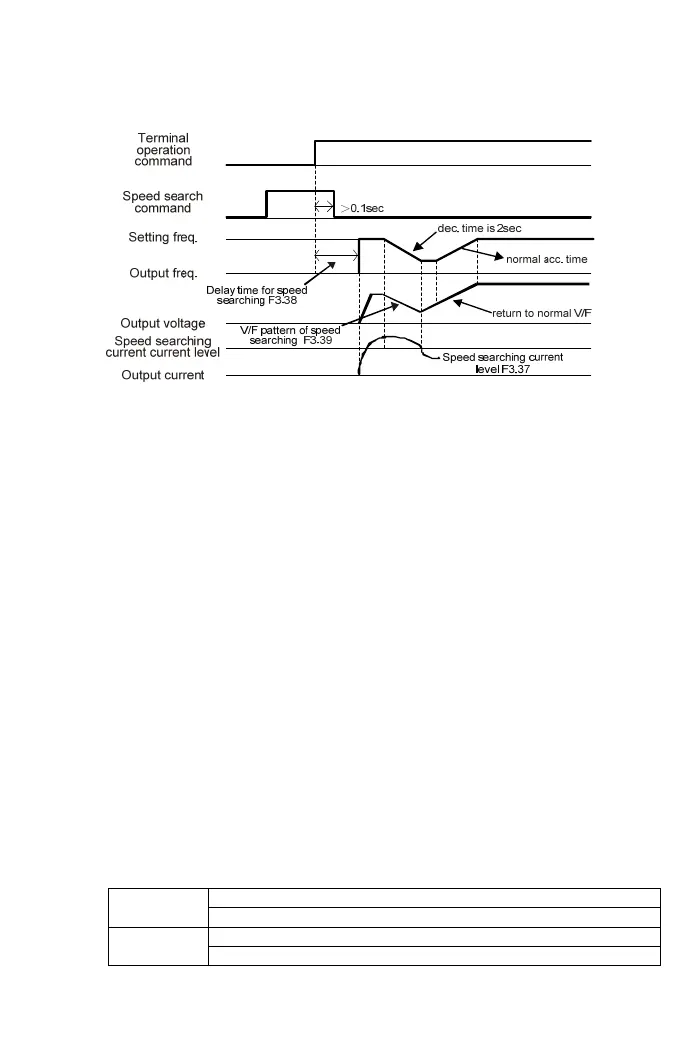
±12: Speed search from the frequency setting
±13: Holding command(refer to the description of multi- acc/dec time)
±14: UP command
Frequency setting stepping increase
±15: DOWN command
Frequency setting stepping decrease
±16: Clean UP/DOWN frequency command
The frequency command is cleaned to 0.00Hz
±17: UP/DOWN command enter key
(1) Setting the UP/DOWN command enter key for multi-function input
terminals X1~X4. UP/DOWN command enter key must be set to activate
UP/DOWN command (±14 and ±15) when one of multi-function input
terminals X1~X4 is defined as UP/DOWN command enter key.
Open (Multi-function Input Terminal): UP/DOWN commands to change
the input frequency command and the output frequency is not changed
with the variation of frequency commands.
Short (Multi-function Input Terminal): The output frequency
accelerates/decelerates to the frequency command setting.
(2) If one of multi-function input terminals X1~X4 is not defined as
UP/DOWN command enter key, the drive output frequency is controlled
by UP/DOWN command.
±18: Analog input source selection(
“Pot knob”/AI)
Setting the function F1.03 (Analog Input Selection) to 3 (
“Pot knob” or AI)
a contact ;
“Pot knob” is the analog input source
Set to 18
b contact ; AI is the analog input source
a contact ; AI is the analog input source
Set to -18
b contact ;
“Pot knob” is the analog input source
69



 To Next Page