4.4.3 POWER Section
POWER Section
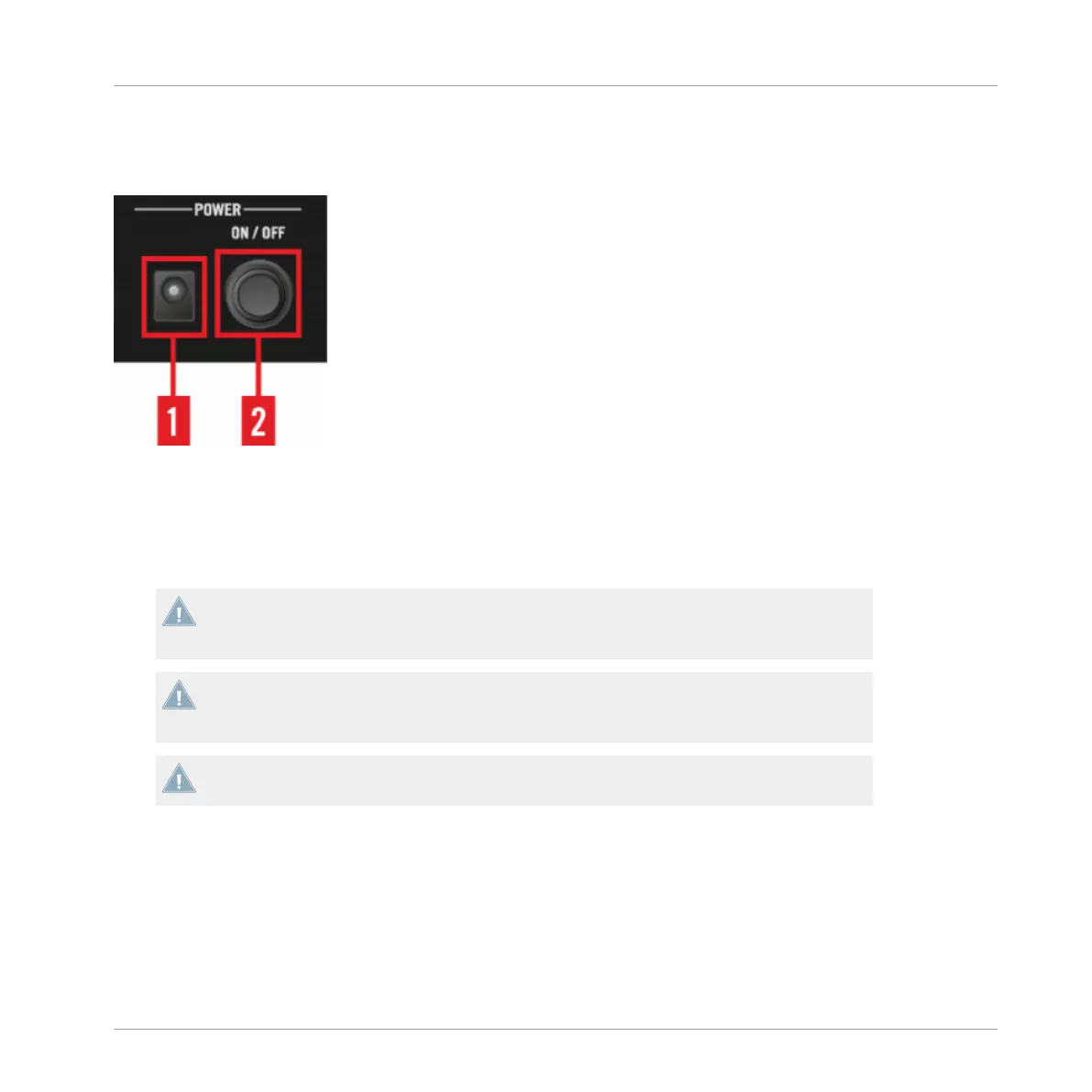
In the POWER section, you make the connection to the power supply and to your computer:
(1) Power Supply connector (15V - 2.66 A): connect the included power supply.
(2) ON/OFF switch: press this switch to turn your device on or off.
Do not use the TRAKTOR KONTROL D2 with a power supply other than the one included in
delivery. In case of loss or damage, make sure to purchase a replacement power supply ap-
proved by Native Instruments for use with the D2.
Before you use the power supply and connect to the D2, please refer to the TRAKTOR
KONTROL D2 IMPORTANT SAFETY INSTRUCTIONS leaflet (included in the box). This
leaflet explains how to attach the specific adaptor plug for your region.
Only use the power supply splitter cable to power a second TRAKTOR KONTROL D2 unit.
Powering another device may damage your devices.
4.4.4 USB Hub
The USB 2 Hub provides additional connectivity for using further equipment such as TRAK-
TOR controllers and audio interfaces.
Hardware Reference
The Rear Panel
TRAKTOR KONTROL D2 - Manual - 150



 To Next Page