7
Operation 3
Amendment 10
11 May 2015
Operation Guide
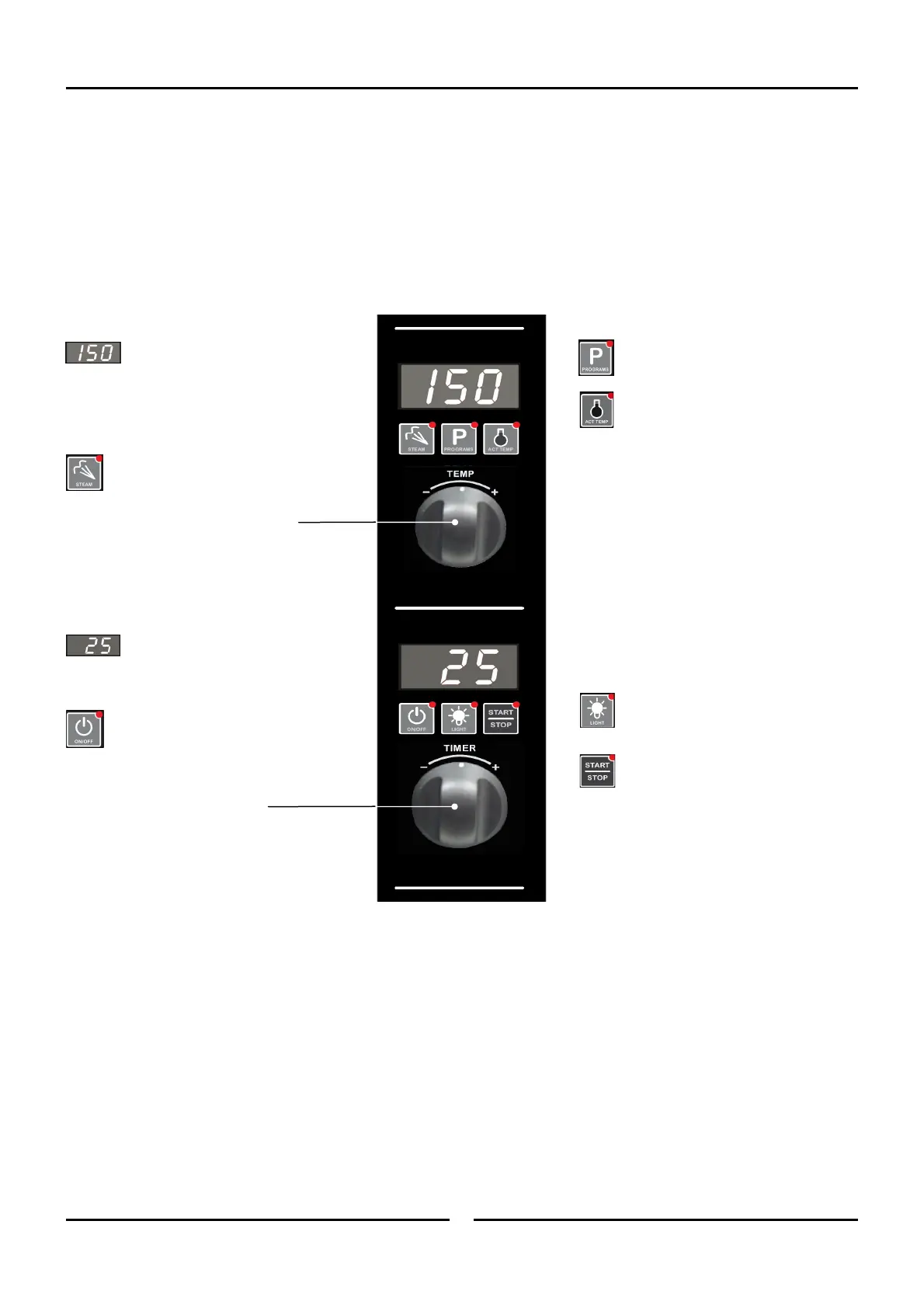
Temperature Display - Shows
the preset chamber temperature.
When used with ‘Temperature’ button,
shows actual oven temperature for 5
seconds.
Shows Cooking Modes and Error Codes.
Steam Button and LED -
Activates the ‘Steam Mode’.
Temperature Adjustment Control.
Time Display - Shows cook
time in full minutes only from
180 - 1, and seconds for final
minute only.
On / Off / Stand-By Button and
LED - Press ‘On / Off’ button once
to turn the oven ‘On’.
Press and hold ‘On / Off’ button for
2 seconds to turn the oven ‘Off’.
Time Adjustment Control.
Programming Button and LED - Used
to enter the ‘Programming’ mode.
Temperature Button and LED - Shows
actual oven temperature for 5 seconds on
the Temperature Display.
LED ‘On’ when heating; LED flashes when
showing actual temperature.
Light On / Off Button and LED - Turns
oven light ‘On / Off’.
Start / Stop Button and LED - Pressing
the ‘Start / Stop’ button for 2 seconds,
when in the cooking cycle, will end the
cooking cycle.
Oven Control Panel (Up to Ser. No. 762119)


 To Next Page
 Loading...
