Page 45 of 83 Pages
6.5 System Parameters
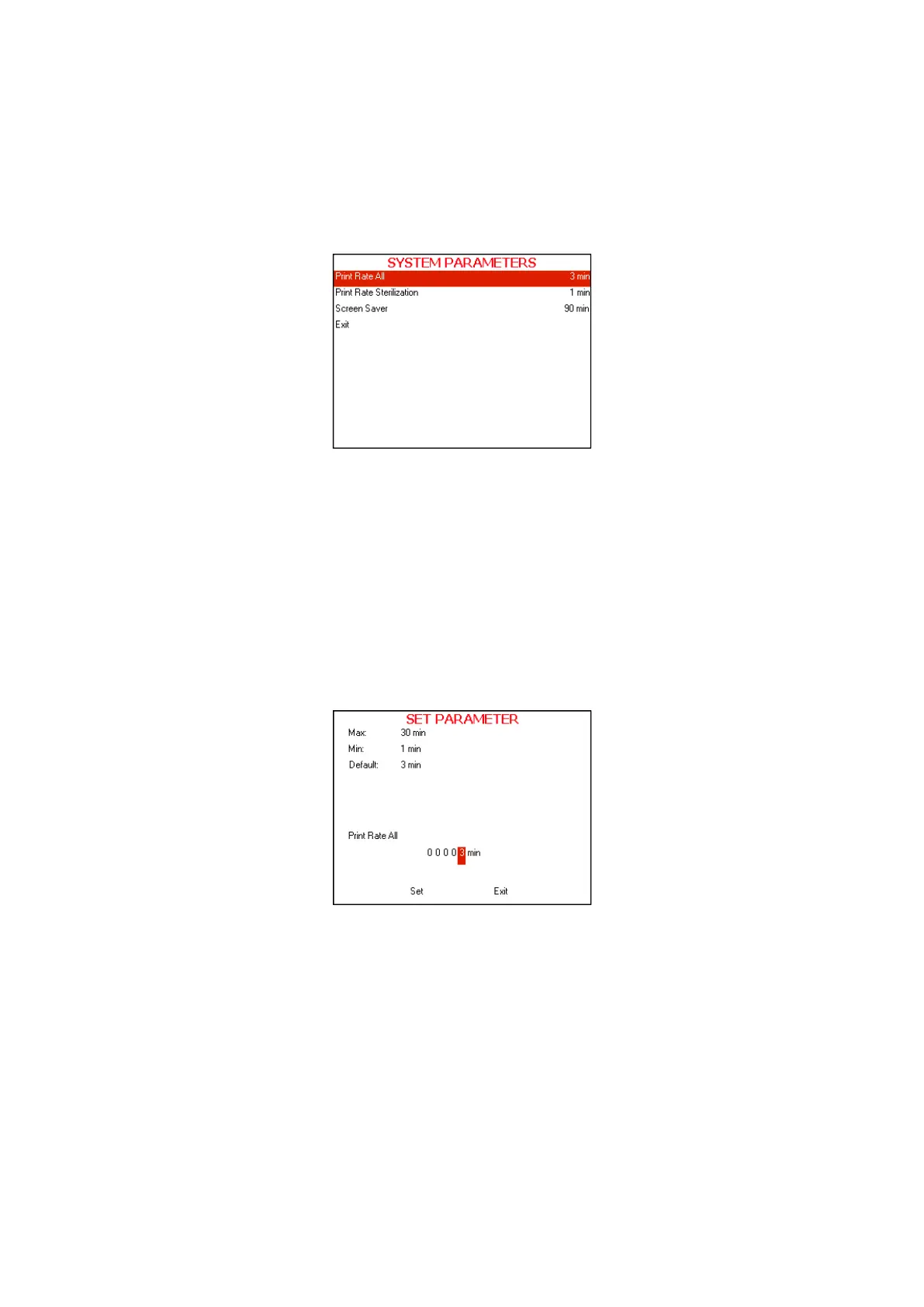
This directory includes three subdirectories
The following screen will be displayed when entering
SYSTEM
PARAMETERS
directory:
1. In order to enter to the sub directories move the cursor by pressing
UP or DOWN keys to the required item and press START/STOP
key
2. In order to exit this screen follows one of the next:
Move the cursor to Exit with the UP or DOWN keys and select it
by pressing the
START/STOP key.
Press the UP and DOWN keys simultaneously.
6.5.1 Print Rate All
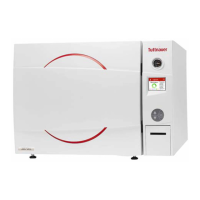
This subdirectory enables to change the printing rate during the
whole cycle except sterilization stage
1. To increase or decrease the digits, press the UP or DOWN
keys.
2. After changing the value move the cursor to Set by pressing
the START/STOP key.
3. When Set is blinking, press the UP or DOWN keys in order
to confirm changes and return to the previous screen.
4. In order to exit this screen follows one of the next:
In order to exit this screen move the cursor to Exit with
the
START/STOP key and select it by pressing the UP
or DOWN keys.
Press the UP and DOWN keys simultaneously.








 To Next Page