Page 55 of 83 Pages
6.8 Advanced Options
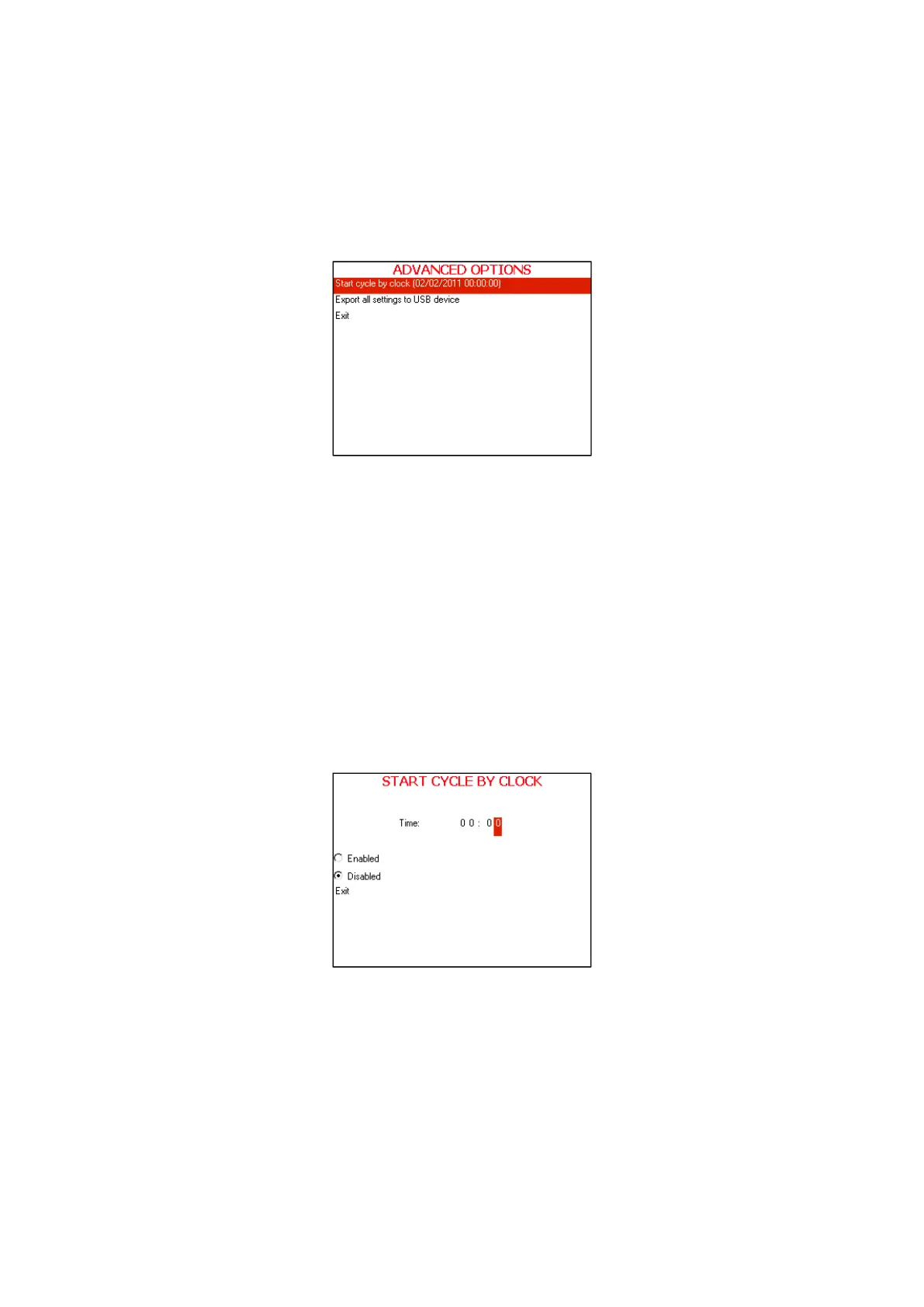
This directory includes two subdirectories
The following screen will be displayed when entering
ADVANCED
OPTIONS
directory:
1. In order to enter to the sub directories move the cursor by pressing
UP or DOWN keys to the required item and press START/STOP
key
2. In order to exit this screen follows one of the next:
Move the cursor to Exit with the UP or DOWN keys and select it
by pressing the
START/STOP key.
Press the UP and DOWN keys simultaneously.
6.8.1 Start Cycle by Clock
This subdirectory enables the operator to postpone the operation
by a pre-set time.
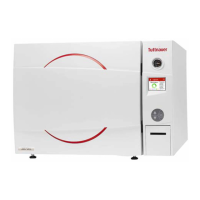
This Start cycle by clock screen will be displayed when
entering the START CYCLE BY CLOCK subdirectory:
When entering the START CYCLE BY CLOCK screen, the
time is displayed. The cursor is blinking on the "minute" digit.
The time is displayed in the form “HH:MM”. The hour range is
24 hours (i.e. from "0" to "24").









 To Next Page