49
6.7 Check the tension of the short belts
Maintaining correct tension on the short belts is important to ensure good print quality.The short belts transfer the
movements of the X and Y motors to the print head. If the belts are too loose, print head movement may not be
accurate, which can cause print inaccuracies.
Over time, the belts may become slack. It is recommended to check the tension of the short belts at least once every
three months.
Pluck the two short belts to check their tension.They should resonate, like a guitar string. It should not be possible to
press the belt against itself. Furthermore, the tension of the two belts should be equal.
To restore the tension, perform the following steps:
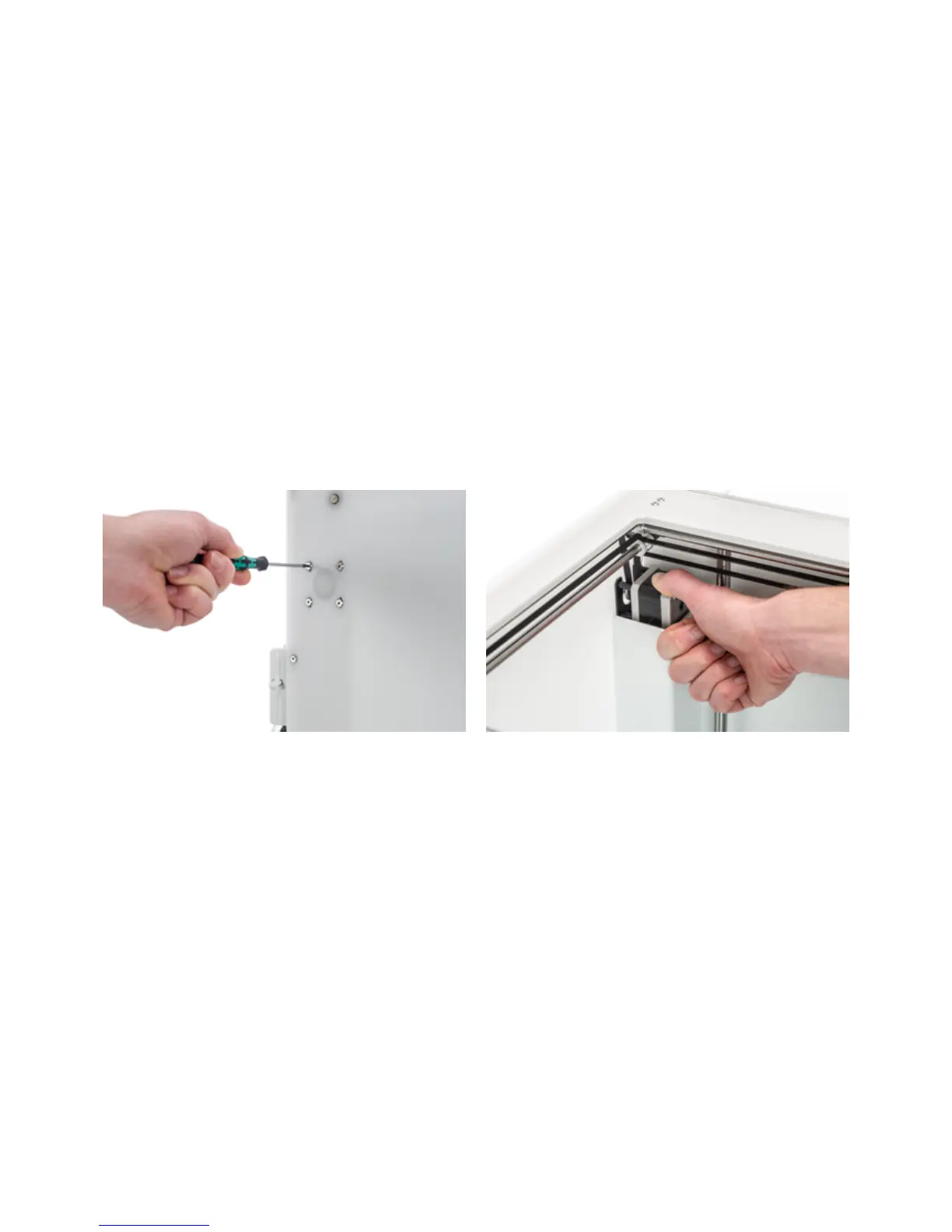
1. Loosen the Y motor by using the hex screwdriver to loosen the four bolts that hold the Y motor to the left panel. Do
not remove the bolts, but the motor should be able to slide up and down.
2. Firmly press down on the motor with one hand. This ensures maximum tension on the short belt.
3. While still pressing the motor down, tighten the four bolts of the Y motor in a cross pattern. First tighten the top-
left bolt, then the bottom-right, next the bottom-left and ending with the top-right. This ensures that the motor is
attached straight.
4. Perform the above steps for the X motor that is attached to the back panel. Afterwards, check the tension of both
belts again.














 To Next Page