APPENDIX B - SP2100 2D Imager Setup Barccodes, con’t
BarcodeGuy.com® - UnionNet SP2100 User’s Guide
2D Imager
Only
Programming “ON”
Programming “OFF”
Figure B.0
Instructions: To change the option, first scan the Programming “ON” barcode.
Then scan the Option Code. Finally scan the Programming “OFF” barcode.
28
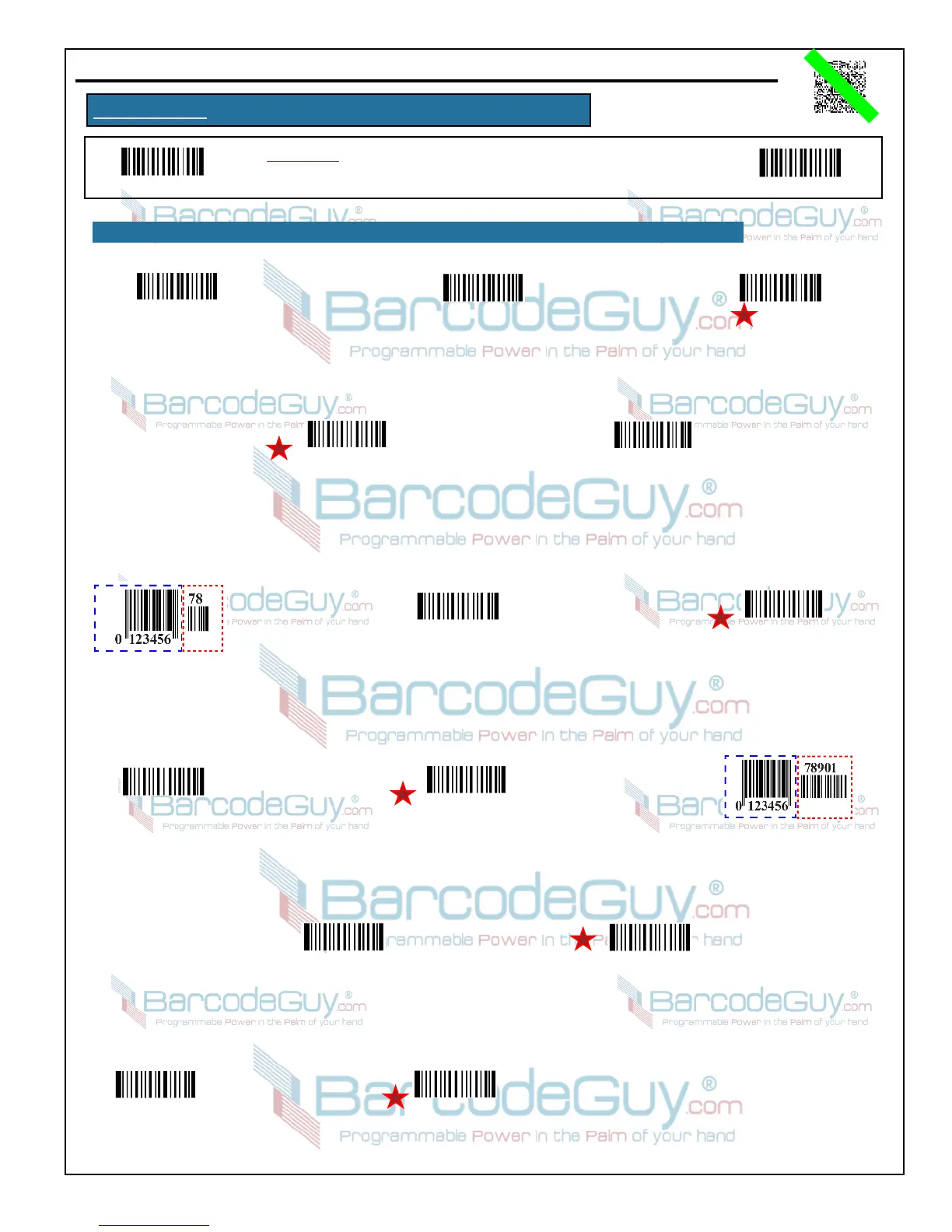
B.6 - UPC-E
Enable
UPC-E
Disable
UPC-E
Set UPC-E
Factory Defaults
Transmit UPC-E
Check Digit
(Single, Right)
Don’t Transmit
UPC-E Check Digit
(Single, Right)
2-Digit Addenda Code in Red
Transmit UPC-E
2-Digit Addenda
Don’t Transmit
UPC-E 2-Digit Addenda
5-Digit Addenda Code in Red
Transmit UPC-E
5-Digit Addenda
Don’t Transmit
UPC-E 5-Digit Addenda
UPC-E Transmit
Default 0
UPC-E Don’t Transmit
Transmit Default 0
UPC-E
Expand to UPC-A
UPC-E Don’t
Expand to UPC-A


 To Next Page