APPENDIX B - SP2100 2D Imager Setup Barccodes, con’t
BarcodeGuy.com® - UnionNet SP2100 User’s Guide
2D Imager
Only
Programming “ON”
Programming “OFF”
Figure B.0
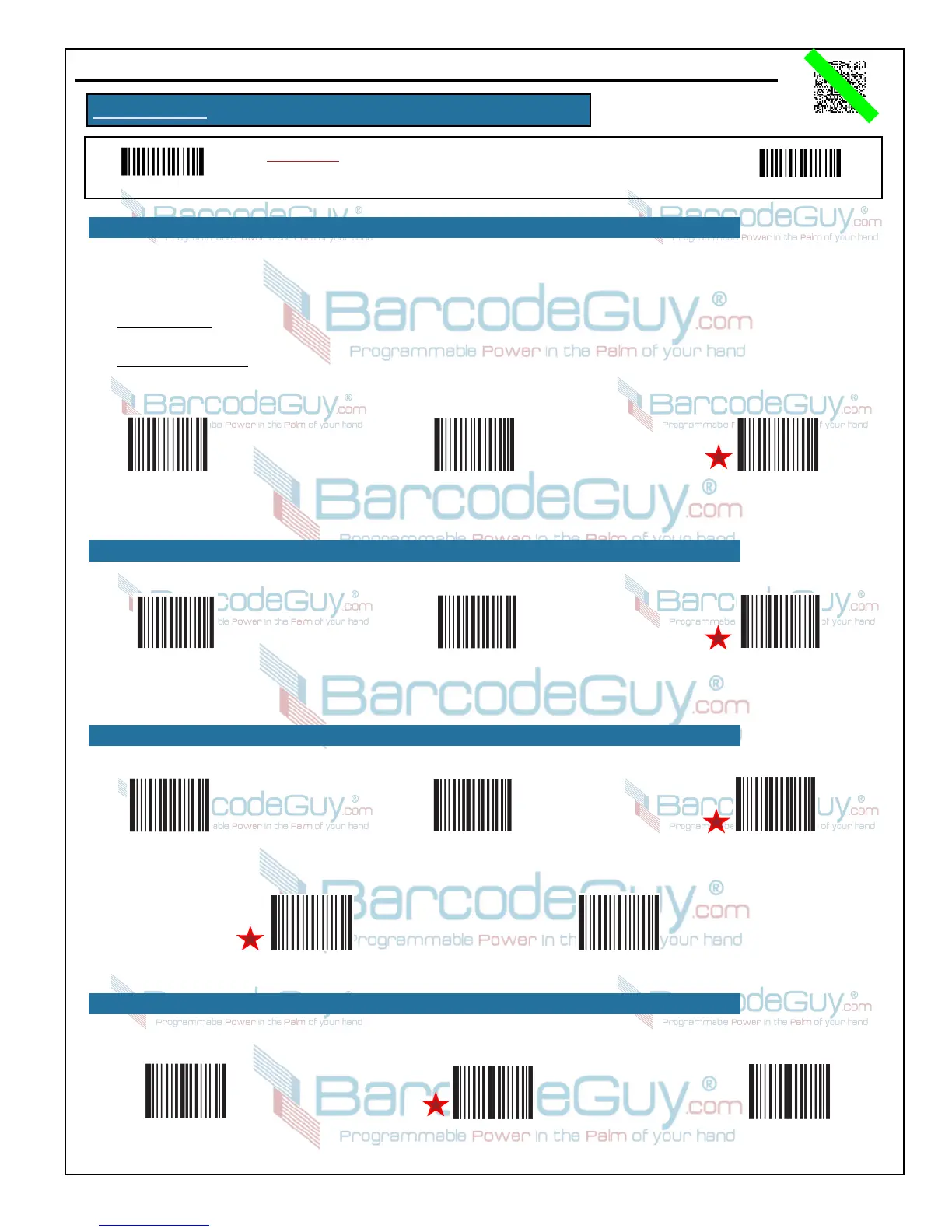
Instructions: To change the option, first scan the Programming “ON” barcode.
Then scan the Option Code. Finally scan the Programming “OFF” barcode.
34
B.13 - Code 93, con’t
Code 93 - Check Digits
Don’t Transmit
Code 93 - Transmit
Check Digits
Code 93
No Check Digits
5. Scan the Save Programming barcode, then scan the Programming “OFF” barcode.
Code 93 may include 2 Check Digits (not compulsory) as the last 2 digits of the encoded string. When used, the check digit is the result
of the symbology's mathematical check of the preceding digits. Below are the options:
● No Check Digits - Read without performing the check using the last 2 digits and transmit all digits. In effect, there is no check digit
present.
● Transmit Check Digits - The last 2 digits are check digits. Perform the mathematical check using the last 2 digits as validation.
Transmit the check digits as part of the string to the host.
B.14 - UCC/EAN-128
Enable
UCC/EAN-128
Disable
UCC/EAN-128
Set UCC/EAN-128
Factory Defaults
B.15 - GS1 Databar
Enable
GS1 Databar
Disable
GS1 Databar
Set GS1 Databar
Factory Defaults
GS1 Databar - Do Not
Transmit AI(01) Character
GS1 Databar - Transmit
AI(01) Character
B.16 - EAN/UCC Composite
Enable
EAN/UCC Composite
Disable
EAN/UCC Composite
Set EAN/UCC Composite
Factory Defaults


 To Next Page