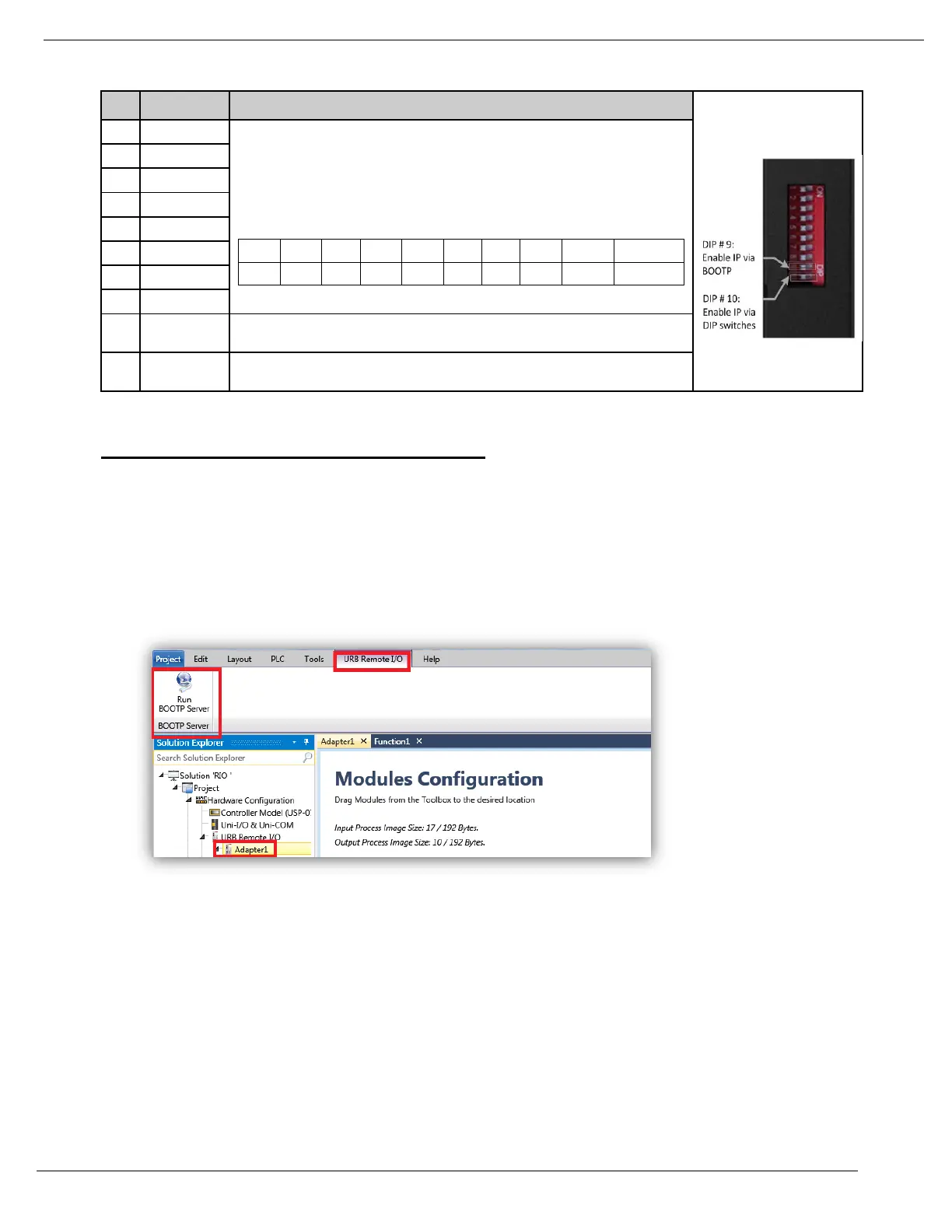
URB Adapter DIP Switches
Lowest IP Address octet when
Switch #10=ON (raised)
Example: XXX.XXX.XXX.IP
[XXX.XXX.XXX represents the last configured network address]
Example for full bitmap: XXX.XXX.XXX.100
Enable IP Address set by DIP Switches
Configuring IP using Unitronics BOOTP Server
Before you can set the IP address of the Remote IO adaptor via Unitronics BOOTP Server, you must raise DIP #9
(check that #10 is down)
1. Power OFF the URB adapter.
2. Raise DIP switch #9 to enable DHCP / BOOTP.
3. In UniLogic, in the Solution Explorer, select the adapter; the ribbon will open the tab URB Remote I/O.
4. On the ribbon, click on Run BOOTP Server to open the utility.
5. Click Start BootP in the Unitronics BOOTP Server; the upper section displays Ethernet devices that
are in the network.


 To Next Page