Operation and configuration
instructions
2 Local panel user interface
VAMP 24h support phone +358 (0)20 753 3264
2.1.1. Display
The relay is provided with a backlightedt 128x64 LCD dot
matrix display. The display enables showing 21 characters in
one row and eight rows at the same time. The display has two
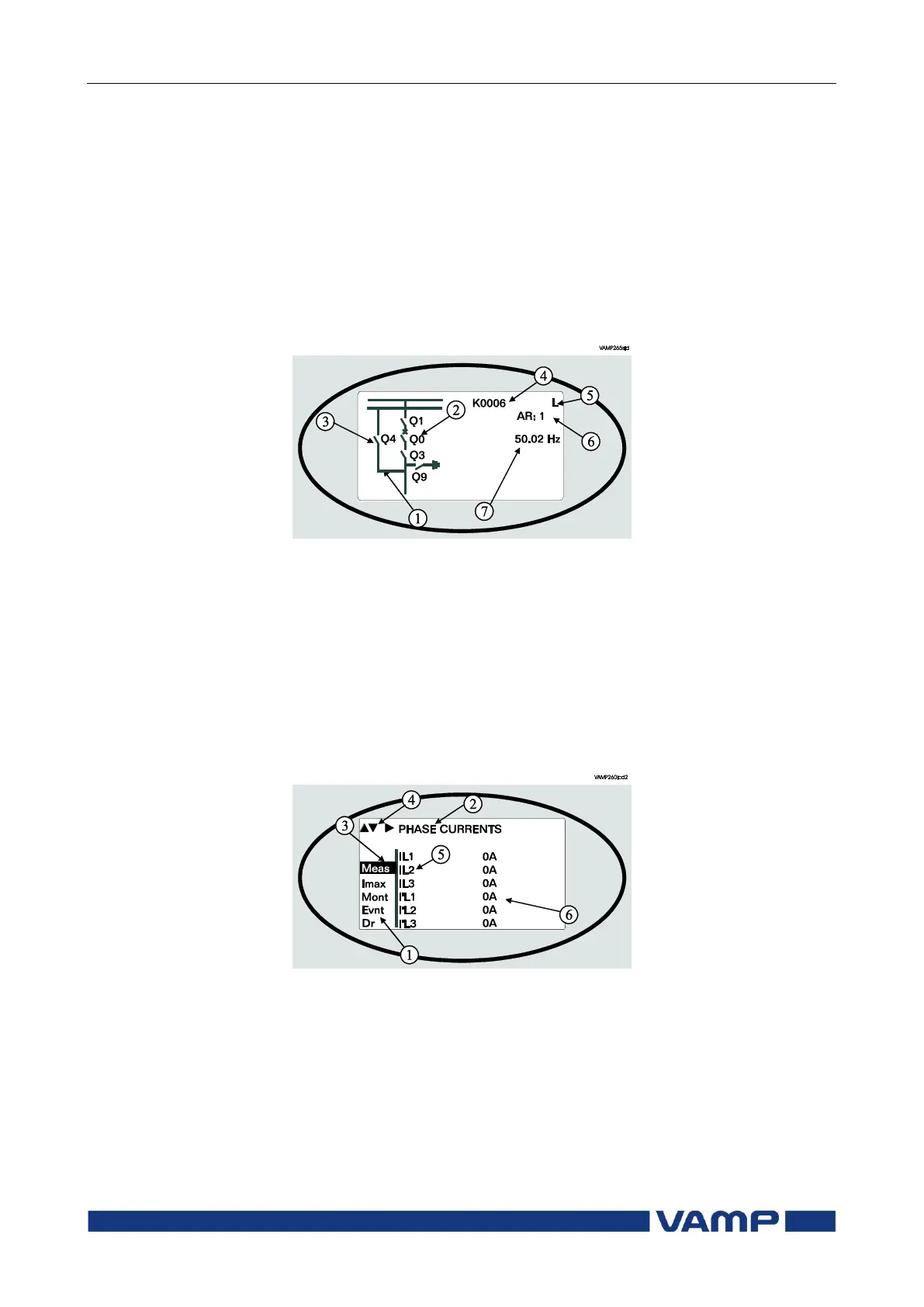
different purposes: one is to show the single line diagram of the
relay with the object status, measurement values, identification
etc. (Figure 2.1.1-1). The other purpose is to show the
configuration and parameterization values of the relay (Figure
2.1.1-2).
Figure 2.1.1-1 Sections of the LCD dot matrix display
1. Freely configurable single-line diagram
2. Five controllable objects
3. Six object statuses
4. Bay identification
5. Local/Remote selection
6. Auto-reclose on/off selection (if applicable)
7. Freely selectable measurement values (max. six values)
Figure 2.1.1-2 Sections of the LCD dot matrix display
1. Main menu column
2. The heading of the active menu
3. The cursor of the main menu
4. Possible navigating directions (push buttons)
5. Measured/setting parameter
6. Measured/set value



 To Next Page