10
Controls and Connections (Cont.)
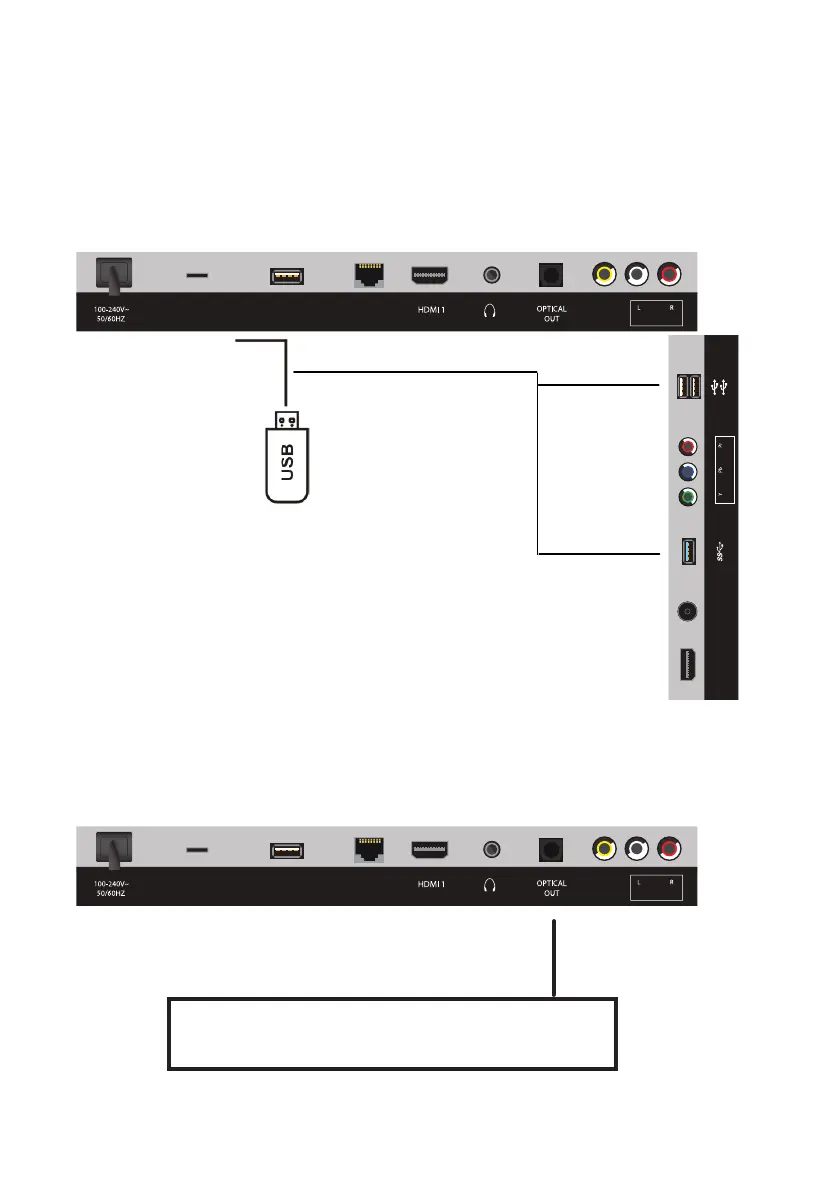
USB Connection
Optical (S/PDIF) Connection
Insert a USB memory device into the USB port for PVR recording,
time-shifting and playback of video/music/photo multimedia files.
Connect to an amplifier or other audio decoding devices for a high quality
digital audio connection.
USB Device
(not included)
Use a optical cable to connect the unit with an amplifier or
other audio decoding device for optical audio signal output.
(Optical cable is not included.)
MICRO SD
USB
(TV)
LAN
VIDEO
(ARC)
(AUDIO IN)(COMPOSITE)
MICRO SD
USB
(TV)
LAN
VIDEO
(ARC)
(AUDIO IN)(COMPOSITE)
HDMI 2
ANT
(ANDROID)
(AIR MOUSE)
(COMPONENT)(TV)
HDMI 2
ANT
(ANDROID)
(AIR MOUSE)
(COMPONENT)(TV)



 To Next Page