44
Smart TV (Cont.)
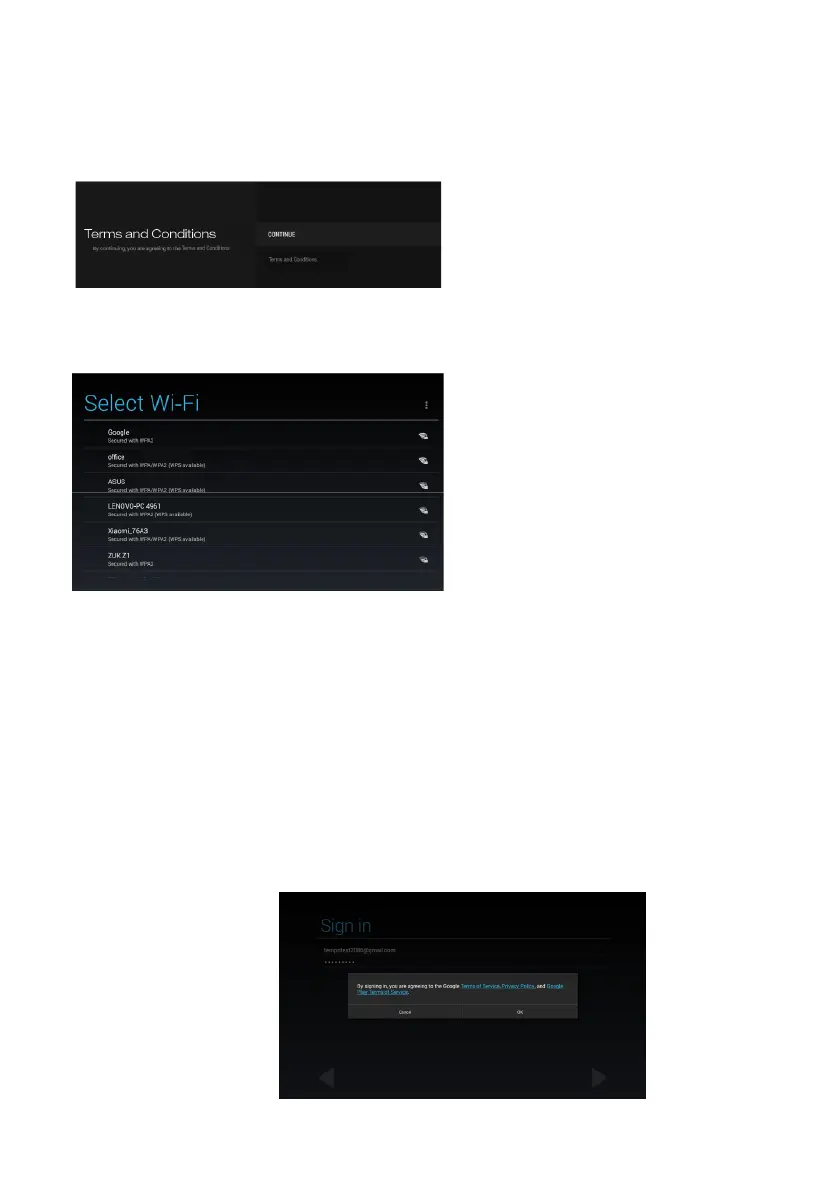
Terms and Conditions
• Use navigation buttons to select
an option.
• To skip this step, select
“Continue” and press the OK
button to enter the next page.
Wi-Fi (only appear when a LAN cable is not connected)
• Use navigation buttons to
select an available Wi-Fi
account and press OK to open
the on-screen keyboard.
• Input correct password
(if available) using on-screen
keyboard or Remote Control
then select “Connect” to
connect it.
NOTE: This step won’t appear if the LAN cable has been connected
successfully.
Setting up a Google account
As a final step, the TV will ask you to add a Google account. You can log into
an existing account, or set up a new account in this step. To do this, select
either “Existing” or “New” and then press OK. Follow the on-screen directions
to add the account.
Agree to the Google Terms of Service, Privacy Policy and Google Play Terms
of Service to proceed with the setup.
Once setup has been confirmed, the TV will display the Smart TV home page.



 To Next Page