iv
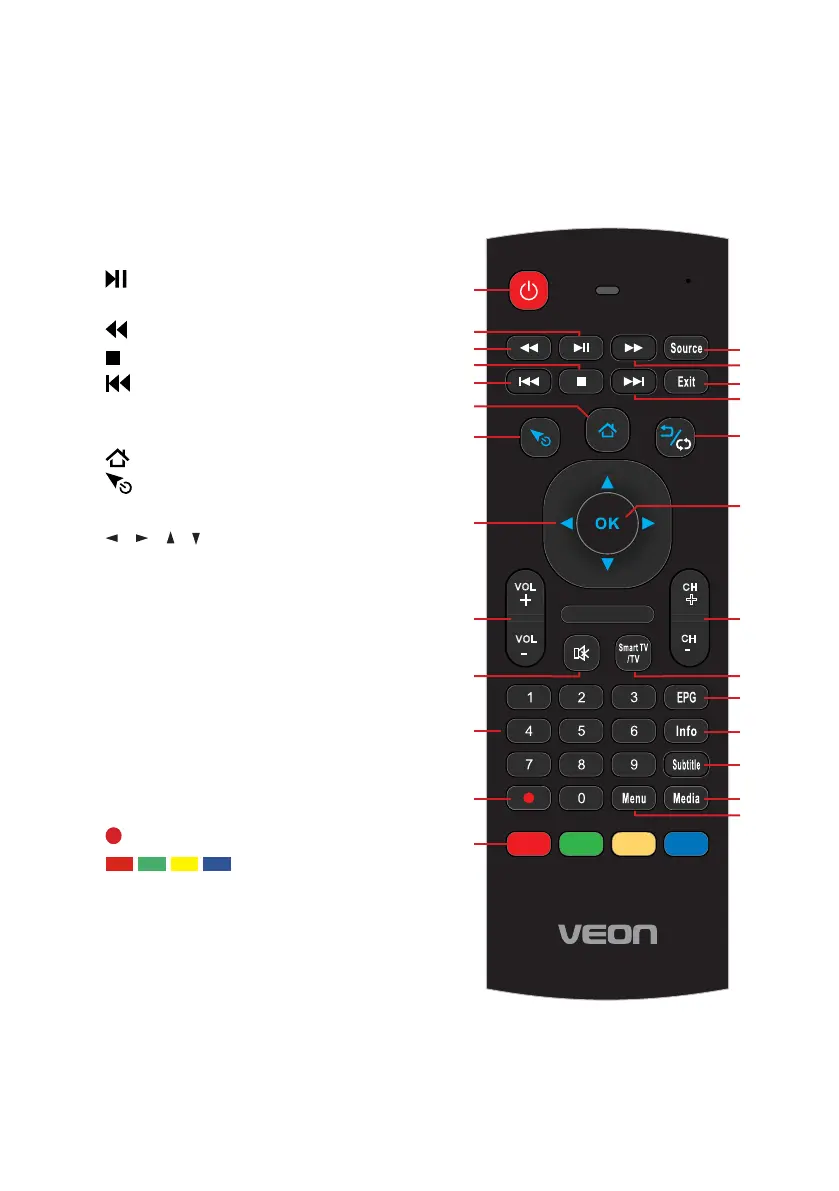
Remote Control
1 POWER: Set the unit to standby
mode; press it again to switch it on.
2 : Play/Pause in Timeshift and USB
mode.
3 : Move fast backward.
4 : Stop playing.
5 : Play the previous file.
FAV: Display your favourite program
list.
6 : Home page in Smart mode.
7 : Activate/deactivate air mouse in
Smart mode.
8 / / / : Press the RIGHT/LEFT
UP/DOWN buttons to navigate the
on-screen menus and adjust the
system settings to your preference.
Press OK to confirm your selection.
9 VOL +/-: Turn the volume up/down.
10 MUTE: Mute the sound. Press again
to restore the sound.
11 NUMBER BUTTONS (0-9): Select a
TV channel directly when watching
TV. The channel changes after 2
seconds.
12 : Record program in DTV mode.
13 : In HbbTV mode,
press the colour buttons to access
HbbTV applications (FreeviewPlus
catchup TV programs).
3
4
5
6 7 8 9 0
1 2
/
07
1E
1A 1F 58
16 1B 54
12 17
50
1
3
5B
03
1C
02 5F 40
5E
18
55
56 57
14
0A
06
48
44
52
33
NA
43/53
4E
4F/09
5C
49/15
11
4A
60
10
4D
0C
4C
VOL
+
VOL
-
CH
+
CH
-
Customer Support
0800 883 301
1
3
5
7
8
9
11
6
4
2
12
13
14
15
15
17
16
18
10 19
20
22
23
24
25
26
21



 To Next Page