v
Remote Control (Cont.)
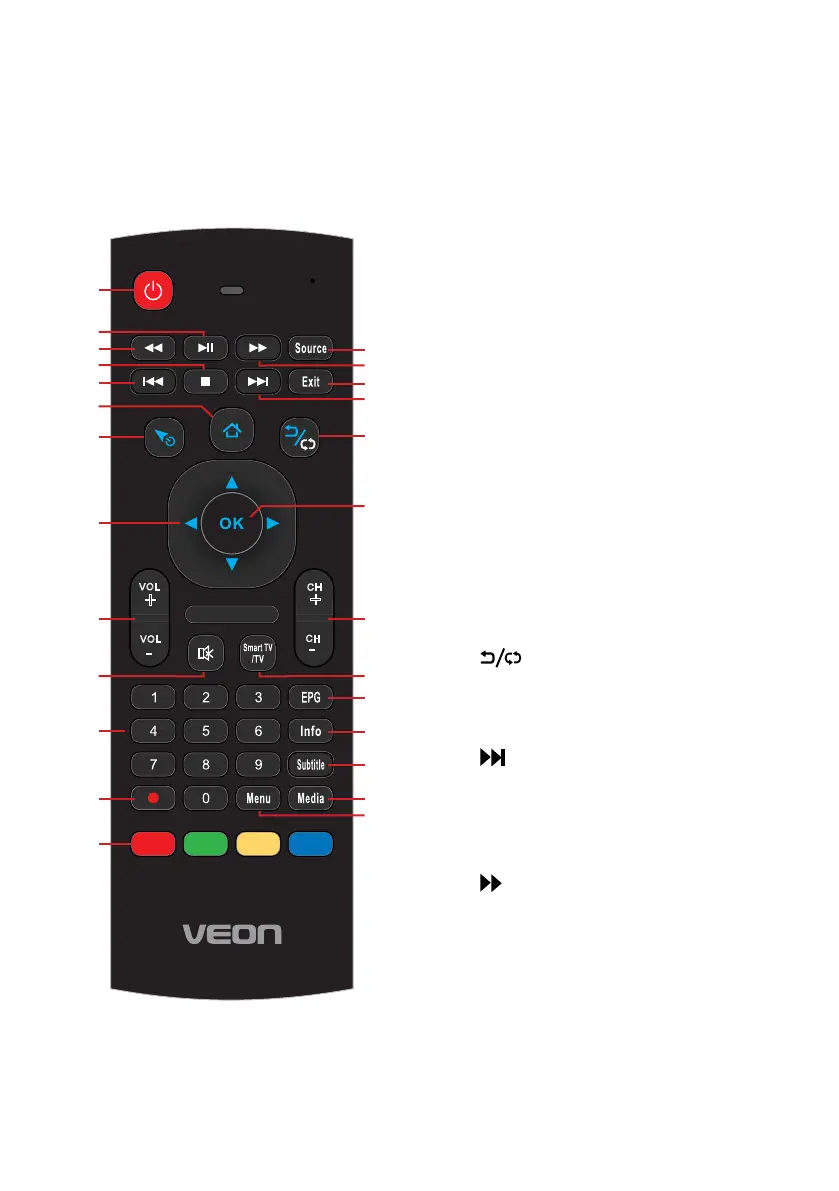
14 MENU: Display the main menu;
press again to return to the
previous menu page.
15 MEDIA: Enter Media (USB) mode
directly.
16 SUBTITLE: Enable/disable
subtitles.**
17 INFO: Display information of the
current program (DTV).
18 EPG: Launch the Electronic
Program Guide (DTV).
19 SMART TV/TV: Select SMART TV
or TV (DTV).
20 CH+/-: Press to play the next or
previous channel; press repeatedly
to scan through the channels.
21 OK: Confirm selection.
22 : Return to the previous
channel in DTV mode. Return to
the previous page in FreeviewPlus
catchup applications.
23 : Play the next file.
INDEX: Display the record list.
24 EXIT: Exit from the main TV menu
displayed on the screen. Display
the DVD title menu (DVD)*.
25 : Move fast forward.
26 SOURCE: Select the input source.
3
4
5
6 7 8 9 0
1 2
/
07
1E
1A 1F 58
16 1B 54
12 17
50
1
3
5B
03
1C
02 5F 40
5E
18
55
56 57
14
0A
06
48
44
52
33
NA
43/53
4E
4F/09
5C
49/15
11
4A
60
10
4D
0C
4C
VOL
+
VOL
-
CH
+
CH
-
Customer Support
0800 883 301
1
3
5
7
8
9
11
6
4
2
12
13
14
15
15
17
16
18
10 19
20
22
23
24
25
26
21



 To Next Page