2.7 UPS States and Operating Modes
NOTE: See LED Indicators on page56, for description of the run-indicator and alarm-indicator LEDs
2.7.1 Normal Mode
When utility power is normal, Normal mode employs the rectifier and inverter to provide voltage and frequency stabilized
power to the load. The charger charges the battery in normal mode. On the front panel display, the run-indicator (green) is
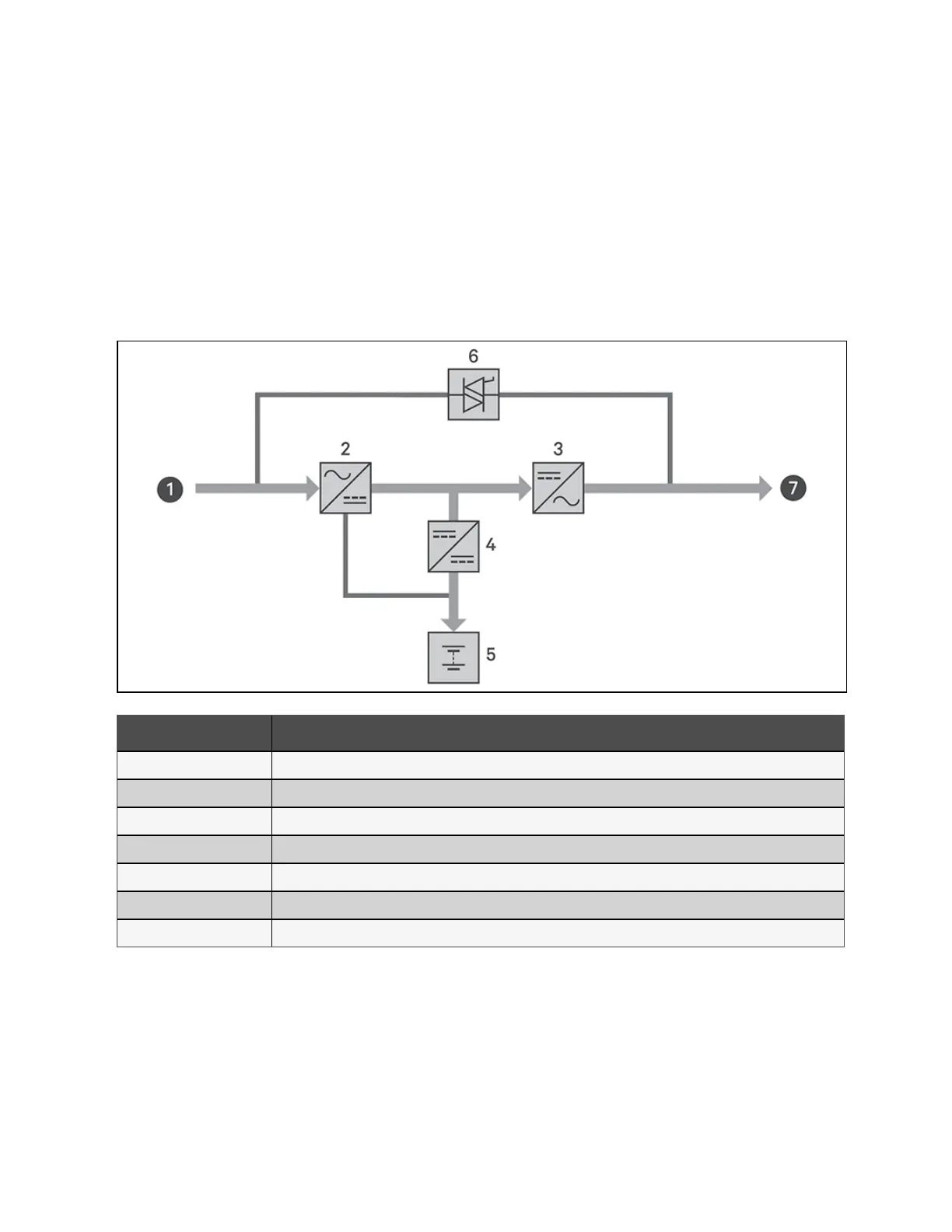
ON, the alarm indicator is OFF, and the buzzer is silent. Figure 2.25 below shows the diagram of normal mode.
Figure 2.25 Normal Mode Operation
Item Description
1 Mains/Utility input (bypass input)
2 Rectifier/PFC
3 Inverter
4 Battery charger
5 Battery
6 Bypass static switch
7 UPS output
2.7.2 Bypass Mode
Bypass mode supplies power to the load from the bypass source (utility power) if an overload or fault occurs during normal
operation. On the front panel display, the run indicator (green) is ON, the alarm indicator (yellow) is ON, and the buzzer beeps
once every two seconds. The LCD Flow screen displays On Bypass. Figure 2.26 on the facing page shows the diagram of
bypass mode.
26 Proprietary and Confidential ©2024 Vertiv Group Corp. 2 Product Description
Vertiv™ Liebert® GXT5 UPS Installer/User Guide








 To Next Page