20
Original Operating Instructions: K4 edition
Document version: E – 02/2020
Running the machine
5.4 Mounting and removing blanks
On delivery, your K4 edition processes discs with a diameter
of 98.5 mm.
5.4.1 Mounting discs
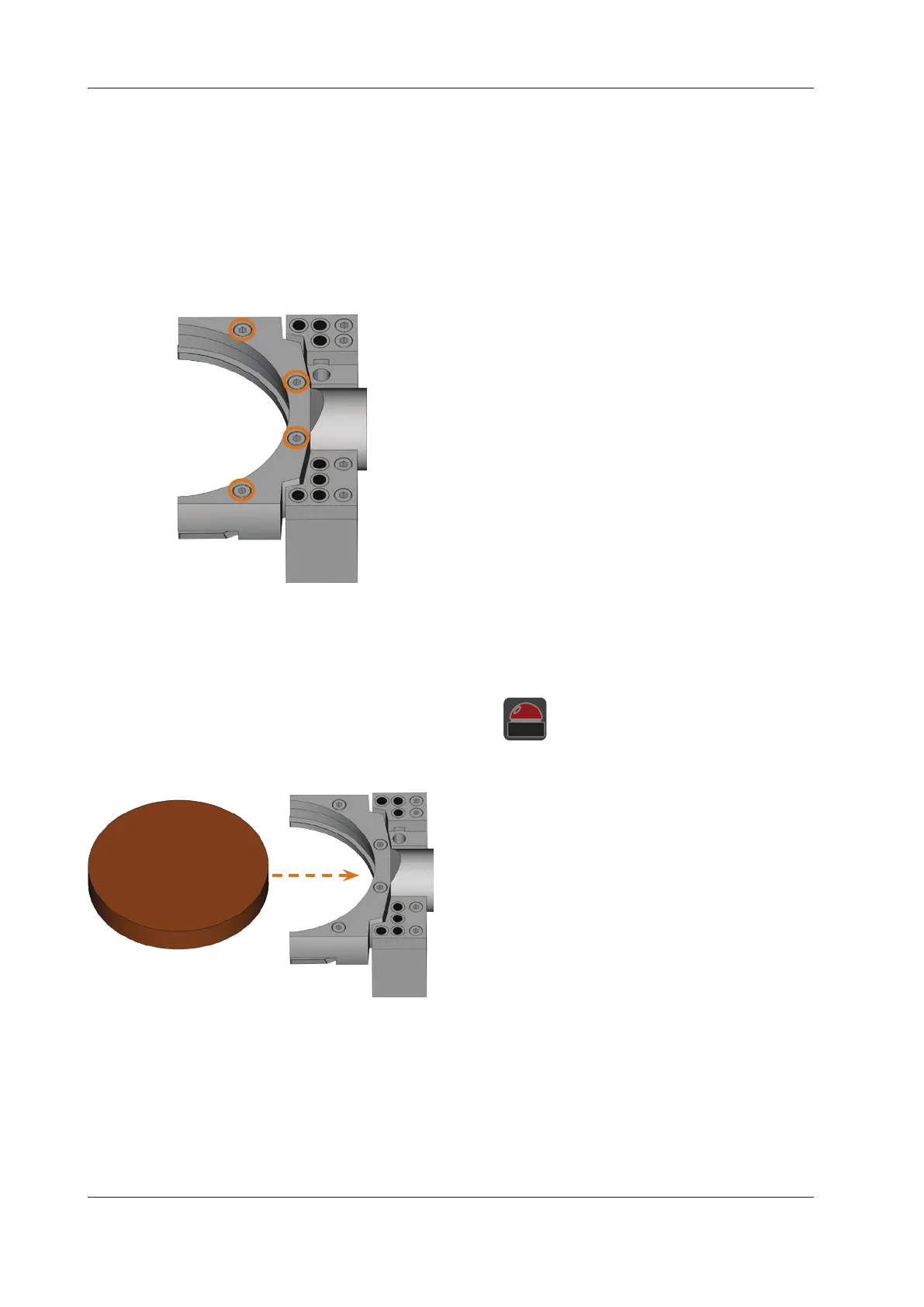
You put discs into the blank holder and immobilize them with
a xingring.
M1. Open the working chamber door.
M2. Loosen the 4 screws which attach the xingring to the
blank holder.
M3. Remove the xingring and the disc in the blank holder
(if any).
M4. Place the desired disc into the groove of the blank hold
-
er.
M5. Hold the disc in place with one hand and screw down
the screws you loosened in step M2.
n
Tighten the screwsrmly. If blanks move or vibrate
during processing, the result may become unusable.
5.4.2 Removing discs
M To unmount a disc, unscrew the 4 screws of the xing
ring and remove the xingring and the disc.
5.5 Executing jobs
n
Do not move the machine during job execution, other-
wise the results may become imprecise.
M1.
Make sure that the following requirements are met be-
fore job execution:
You created the job that you want to execute in
DentalCAM and transferred it to DentalCNC.
All required tools are assigned to the job in
DentalCNC.
The required tools are in the right positions in the tool
magazine of the machine.
All required blanks of the correct material are mount
-
ed.
The compressed air supply is set correctly.
M2. Close the working chamber door.
M3. Switch on the suction device and set it to the required
level.
S4. Start the job execution in DentalCNC.
The Machine begins with the job execution.
5.6 Interrupting the job execution
S Click on the depicted icon to interrupt the job
execution. The icon only displays during job
operation.
5.7 Operation interruption or abortion of job
execution
An operation interruption can occur because the compressed
airsupplyorthevacuumintheworkingchamberisnotsu-
cient. An job will normally be resumed automati-
cally after the error is corrected.
The job e
xecution is
in the following cases:
In case of a machine malfunction
In case of a tool breakage
In case of a power failure
If a job was , you have to execute it again in DentalCNC.
5.7.1 How to proceed in case of an operation
interruption
If the job execution was interrupted, DentalCNC displays a
corresponding message.


 To Next Page