EmbryoScope time-lapse incubator
- 18 -
5 The incubator
5.1 The incubator control panel
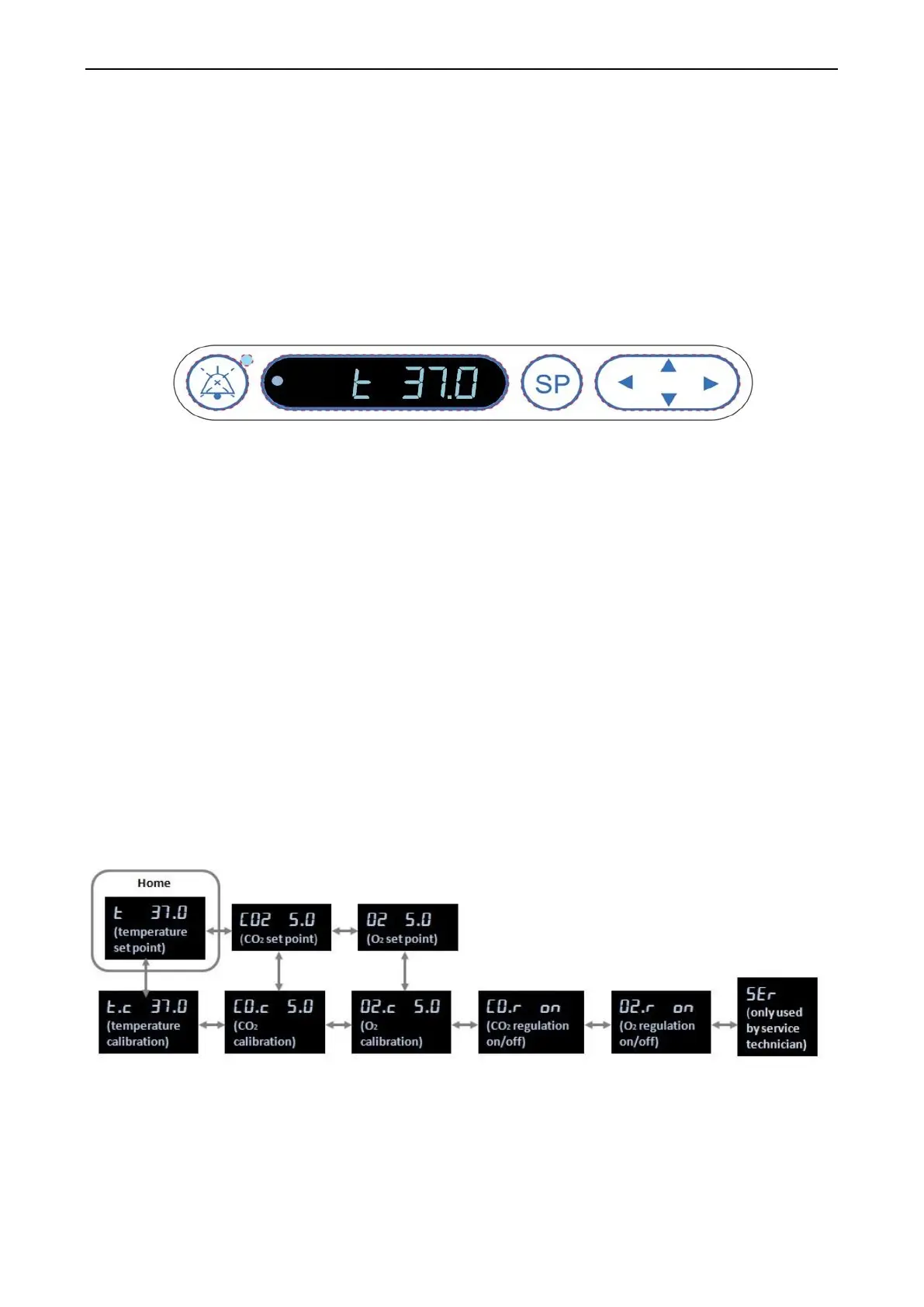
The incubator control panel is located in the upper left corner of the EmbryoScope time-lapse
incubator:
The control panel is used for:
• Pausing audible warning alarms issued by the EmbryoScope time-lapse incubator (using
the pause audio button)
• Inspecting a range of incubation parameters such as temperature, CO
2
concentration, O
2
concentration, etc. (from the set point menu)
• Changing the set point of the incubation parameters (from the set point menu)
• Calibrating the EmbryoScope time-lapse incubator (from the calibration menu)
• Turning on or off CO
2
and O
2
regulation (from the calibration menu).
5.1.1 Overview of menu items accessible from the control panel
The incubator control panel provides access to two separate menus: the set point menu and the
calibration menu.
Overview of menu items available from incubator control panel


 To Next Page