iPump User’s Manual
800009-01 Rev. A 34 wegener.com
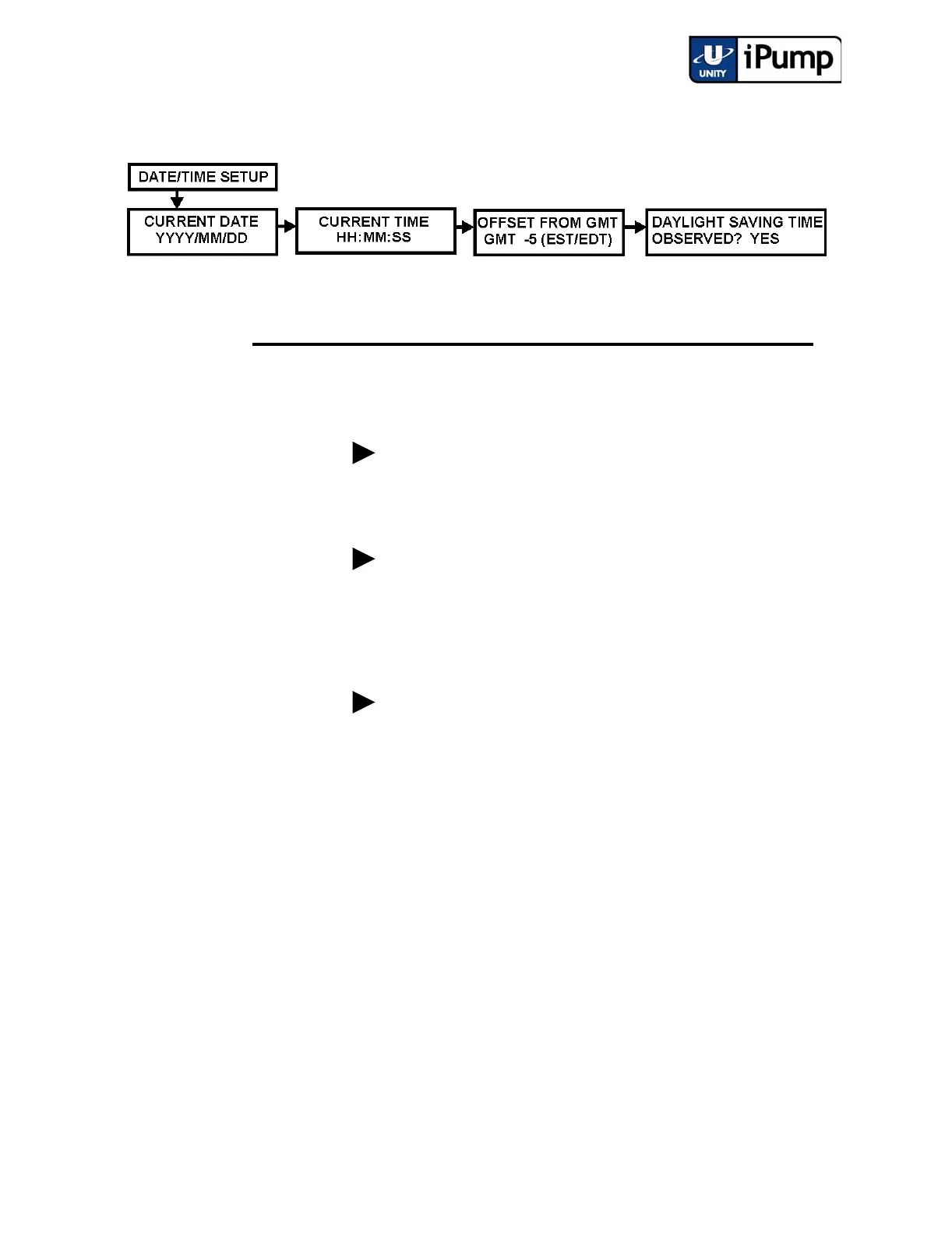
From Date/Time Setup, adjust the current date, time, offset from GMT, and
daylight saving time settings as follows:
Unit Label
Setup
Set the unit label (or name of your iPump) during the initial setup. First navi-
gate to the Set Unit Label screen.
Step Press Displayed/Field Details
Screen
Type
a) ENTER CURRENT DATE
YYYY/MM/DD
User Input
- Editable
Enter current date in year/month/day format.
b) CURRENT TIME
HH:MM:SS
User Input
- Editable
Enter current time in hours:minutes:seconds
format.
c) OFFSET FROM GMT
GMT -5 (EST/EDT)
User Input
-Selectable
Select the appropriate offset from Greenwich
Mean Time (GMT). Offset selections range
from GMT -12 to GMT +11. (Eastern U.S. is at
GMT -5; West Coast U.S. is at GMT -8.)
d) DAYLIGHT SAVING TIME
OBSERVED? YES
User Input
-Selectable
Select Yes if daylight saving time is observed in
your area or No if it is not.



 To Next Page