232576780000/00/02-2018
Operation
Operation
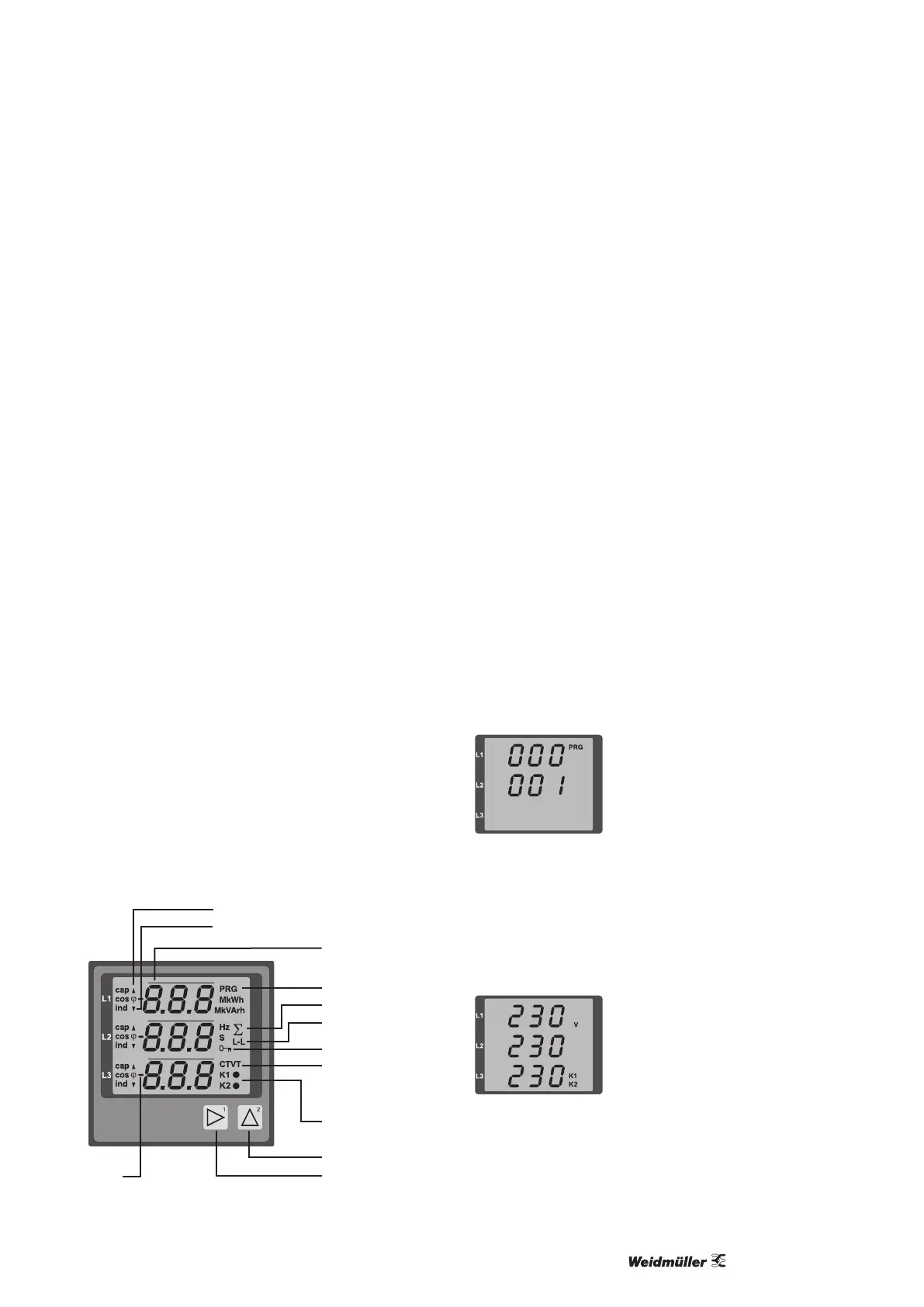
The Energy Meter 610/610-PB is operated using buttons 1 and
2. Measured values and programming data appears on a liquid
crystal display.
A distinction is made between display mode and programming
mode. The accidental changing of programming data is prevented
by the entry of a password.
Display mode
In the display mode, you can scroll between the programmed
measured value displays using buttons 1 and 2. All factory-set
measured value displays listed in section 1 can be called up. Up
to three measured values are displayed per measured value dis-
play. The measured value relaying allows select measured value
displays to be shown alternately after a settable changeover time.
Programming mode
In the programming mode, the settings required for operating the
Energy Meter 610/610-PB can be displayed and changed. Press-
ing buttons 1 and 2 simultaneously for about one second calls
up the programming mode after the password prompt. If no user
password was programmed, the user arrives directly in the rst
programming menu. Programming mode is indicated by the text
“PRG” on the display.
Button 2 can now be used to switch between the following pro-
gramming menus:
• current transformer,
• voltage transformer,
• parameter list.
If the device is in programming mode and no button has been
pressed for approximately 60 seconds or if buttons 1 and 2 are
pressed simultaneously for approx. one second, the Energy
Meter 610/610-PB returns to display mode.
Button 1
Button 2
Export
Mean value
CT: Current
transformer
VT: Voltage
transformer
K1: Output 1
K2: Output 2
Password
Phase conductor-
Phase conductor
Sum measurement
Programming
mode
Minimum value, NT/export
Maximum value, HT/import
Parameters and measured values
All parameters necessary for operating the Energy
Meter 610/610-PB, e.g. the current transformer data, and a selec-
tion of frequently required measured values are stored in the table.
The contents of most addresses can be accessed via the serial
interface and the buttons on the Energy Meter 610/610-PB.
Only the rst 3 signicant digits of a value can be entered
on the device. Values with more digits can be entered using
ecoExplorer go software.
The device always only displays the rst 3 signicant digits of a
value.
Selected measured values are summarised in measured value
display proles and can be shown in display mode using buttons
1 and 2.
The current measured value display prole and the current dis-
play change prole can only be read and changed via the RS485
interface.
Example of the parameter display
On the Energy Meter 610/610-PB display the value “001” is shown
as the content of address “000”. This parameter reects the device
address (here “001”) of the Energy Meter 610/610-PB on a bus in
list form.
Example of the measured value display
In this example, the Energy Meter 610/610-PB display shows the
voltages L to N with 230 V each.
The K1 and K2 transistor outputs are conductive and current can
ow.



 To Next Page