472576780000/00/02-2018
Error messages
Replacing the battery
If the battery capacity is shown as < 75 %, we recommend that the
battery be replaced.
Procedure
1. Disconnect system and device from power supply before be-
ginning work.
2. Discharge any electrostatic charge in your body, e.g. by touch-
ing an earthed cabinet or metal part (radiator) connected to the
earth of the building.
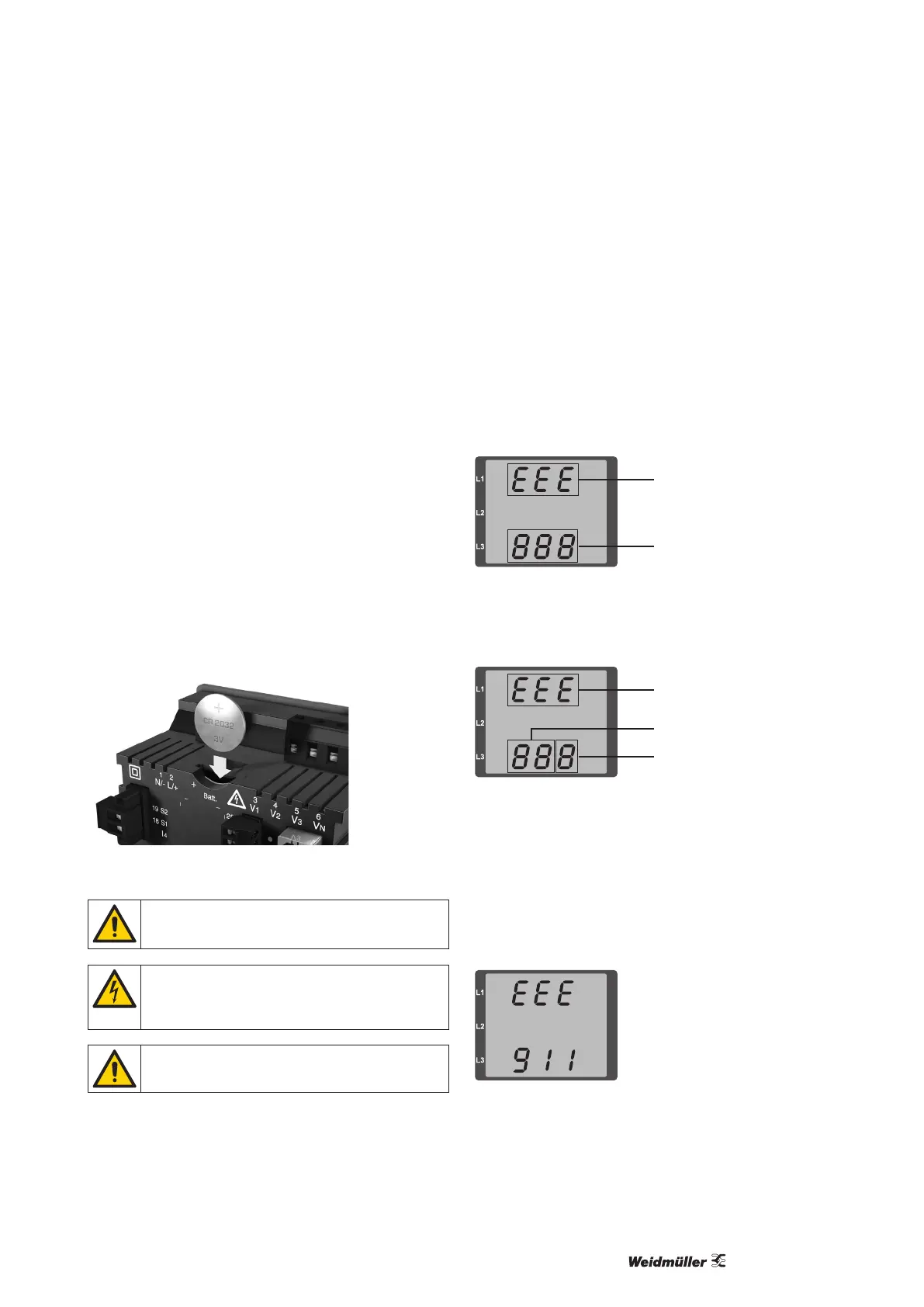
3. Remove the battery from the battery compartment, – e.g.
using long-nose pliers –. The device does not need to be
opened to do this as the battery compartment can be ac-
cessed from the outside (see gure below).
4. Make sure that the polarity is as shown on the insertion open-
ing of the battery compartment and slide the replacement
battery into the battery compartment. For this, use a battery
compliant with the description in the technical data. The bat-
tery must full the safety requirements of UL 1642. Otherwise,
there is a risk of combustion or explosion.
5. Dispose of the old battery according to the legal regulations.
6. Start up the system and the device again and check the
functionality of the Energy Meter 610/610-PB. Set the date
and time.
Fig.: Battery insertion on the rear
Grease or dirt on the contact surfaces form a transfer
resistance that will shorten the life of the battery. Only
touch the battery at the edges.
Dangerous voltage!
Danger to life or risk of serious injury. Disconnect
system and device from power supply before begin-
ning work.
Make sure that the correct type of battery is used and
observe correct polarity when changing it.
Error messages
The Energy Meter 610/610-PB shows three different error mes-
sages on the display:
• warnings,
• clock/battery errors,
• serious error and
• metering range exceedances.
If there are warnings and serious errors, the error message is indi-
cated by the symbol “EEE” followed by an error number.
Symbol for an error
message
Error number
The three-digit error number is composed of the error description
and (if detectable by the Energy Meter 610/610-PB) one or more
error causes.
Symbol for an error
message
Description of the error
Error cause
Example of error message 911:
The error number is composed of serious error 910 and internal
error cause 0x01.
In this example, an error occurred when reading the calibration
from the EEPROM. The device must be sent to the manufacturer
for inspection.



 To Next Page